BIOS Update Locks Up on Dell Pro With DASH Support Enabled
Summary: Learn what to do if a Dell Pro Micro QCM1255, Dell Pro Slim QCS1255, or Dell Pro Tower QCT1255 with DASH Support enabled lock up while updating the BIOS.
Symptoms
A Dell Pro Micro QCM1255, Dell Pro Slim QCS1255, or Dell Pro Tower QCT1255 may lock up on the BIOS updating screen when DASH Support is enabled. The BIOS update screen says, "Updating your firmware - Do not power down your system. Flash Progress 100% - Firmware Update successful."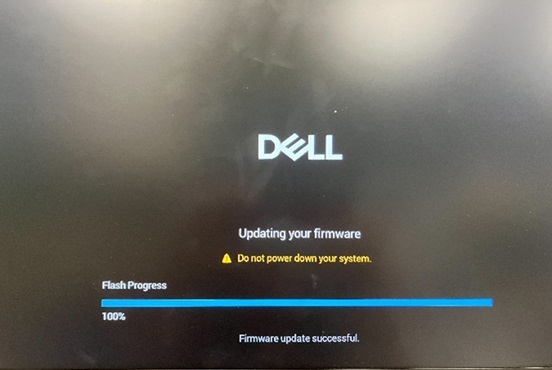
DASH Support is found in the BIOS under Advanced Setup, System Management, and then DASH Support.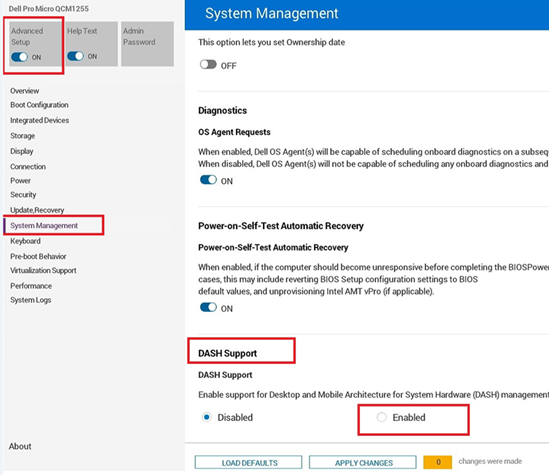
The computer boots after rebooting manually. The BIOS version is updated successfully. The computer is expected to reboot automatically after the BIOS update is completed.
Affected Platforms:
Dell Pro Micro QCM1255Dell Pro Slim QCS1255Dell Pro Tower QCT1255
Cause
A BIOS coding issue causes this behavior.
Resolution
Short-term workaround
If the computer remains stuck on the BIOS updating screen, follow these steps:
- Press and hold the power button for about 25 seconds until the computer shuts down.
- If the computer does not shut down, unplug the power cable and then plug it back in.
- Press the power button to turn the computer back on.
Long-term solution
Updating to BIOS version 1.6.2 or later on the computer resolves the issue. To download and install the BIOS, refer to the BIOS Update Guide.