Data Protection Advisor: The PowerProtect Data Manager (PPDM) jobmonitor data collection request fails with an authentication error
Summary: The PPDM jobmonitor data collection request fails with an authentication error
This article applies to
This article does not apply to
This article is not tied to any specific product.
Not all product versions are identified in this article.
Symptoms
The Data Protection Advisor (DPA) PPDM data collection is not working. Looking at the PPDM jobmonitor data collection request's history shows that it fails with an authentication error as below.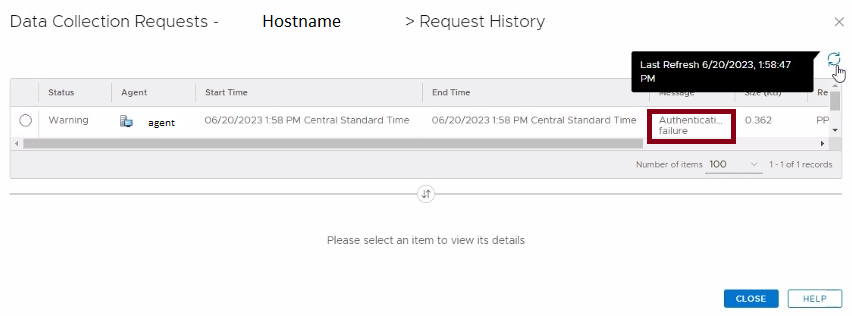
Examining the DPA Agent logs, the follow error may be observed.
INFO     2372.4848     20230606:155519 com.emc.dpa.agent.mo - authenticate(): Using authType CRED
WARN     2372.4848     20230606:155520 com.emc.dpa.agent.mo - obtainAccessToken(): Failed to login to <hostname> with user <username> : HTTP post status: 302
Another form of the error that may appear is as below.
DBG1         .         20230612:084631 org.apache.logging.log4j.spi.AbstractLogger - obtainAccessToken(): Making login request to <hostname>
DBG1         .         20230612:084631 org.apache.logging.log4j.spi.AbstractLogger - post(): POST [/api/v2/login] with payload: GenericApplicationCredential: user=<username>
UNKN         .         20230612:084631 org.apache.logging.log4j.spi.AbstractLogger - obtainAccessToken(): Failed to login to <hostname> with user <username>: HTTP post status: 401
This error means DPA Agent Module is not able to log in to PPDM. The DPA Agent Module tries to log in into PPDM with an account credential, but PPDM returns this error.
Cause
This is an environmental issue.
The credentials for PPDM used by the DPA PPDM data collection module are not working.
In one instance, this issue occurred when the PPDM admin account login was updated by local Administrators. This account was used by the DPA data collection requests and the login was not updated in the DPA data collection request configuration.
Another possible way this can occur is if an incorrect password was configured in the DPA data collection request. If the Agent then attempts to log in into the PPDM server with this specific user account too many times, the PPDM user account may become locked.
The credentials for PPDM used by the DPA PPDM data collection module are not working.
In one instance, this issue occurred when the PPDM admin account login was updated by local Administrators. This account was used by the DPA data collection requests and the login was not updated in the DPA data collection request configuration.
Another possible way this can occur is if an incorrect password was configured in the DPA data collection request. If the Agent then attempts to log in into the PPDM server with this specific user account too many times, the PPDM user account may become locked.
Resolution
Provide or update the credentials in the DPA data collection requests appropriately, so they match what has been set or updated in PPDM.
If the credentials have been set correctly and the Agent still receives unauthorized errors, the PPDM user account may be locked. Check this by logging into the PPDM UI using the user account that is configured in DPA. If the account is locked PPDM, will notify one of this upon the PPDM UI login attempt. If this has occurred, stop the DPA Agent and wait for the PPDM user account lock to clear (normally this is 5 minutes). Once the lock has cleared and one can successfully log in to the PPDM UI with this user, restart the DPA Agent and check that the requests can run successfully again.
If the credentials have been set correctly and the Agent still receives unauthorized errors, the PPDM user account may be locked. Check this by logging into the PPDM UI using the user account that is configured in DPA. If the account is locked PPDM, will notify one of this upon the PPDM UI login attempt. If this has occurred, stop the DPA Agent and wait for the PPDM user account lock to clear (normally this is 5 minutes). Once the lock has cleared and one can successfully log in to the PPDM UI with this user, restart the DPA Agent and check that the requests can run successfully again.
Article Properties
Article Number: 000213017
Article Type: Solution
Last Modified: 22 Sept 2025
Version: 2
Find answers to your questions from other Dell users
Support Services
Check if your device is covered by Support Services.