Latitude Laptop Displays in Black and White When Running LCD Built-in Self-Test
Summary: Learn about Latitude laptops showing in black and white only when running LCD Built-in Self-Test (BIST).
This article applies to
This article does not apply to
This article is not tied to any specific product.
Not all product versions are identified in this article.
Symptoms
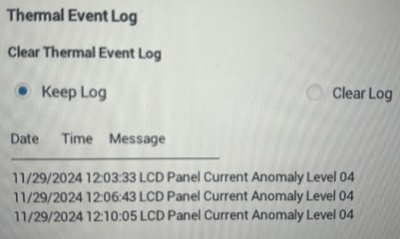
Latitude laptop may not display red, green, blue but only black and white when running the LCD BIST to test the LCD function. The Thermal event log may display LCD Panel Current Anomaly Level xx. The issue occurs after updating the BIOS.
Affected Platforms:
- Latitude 5320
- Latitude 5330
- Latitude 5420
- Latitude 5430
- Latitude 5520
- Latitude 5530
- Latitude 7320
- Latitude 7330
- Latitude 7420
- Latitude 7430
- Latitude 7520
- Latitude 7530
Affected BIOS Versions:
- 1.37.0 for Latitude 5x20
- 1.24.0 for Latitude 5x30
- 1.35.0 for Latitude 7x20
- 1.25.0 for Latitude 7x30
Cause
A new feature implemented in the BIOS caused the side effect.
Resolution
Updating to the following versions of BIOS resolves the issue:
- Latitude 5x20 - 1.44.0
- Latitude 5x30 - 1.28.0
- Latitude 7x20 - 1.41.0
- Latitude 7x30 - 1.30.0
To download and install the BIOS, refer to the BIOS Update Guide.
Affected Products
Latitude 5320, Latitude 5330, Latitude 7320, Latitude 7330, Latitude 7420, Latitude 7430, Latitude 5520, Latitude 5530, Latitude 7520, Latitude 7530, Latitude 5420, Latitude 5430Article Properties
Article Number: 000260939
Article Type: Solution
Last Modified: 13 Nov 2025
Version: 7
Find answers to your questions from other Dell users
Support Services
Check if your device is covered by Support Services.