PowerFlex PXE boot failing on 14G servers with X710 NICs
Summary: Nodes are failing to PXE boot during deployment when Intel X710 NICs are present.
This article applies to
This article does not apply to
This article is not tied to any specific product.
Not all product versions are identified in this article.
Symptoms
- OS installation is timing out during deployment.
- While the node is doing the PXE boot, you will see "Connection timed out" messages on iDRAC console.
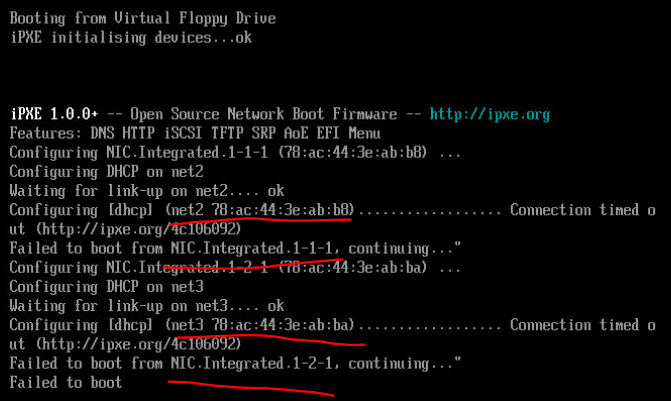
- Error message in the rackserver-<service tag>_exception.log file:
#<ASM::UserException: The installation of the operating system for node 3Z5ZDF3 10.5.42.165 timed out.>

/opt/asm-deployer/lib/asm/razor.rb:314:in `block_until_task_complete'
/opt/asm-deployer/lib/asm/type/server.rb:3428:in `razor_block_until'
/opt/asm-deployer/lib/asm/type/server.rb:1687:in `provision_server!'
/opt/asm-deployer/lib/asm/service_deployment.rb:5146:in `process_server_with_types'
/opt/asm-deployer/lib/asm/service_deployment.rb:2949:in `process_server'
/opt/asm-deployer/lib/asm/service_deployment.rb:1409:in `block in create_component_thread'
Cause
- This is a regression from a change to add the LACP port channel (with fallback enabled) to the PXE switch interfaces before the PXE install process.
- Prior to this change, trunk ports were used. The new method works fine on Mellanox NICs but seems to be failing on Intel X710 NICs.
Resolution
- When the node begins the PXE boot, you see Connection timed out messages on the iDRAC console.
- Now remove the port channel from the PXE switch interface.
- Identify the ports used for the PXE network for each node in the deployment and the find the channel group # configured on each port (example below):
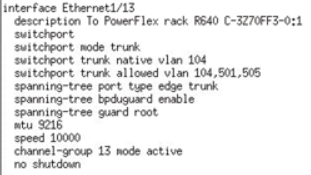
- Enter config mode on the interface for the first node and run the following command:
no channel-group <channel-group #> mode active
- Repeat the above steps for each node in the service.
- Save your config changes on the switch.
copy run start
- When the node reboots (should be in a boot loop due to PXE boot failure), the PXE install will go through.
- If the service has already failed, you will have to make the port channel changes and retry the service.
- Reboot the nodes and ensure that ESX is completely installed using PXE before retrying the service.
Affected Products
PowerFlex rackArticle Properties
Article Number: 000195206
Article Type: Solution
Last Modified: 26 May 2025
Version: 4
Find answers to your questions from other Dell users
Support Services
Check if your device is covered by Support Services.