NetWorker: Shared Drive Backup Failure
Summary: Shared Drive Backup is getting failed. ERROR: The DPSS backup has been cancelled.
Symptoms
No Firewall between server and client
Below are the errors found in the Action Logs:
ERROR:
174412:save: Step (2 of 5) for PID-7508: Running the backup on the client '****' for the save set 'null'.
Received a termination signal. Terminating the save operation.
Terminated the backup.
133079:save: Backups have been interrupted and are being aborted within the next 180 seconds ...
125796:save: The DPSS backup has been cancelled.
01/17/24 03:08:59.666313 find_idle_emitter() (tid:1): ERROR: Could not get Emitter
Do MBS: Unable to find an idle emitter.
125798:save: DPSS save point '****:\\****\HOME$' has encountered a critical error.
Cause
History of DPSS:
The parallel save streams (PSS) feature is intended to increase net aggregate backup throughput written to the backend media. This feature first came in NW 8.1 with support only for UNIX Platform. In NW 8.2 this support is extended to the the Windows platform also. In PSS stream allocation per save set is static assignment and by default the save set can be split into a maximum of four streams. Also, it depends on the client parallelism value and number of save sets. For example, if a user has three save sets and the client parallelism value is 6 the save set is divided totally into six streams, two streams for each save set.
DPSS is an approach based on the existing PSS infrastructure that allows the streams vacated from one completed or aborted save point to be reclaimed by another. This approach allows full utilization of all available save streams at any given time regardless the number of save points specified for the backup or how many streams each save point has started with in the beginning, and thus the name dynamic PSS (DPSS).
Resolution
- Open client properties.
- Go to the Global (1 of 2) tab.
- Check the Parallel save streams per save set option to enable DPSS backup.
- Verify the Parallelism value is more than the number of PSS sessions.
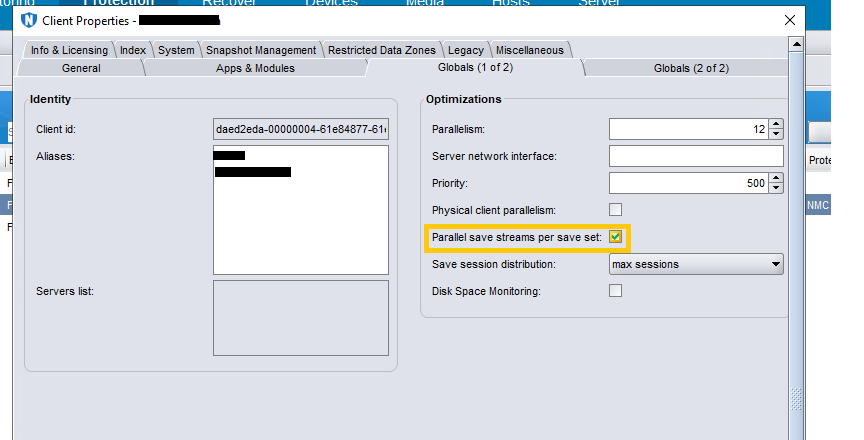
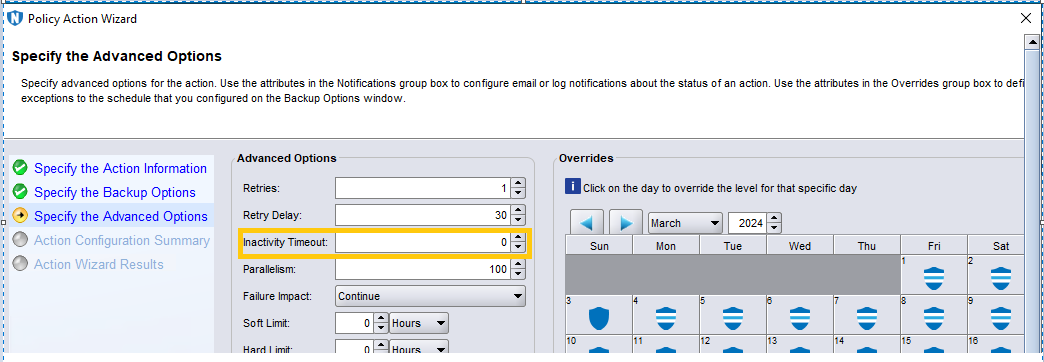
2. Set "inactivity timeout" in the backup action to 0:
- Go to Backup Action Properties.
- Specify the Advanced Options >> Inactivity Timeout to 0.
3. Set TCP_KeepAlive on the client to 5 minutes at operating system level
To keep the session channel open in a firewall environment.
The recommended value for the Wait Before Probing and Interval Between Probes parameters is 57 minutes (the exact number depends on units of measure used on the operating system). These should be further decreased if network-enforced timeouts are shorter than the common one-hour value. There are no side-effects of enabling TCP KeepAlive or even setting it to low values as the network overhead is minimal.
Common values are: 57 minutes = 3420 seconds = 6840 half seconds = 3420000 milliseconds
Linux
To set the value temporarily until the computer is restarted:
# sysctl -w net.ipv4.<tcp_parameter> = <tcp_value>
To make the change permanent, update /etc/sysctl.conf with
net.ipv4.<tcp_parameter> = <tcp_value> and issue one of the following
Commands:
RHEL
chkconfig sysctl on
SLES
chkconfig boot.sysctl on
Windows
Change the registry key:
HKLM\System\CurrentControlSet\Services\Tcpip\Parameters\<tcp_parameter>:DWORD=<tcp_value>
After changing the registry key, you must restart the computer for the change to take effect.
See the Security Configuration Guide for the same (Page 107-108)
https://dl.dell.com/content/manual24934822-dell-networker-19-9-security-configuration-guide.pdf?language=en-us