Data Protection Central: RabbitMQ Fails to Start
Summary: This article provides a procedure for Data Protection Central (DPC) when RabbitMQ fails to start after a software update.
This article applies to
This article does not apply to
This article is not tied to any specific product.
Not all product versions are identified in this article.
Symptoms
When RabbitMQ fails to start after a DPC software update, the status shows the RabbitMQ service (
rabbitmq-server) is activating but never completes:
# /usr/local/dpc/bin/dpc status
Version: 19.9.0-13
msm-ui-main: active
msm-monitor: inactive
msm-elg: active
mongod: active
rabbitmq-server: activating
nginx: active
dp-iam: active
FIPS: disabled
#
The RabbitMQ log shows errors when accessing the message store during startup. For example, in the /var/log/dpc/rabbitmq/rabbit@<DPC Hostname>.log, it shows RabbitMQ fails when trying to rebuild the index:
2024-05-07 23:56:25.408992-04:00 [info] <0.230.0> Running boot step recovery defined by app rabbit
2024-05-07 23:56:25.410137-04:00 [info] <0.423.0> Making sure data directory '/var/lib/dpc/rabbitmq/mnesia/rabbit@<DPC Hostname>/msg_stores/vhosts/628WB79CIFDYO9LJI6DKMI09L' for vhost '/' exists
2024-05-07 23:56:25.412199-04:00 [info] <0.423.0> Starting message stores for vhost '/'
2024-05-07 23:56:25.412425-04:00 [info] <0.428.0> Message store "628WB79CIFDYO9LJI6DKMI09L/msg_store_transient": using rabbit_msg_store_ets_index to provide index
2024-05-07 23:56:25.413720-04:00 [info] <0.423.0> Started message store of type transient for vhost '/'
2024-05-07 23:56:25.413970-04:00 [info] <0.432.0> Message store "628WB79CIFDYO9LJI6DKMI09L/msg_store_persistent": using rabbit_msg_store_ets_index to provide index
2024-05-07 23:56:25.414552-04:00 [warning] <0.432.0> Message store "628WB79CIFDYO9LJI6DKMI09L/msg_store_persistent": rebuilding indices from scratch
2024-05-07 23:56:25.495894-04:00 [error] <0.369.0> ** Generic server <0.369.0> terminating
2024-05-07 23:56:25.495894-04:00 [error] <0.369.0> ** Last message in was {'$gen_cast',
2024-05-07 23:56:25.495894-04:00 [error] <0.369.0>                            {submit_async,
2024-05-07 23:56:25.495894-04:00 [error] <0.369.0>                                #Fun<rabbit_classic_queue_index_v2.11.72031207>,
2024-05-07 23:56:25.495894-04:00 [error] <0.369.0>                                <0.367.0>}}
2024-05-07 23:56:25.495894-04:00 [error] <0.369.0> ** When Server state == undefined
2024-05-07 23:56:25.495894-04:00 [error] <0.369.0> ** Reason for termination ==
2024-05-07 23:56:25.495894-04:00 [error] <0.369.0> ** {function_clause,
2024-05-07 23:56:25.495894-04:00 [error] <0.369.0>        [{rabbit_queue_index,journal_minus_segment1,
2024-05-07 23:56:25.495894-04:00 [error] <0.369.0>             [{no_pub,no_del,ack},
2024-05-07 23:56:25.495894-04:00 [error] <0.369.0>              {{true,
2024-05-07 23:56:25.495894-04:00 [error] <0.369.0>                   <<136,59,154,30,244,191,111,192,154,235,124,189,92,104,1,207,
Cause
The RabbitMQ fails to start due to a high volume of stuck messages in the queue.
In this example, there are over 800 MB of data in the queue:
In this example, there are over 800 MB of data in the queue:
<DPC Hostname>:/var/lib/dpc/rabbitmq/mnesia # du -h .
20K     ./rabbit@<DPC Hostname>/quorum/rabbit@<DPC Hostname>
20K     ./rabbit@<DPC Hostname>/quorum
58M     ./rabbit@<DPC Hostname>/msg_stores/vhosts/628WB79CIFDYO9LJI6DKMI09L/msg_store_persistent
824M    ./rabbit@<DPC Hostname>/msg_stores/vhosts/628WB79CIFDYO9LJI6DKMI09L/queues/BV3H25N6AGWF7TDIN2L5RE0DA
824M    ./rabbit@<DPC Hostname>/msg_stores/vhosts/628WB79CIFDYO9LJI6DKMI09L/queues
0       ./rabbit@<DPC Hostname>/msg_stores/vhosts/628WB79CIFDYO9LJI6DKMI09L/msg_store_transient
881M    ./rabbit@<DPC Hostname>/msg_stores/vhosts/628WB79CIFDYO9LJI6DKMI09L
881M    ./rabbit@<DPC Hostname>/msg_stores/vhosts
881M    ./rabbit@<DPC Hostname>/msg_stores
20K     ./rabbit@<DPC Hostname>/coordination/rabbit@<DPC Hostname>
20K     ./rabbit@<DPC Hostname>/coordination
881M    ./rabbit@<DPC Hostname>
0       ./rabbit@<DPC Hostname>-plugins-expand
881M    .
<DPC Hostname>:/var/lib/dpc/rabbitmq/mnesia #
Resolution
To address the issue, use the below procedure to rebuild the RabbitMQ resources:
An example output from a lab environment:
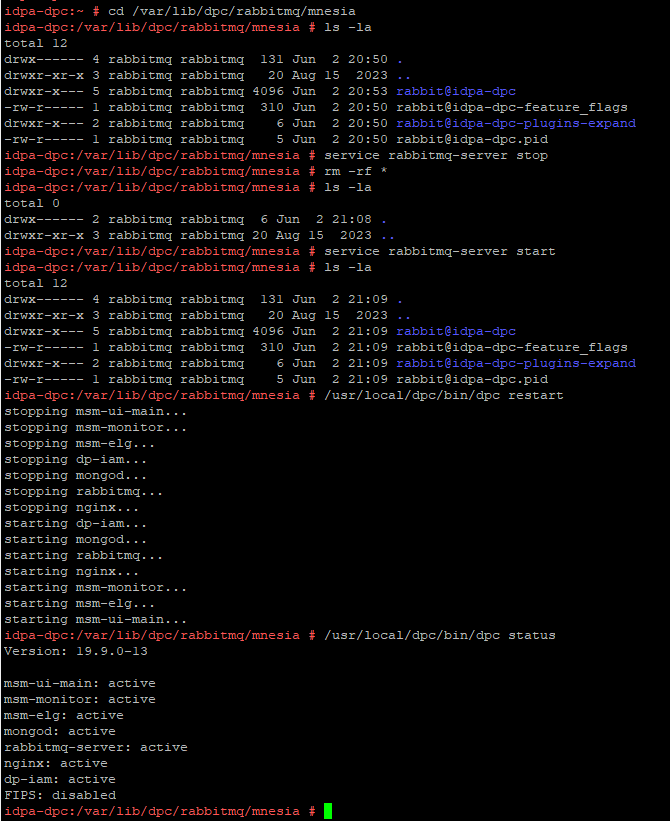
- Take a snapshot of the DPC virtual machine or perform a full backup of the DPC server.
- SSH to the DPC and login as "admin" then change the user to root:
su -
- Stop the RabbitMQ service (
rabbitmq-server) with the following command:
service rabbitmq-server stop
- Change the directory to
/var/lib/dpc/rabbitmq/mnesia:
cd /var/lib/dpc/rabbitmq/mnesia
- If there is enough free space in
/tmp, copy the data to/tmp(optional):
cp -rp * /tmp
- Remove the data under
/var/lib/dpc/rabbitmq/mnesiawith the following command:
rm -rf *
- Restart the RabbitMQ service, files under
/var/lib/dpc/rabbitmq/mnesiashould be regenerated:
service rabbitmq-server start
- Restart the DPC services:
/usr/local/dpc/bin/dpc restart
An example output from a lab environment:
Figure 1: An example showing RabbitMQ regenerating the data structure under
/var/lib/dpc/rabbitmq/mnesia during start-up
- Log in to the DPC UI to verify if the DPC is working as expected.
- Delete the subfolders previously moved to
/tmpif data has been copied in Step 5. - When the service returns to normal, delete the DPC virtual machine snapshot if it was taken.
Affected Products
Data Protection Central, PowerProtect DP4400, PowerProtect DP5300, PowerProtect DP5800, PowerProtect DP8300, PowerProtect DP8800, PowerProtect Data Protection Software, Integrated Data Protection Appliance Family
, Integrated Data Protection Appliance Software, PowerProtect DP5900, PowerProtect DP8400, PowerProtect DP8900
...
Article Properties
Article Number: 000225640
Article Type: Solution
Last Modified: 27 Jun 2025
Version: 3
Find answers to your questions from other Dell users
Support Services
Check if your device is covered by Support Services.