Dell FluidFS: SMB 3.1.1을 사용하여 Windows 10 v1903으로 업데이트한 후 공유에 액세스할 수 없음
Summary: SMB(Server Message Block) 3.1.1을 사용하여 Windows 10 버전 1903으로 업데이트한 후 클라이언트가 공유에 액세스할 수 없습니다.
This article applies to
This article does not apply to
This article is not tied to any specific product.
Not all product versions are identified in this article.
Symptoms
SMB 3.1.1을 사용하는 Windows 클라이언트는 Windows 10 버전 1903으로 업데이트한 후 SMB 공유에 액세스할 수 없습니다.
Cause
이 문제는 FluidFS 버전 6.0.300135 이하에서 지원하지 않는 SMB 3.1.1에서 나타나는 협상 컨텍스트 때문에 발생합니다.
Resolution
오류 식별
이 오류는 다음 오류 메시지에서 확인할 수 있습니다.
- SMB 공유에 액세스하는 동안 클라이언트에 다음 오류 메시지가 표시됩니다.
Windows cannot access "\\servername" check the spelling.... Error code 0x80004005 Unspecified error - Windows 이벤트 뷰어에 다음 오류 메시지가 나타납니다.
The server does not support any dialect that the client is trying to negotiate, such as the client has SMB2/SMB3 disabled and the server has SMB1 disabled. - UNC(Universal Naming Convention) 경로를 사용하는 경우:
0x80070043 Network name cannot be found - 네트워크 추적의 오류 메시지:
STATUS_INVALID_PARAMETER
참고: SMB 클라이언트는 매개변수 값에 따라 적절한 언어를 협상하기 위해 모든 SMB 서버 공유에 대한 연결을 해제해야 합니다.
FluidFS 버전 MR640은 이 문제를 해결합니다. 지원팀에 문의하고 이 문서를 참조하십시오.
아래 단계에 따라 SMBv3를 비활성화하고 SMB v2를 대신 사용하면 다른 해결 방법을 사용할 수 있습니다.
이 작업은 Dell Storage Manager 또는 CLI를 사용하여 수행할 수 있습니다.
SMB 버전을 수정하려면 최신 MR630에서 - DSM(Dell Storage Manager) 사용
- Dell Storage Manager에 액세스합니다.
- Client Accessibility로 이동
- 프로토콜 탭을 선택합니다.
- SMB 프로토콜 설정 편집을 선택합니다.
- SMBv3 프로토콜 옆에 있는 상자에서 선택 해제를 합니다.
- 확인을 클릭하여 설정을 저장합니다.
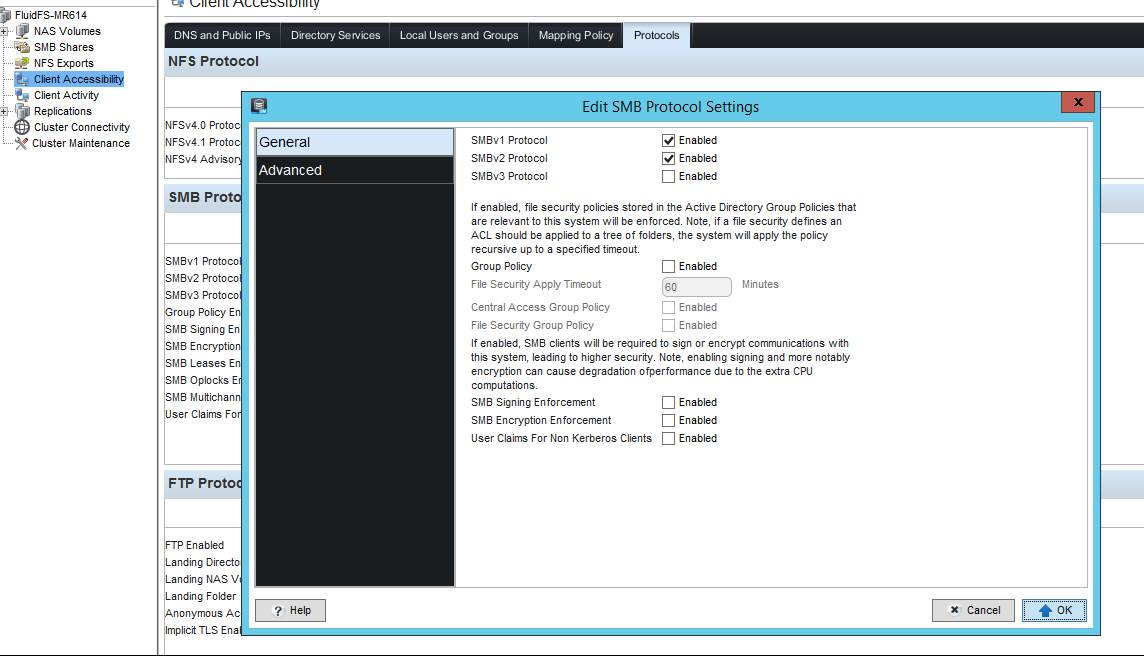
그림 1: Dell Storage Manager DSM - SMB 프로토콜 설정
CLI를 사용하여 최신 MR630에서 SMB 버전을 수정하려면 아래와
같이 명령을 입력합니다.
CLI/client-access/authentication/protocols/SMB-settings> view
SMBv1 Enabled                               = Yes
SMBv2 Enabled                               = Yes
SMBv3 Enabled                               = Yes
Is Required Message Signing                 = No
Is Required Message Encryption              = No
Multichannel Enabled                        = No
Leases Enabled                              = Yes
Oplocks Enabled                             = Yes
Disconnect Idle Sessions                    = No
Idle Sessions Timeout (minutes)             = 720
Idle Sessions Scan Interval (minutes)       = 720
Enable User Claims for Non-Kerberos Clients = No

CLI/client-access/authentication/protocols/SMB-settings> edit
Usage: edit [Options]


    Options:
    -EnableSMBv1 <EnableSMBv1>
    -EnableSMBv2 <EnableSMBv2>
    -EnableSMBv3 <EnableSMBv3>
    -RequireMessageSigning <RequireMessageSigning>
    -RequireMessageEncryption <RequireMessageEncryption>
    -EnableMultichannel <EnableMultichannel>
    -EnableLeases <EnableLeases>
    -EnableOplocks <EnableOplocks>
    -DisconnectIdleSessions <DisconnectIdleSessions>
    -IdleSessionsTimeout <IdleSessionsTimeout>
    -IdleSessionScanInterval <IdleSessionScanInterval>
    -EnableUserClaimsForNonKRBClients <EnableUserClaimsForNonKRBClients>
참고: 최대 언어 프로그램 SMB 3.1.1이 필요한 경우, Windows 10 버전 1903 또는 Windows Server 버전 1903 설치를 이전의 GA(Generally Available) 버전(1803)으로 되돌립니다.
Affected Products
Dell Compellent FS8600Article Properties
Article Number: 000130252
Article Type: Solution
Last Modified: 29 Jul 2025
Version: 6
Find answers to your questions from other Dell users
Support Services
Check if your device is covered by Support Services.