IDPA: PowerProtect DP Rapid Upgrade Checker Reported a Firmware Upgrade precheck failure
Summary: PowerProtect Data Protection (DP) Series Appliances and IDPA: PowerProtect DP Rapid Upgrade Checker (RUCK) reported a Firmware upgrade precheck failed. The cached response with Node Event Service is disabled. The Node Event Service is in a degraded state, iDRAC Service Module is not available/active currently. Check iDRAC Service Module/iDRAC status. This can be caused by outdated NVMe PM1735 card firmware in PCIe SSD Slot 4. ...
Symptoms
The PowerProtect Data Protection Rapid Upgrade Checker (RUCK) fails with the following error:
+-----------+--------------------+--------+-----------------------------------------------+-----------------------------------------------+
| Component | Check              | Status | Message                                       | Remedy                                        |
+-----------+--------------------+--------+-----------------------------------------------+-----------------------------------------------+
| ESXi      | firmware_readiness | FAILED | Firmware pre-upgrade checks failed. [ xxx.xxx.| Use KB https://www.dell.com/support/kbdoc/191 |
|           |                    |        | xxx.xxx ]: The cached response with Node Event| 627 to fix the issue.                         |
|           |                    |        | Service is disabled. Node Event Service is in |                                               |
|           |                    |        |  a degraded state,iDRAC Service Module is not |                                               |
|           |                    |        |  available/active at this time. Check iDRAC S |                                               |
|           |                    |        | ervice Module/iDRAC status.                   |                                               |
+-----------+--------------------+--------+-----------------------------------------------+-----------------------------------------------+
[ERROR] Firmware pre-upgrade checks failed. [ <ESXi IP Address> ]: The cached response with Node Event Service is disabled. Node Event Service is in a degraded state, iDRAC Service Module is not available/active at this time. Check iDRAC Service Module/iDRAC status.
The Hardware Model of the PCIe SSD in Slot 4 is a Dell Enterprise NVMe AGN MU AIC 1.6 TB card (NVMe PM1735) and the firmware is below version 2.3.0.
The PCIe SSD card model and firmware version can be found on the iDRAC. System > Physical Disks > PCIe Device - PCIe SSD in Slot 4 Disk 1
In this example, the PCIe SSD card is a PM1725b. Therefore the workaround is not applicable in this case:
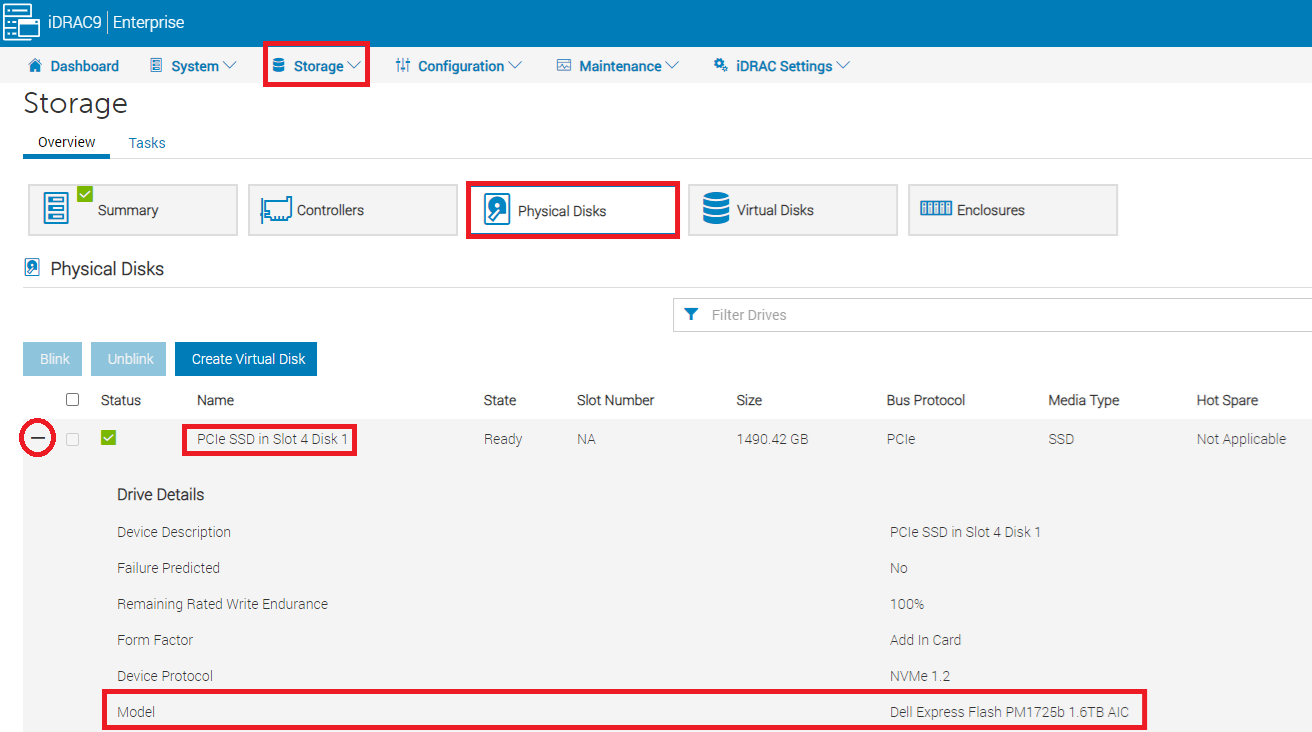
Figure 1: How to find the PCIe SSD card from the iDRAC user interface.
From the Dell iDRAC Technical Support Report (TSR) log, the PCIe SSD card is named "Dell Ent NVMe AGN MU AIC 1.6TB":
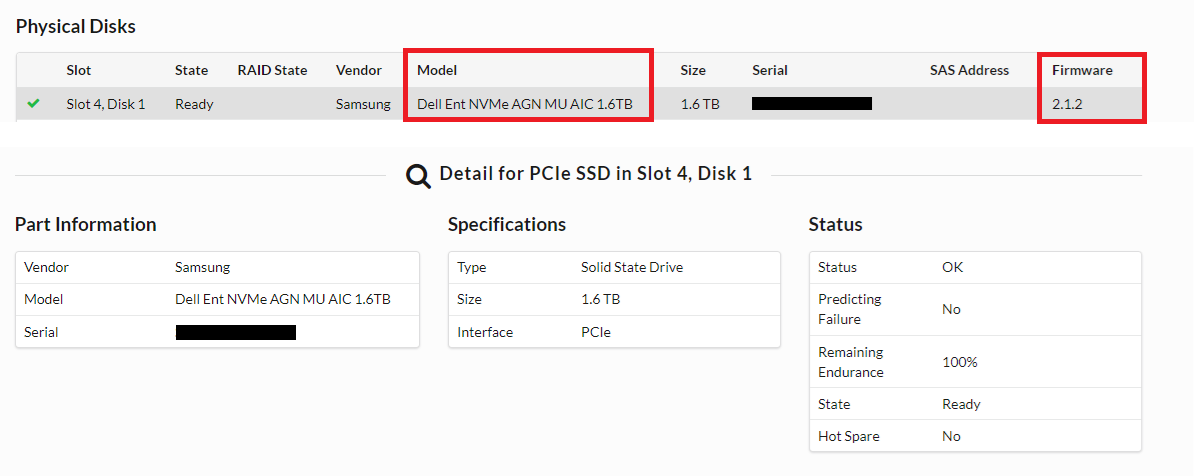
Figure 2: From the TSR log, the NVMe PM1735 card is named Dell Ent NVMe AGN MU AIC 1.6 TB.
The iDRAC Service Module (iSM) shows as Running in the iDRAC user interface:

Figure 3: The iSM status is running.
Dell PT Agent and iSM are running, and the issue persists after restarting them:
[root@ESXi:/opt/dell/DellPTAgent/tools] /etc/init.d/DellPTAgent status
DellPTAgent is running
[root@ESXi:/opt/dell/DellPTAgent/tools] /etc/init.d/DellPTAgent stop
Stopping DellPTAgent...
watchdog-DellPTAgent: Terminating watchdog process with PID 7447869
DellPTAgent stopped
[root@ESXi:/opt/dell/DellPTAgent/tools] /etc/init.d/DellPTAgent start
Starting DellPTAgent...
DellPTAgent started
[root@ESXi:/opt/dell/DellPTAgent/tools] /etc/init.d/DellPTAgent status
DellPTAgent is running
[root@ESXi:/opt/dell/DellPTAgent/tools]

[root@ESXi:/opt/dell/DellPTAgent/tools] /etc/init.d/dcism-netmon-watchdog status
iSM is active (running)
[root@ESXi:/opt/dell/DellPTAgent/tools] /etc/init.d/dcism-netmon-watchdog stop
Module dcism_module successfully unloaded
[root@ESXi:/opt/dell/DellPTAgent/tools] /etc/init.d/dcism-netmon-watchdog start
[root@ESXi:/opt/dell/DellPTAgent/tools] /etc/init.d/dcism-netmon-watchdog status
iSM is active (running)
[root@ESXi:/opt/dell/DellPTAgent/tools]
Cause
From the ACM, it shows that the iDRAC cache is degraded:
ACM:/tmp # dpacli -agentinfo
{"Agent Info": [{"ESXiHost-xxx.xxxx.xxx.xxx": {
    "ptagentversion": "2.4.1-3",
    "uptime": "54 seconds ( 54 seconds )",
    "ism_version": "3.6.0",
    "system_uuid": "618axxxx-xxxx-xxxx-xxxx-xxxxxxxxdd70",
    "process_id": "7440642",
    "host_epoch_time": "1646617738.156490 (secs.usecs)",
    "model": "DP4400",
    "name": "<ESXi_hostname>",
    "mfr": "Dell Inc.",
    "domain": "<ESXi FQDN>",
    "servicetag": "XXXXXXX",
    "os": "VMWare ESXi",
    "os_version": "6.7.0 build-17700523",
    "rest_endpoints": "https://127.0.0.1:8086,https://192.168.100.101:8086",
    "api_blocking_enabled": "false",
    "TPM Present": "false",
    "MarvellLibraryVersion": "5.0.13.1109",
    "libstorelib.so": "07.07",
    "libstorelibir-3.so": "15.03-0",
    "libstorelibit.so": "07.05",
    "idrac_pass_thru_ip": "169.254.0.1",
    "idrac_ethernet_ip": "xx.xxx.xxx.x",
    "host_pass_thru_ip": "169.254.0.2",
    "default_server_cert": "true",
    "status": {
        "idraccache": "Degraded",
        "idracConnection": "OK",
        "iSM": "N/A",
        "agent": "Degraded"
    }
}}]}
ACM:/tmp #
And the same information is seen when pulling from ESXi:
[root@ESXi:~] /opt/dell/DellPTAgent/tools/pta_call get agent/info
Request sent to DellPTAgent @ https://192.168.100.101:8086
{
    "TPM Present": "false",
    "MarvellLibraryVersion": "5.0.13.1109",
    "uptime": "344 seconds ( 5 minutes 44 seconds )",
    "system_uuid": "618axxxx-xxxx-xxxx-xxxx-xxxxxxxxdd70",
    "host_pass_thru_ip": "169.254.0.2",
    "servicetag": "XXXXXXX",
    "domain": "<ESXi FQDN>",
    "default_server_cert": "true",
    "libstorelibir-3.so": "15.03-0",
    "model": "DP4400",
    "idrac_ethernet_ip": "xxx.xxx.xxx.xxx",
    "os": "VMWare ESXi",
    "rest_endpoints": "https://127.0.0.1:8086,https://192.168.100.101:8086",
    "mfr": "Dell Inc.",
    "api_blocking_enabled": "false",
    "libstorelib.so": "07.07",
    "ptagentversion": "2.4.1-3",
    "ism_version": "3.6.0",
    "host_epoch_time": "1646618523.10088 (secs.usecs)",
    "os_version": "6.7.0 build-17700523",
    "libstorelibit.so": "07.05",
    "idrac_pass_thru_ip": "169.254.0.1",
    "name": "<ESXi_hostname>",
    "process_id": "7441193",
    "status": {
        "idraccache": "Degraded",
        "idracConnection": "OK",
        "agent": "Degraded",
        "iSM": "N/A"
    }
}
Response: status: 200 [OK], size: 1067 bytes, latency: 0.145 seconds.
[root@ESXi:~]
In this case, the PT Agent failed to find the component 'PhysicalDisk' in hwInventory because it has trouble querying data from the NVMe PM1735 card in Slot 4.
From the ESXi /scratch/log/pta_debug.log, it shows the error message:
2022/03/07 04:51:03[UTC] [7459005:193227584] WARN  - WSManClient::isValidResponse: Http request to host: 169.254.0.1, failed with status code: -5
2022/03/07 04:51:03[UTC] [7459005:193227584] WARN  - getComponentFromInventory: Cannot find component 'PhysicalDisk' in hwInventory:
{
    "Message": "Read timed out!",
    "ReturnValue": -5
}
2022/03/07 04:52:57[UTC] [7459005:189000512] WARN  - NvmeDiscoveredDevice::setIntAttrFromDescriptor: Cannot convert string <ie> to int.
2022/03/07 04:52:57[UTC] [7459005:189000512] WARN  - NvmeDiscoveredDevice::setIntAttrFromDescriptor: Failed to read <bay> from <PCIe Slot 4>
Therefore, upgrading NVMe 1735 firmware to version 2.3.0 is suggested, which is bundled in "PowerProtect Data Protection Appliance-IDPA Firmware Gen14 December 2021." The required firmware file is: Express-Flash-PCIe-SSD_Firmware_RP8RC_WN64_2.3.0_A03.EXE
Resolution
To upgrade the NVMe 1735 firmware to version 2.3.0:
-
Download the "PowerProtect Data Protection Series Appliance-IDPA Firmware Gen14 December 2021" from Dell Support web then extract the required firmware file
Express-Flash-PCIe-SSD_Firmware_RP8RC_WN64_2.3.0_A03.EXE. -
Shut down the Integrated Data Protection Appliance from the ACM web user interface.
-
After confirming the ESXi is powered off, log in to the iDRAC user interface then manually upload the firmware file to iDRAC:
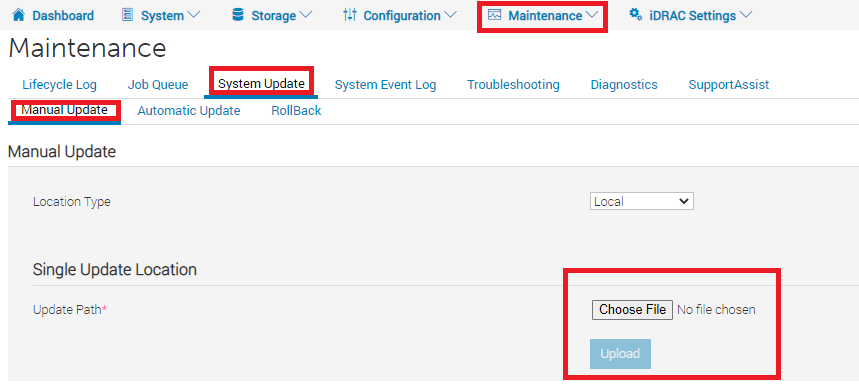
Figure 4: How to upload firmware in the iDRAC user interface -
Select the
Express-Flash-PCIe-SSD_Firmware_RP8RC_WN64_2.3.0_A03.EXEfile and click Install and Reboot. Then the iDRAC installs the firmware and reboots.
Figure 5: How to apply the firmware -
After reboot, the firmware version can be verified in iDRAC > System > Inventory > Firmware Inventory:

Figure 6: How to review the firmware from the Firmware Inventory - Monitoring the DP4400 startup and after all the virtual machines start up successfully.
- Run the
dpaclicommand again in ACM, and confirm that theidraccacheand agent status should change to OK:
ACM:~ # dpacli -agentinfo
{"Agent Info": [{"ESXiHost-xxx.xxxx.xxx.xxx": {
    "ptagentversion": "2.4.1-3",
    "uptime": "595 seconds ( 9 minutes 55 seconds )",
    "ism_version": "3.6.0",
    "system_uuid": "618axxxx-xxxx-xxxx-xxxx-xxxxxxxxdd70",
    "process_id": "2100391",
    "host_epoch_time": "1646800495.522825 (secs.usecs)",
    "model": "DP4400",
    "name": "<ESXi_hostname>",
    "mfr": "Dell Inc.",
    "domain": "<ESXi FQDN>",
    "servicetag": "XXXXXXX",
    "os": "VMWare ESXi",
    "os_version": "6.7.0 build-17700523",
    "rest_endpoints": "https://127.0.0.1:8086,https://192.168.100.101:8086",
    "api_blocking_enabled": "false",
    "TPM Present": "false",
    "MarvellLibraryVersion": "5.0.13.1109",
    "libstorelib.so": "07.07",
    "libstorelibir-3.so": "15.03-0",
    "libstorelibit.so": "07.05",
    "idrac_pass_thru_ip": "169.254.0.1",
    "idrac_ethernet_ip": "xxx.xxx.xxx.xxx",
    "host_pass_thru_ip": "169.254.0.2",
    "default_server_cert": "true",
    "status": {
        "idraccache": "OK",
        "idracConnection": "OK",
        "iSM": "N/A",
        "agent": "OK"
    }
}}]}
ACM:~ #
-
Run the health check RUCK tool again to confirm if the issue has been resolved.
Additional Information
The "PowerProtect DP Series Appliance-IDPA Firmware Gen14 December 2021" firmware pack can be downloaded from the Dell Support web page: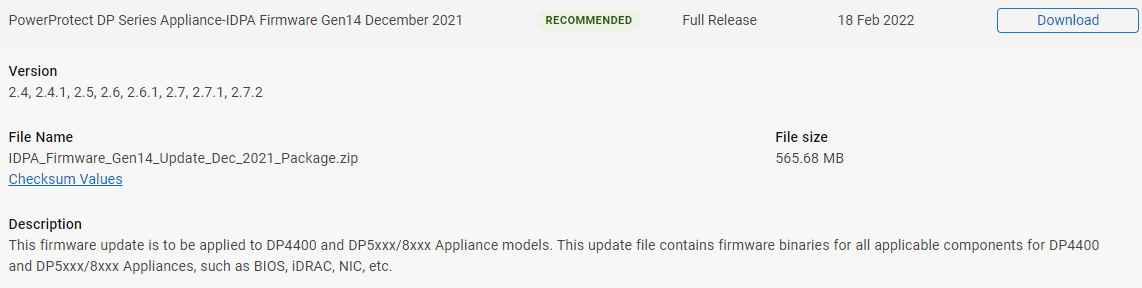
Figure 7: The "PowerProtect DP Series Appliance-IDPA Firmware Gen14 December 2021" firmware is available from the Dell Support web page.
To extract the firmware from IDPA_Firmware_Gen14_Update_Dec_2021_Package.zip, extract all the bundle files: "dpafw-2.312.rpm" > "dpafw-2.312-0.noarch.cpio" > "IDPA-2.312-2.312.tar.gz" > "IDPA-2.312-2.312.tar">, then the firmware file can be found under DUPS > NVME:
Figure 8: An Example of extracting the NVMe PM1735 firmware from the "PowerProtect DP Series Appliance-IDPA Firmware Gen14 December 2021" firmware bundle.