Dell Pro 14 Plus PB14255 Connected to Dock Does Not Show Correct Monitor Name in SupportAssist for Home PCs
Summary: A Dell Pro 14 Plus PB14255 connected to a dock may not show the correct monitor device name in SupportAssist for Home PCs when using DisplayPort.
This article applies to
This article does not apply to
This article is not tied to any specific product.
Not all product versions are identified in this article.
Symptoms
A Dell Pro 14 Plus PB14255 that is connected to an affected dock may show a monitor as Generic:USB2.1 Hub. SupportAssist for Home PCs versions 4.6.x and 4.8.x cannot show the correct device name for the monitor.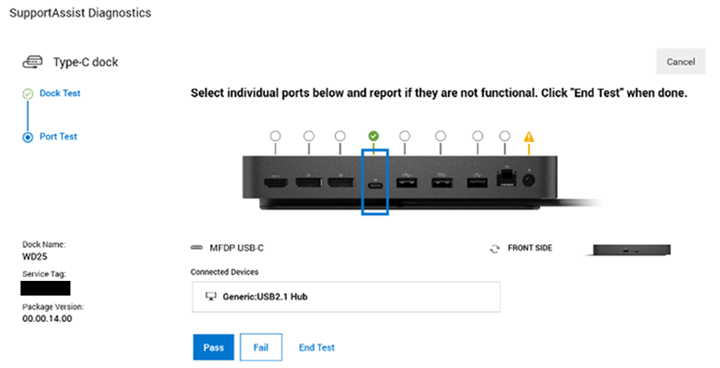
Affected Platforms:
- Dell Pro 14 Plus PB14255
Affected Docks:
- Dell Dock - WD19S
- Dell Dock WD19
- Dell Performance Dock - WD19DC
- Dell Performance Dock - WD19DCS
- Dell Pro Dock WD25
- Dell Pro Dock WD25Z
- Dell Pro Smart Dock SD25
- Dell Pro Thunderbolt 4 Dock WD25TB4
- Dell Pro Thunderbolt 4 Smart Dock SD25TB4
- Dell Thunderbolt Dock - WD19TB
- Dell Thunderbolt Dock - WD19TBS
Affected Software:
- SupportAssist for Home PCs (versions 4.6.x and 4.8.x)
Cause
The correct data is not received from the multistream transport (MST) chip while in DisplayPort mode.
Resolution
The engineering department is working on a fix to be released in SupportAssist for Home PCs version 4.10 and later. SupportAssist version 4.10 is expected to be released in September or October 2025.
Affected Products
Dell Pro 14 Plus PB14255, SupportAssist for Home PCs, Dell Dock WD19, Dell Performance Dock - WD19DC, Dell Performance Dock – WD19DCS, Dell Dock – WD19S, Dell Thunderbolt Dock - WD19TB, Dell Thunderbolt Dock – WD19TBSArticle Properties
Article Number: 000303943
Article Type: Solution
Last Modified: 15 Sept 2025
Version: 3
Find answers to your questions from other Dell users
Support Services
Check if your device is covered by Support Services.