VNXe: How to configure Asynchronous Replication. (User Correctable)
Summary: Replication, Cofiguring Replication, Asynchronous Replication
This article applies to
This article does not apply to
This article is not tied to any specific product.
Not all product versions are identified in this article.
Instructions
1. Login to both source and destination VNXe2 series products
2. Navigate to Settings>Replication Settings, select the port you would like to configure a replication interface for, and click Create Interface on both source and destination units. Configure all fields for SPA and SPB.
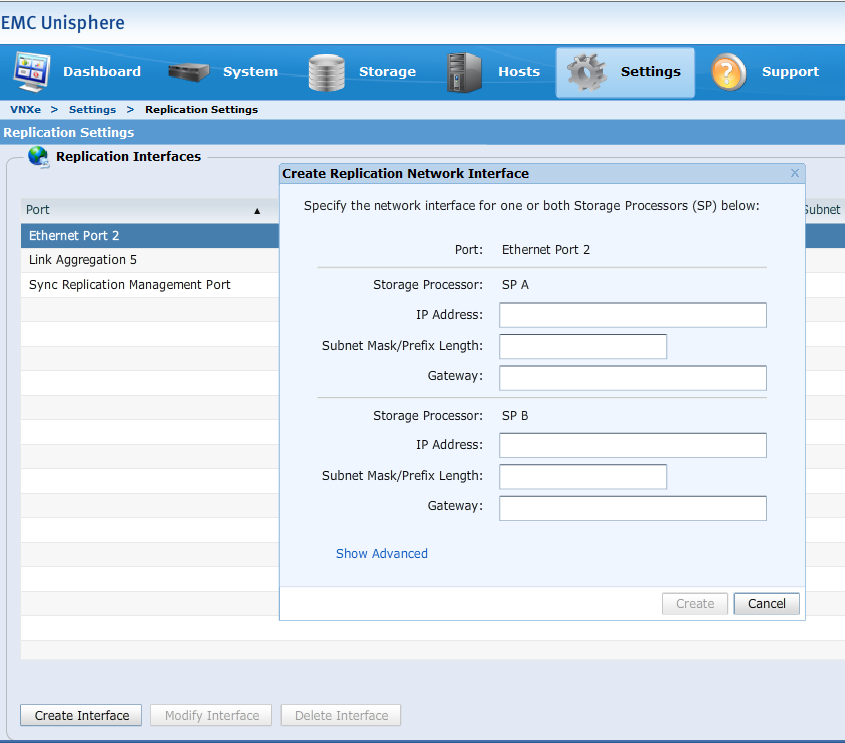
2. Navigate to Settings>Replication Settings, select the port you would like to configure a replication interface for, and click Create Interface on both source and destination units. Configure all fields for SPA and SPB.
- Note: configuring management replication interfaces is only required for synchronous replication. Synchronous replication is beyond the scope of this knowledge article. See https://support.emc.com/docu57828_VNXe3200-Replication-Technologies--A-Detailed-Review.pdf?language=en_US for details on Synchronous Replication
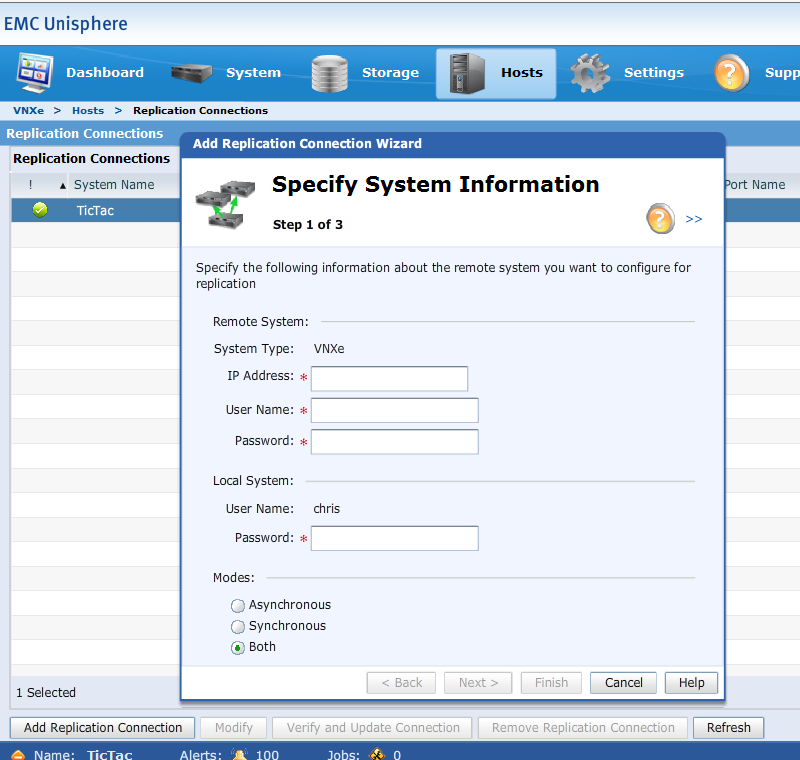
3. Navigate to Hosts>Replication Connections on either VNXe2 series product, then click Add Replication Connection. Enter the following in the appropriate fields:
- Management IP of the remote VNXe2 product
- Remote user name (Note: This user must be assigned the administrator role)
- Remote user password
- Set the mode to Asynchronous
-
Click the Finish button.
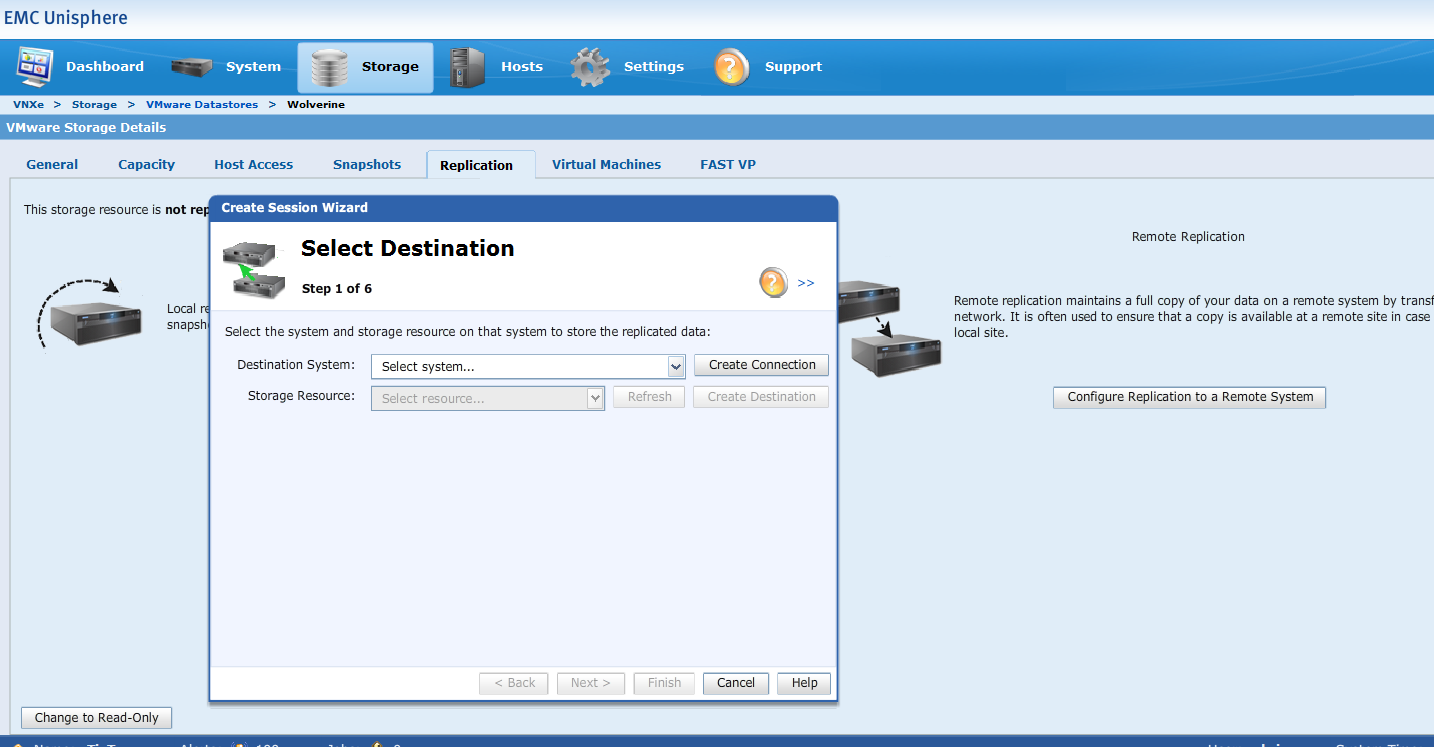
4. Click the details button for the LUN or VMFS datastore that you would like to replicate. Click the Configure Replication to a Remote System button and follow the wizard:
- Select the Destination System (The IP of the remote VNXe3200)
- Click the create Destination button for Storage Resource (a new instance of Unisphere will open for the remote system)
- Using the new instance of Unisphere, follow the wizard to create the Destination LUN
- Return to the Unisphere session where you originally configured replication and click the Refresh button
- Selecting the drop down under Storage Resource should now include the newly created destination LUN
- Select the destination LUN and click next
- Click next on the specify Name window
- Click Show advanced and set the RPO to the appropriate level, on the Configure Synchronization screen
- Set all interfaces to the specified interface on the Replication Path screen
Additional Information
VNXe2 series replication is not supported with non VNXe2 series products
VNXe2 series replication is not supported for use with Fiber Channel
VNXe2 series replication is not supported for use with Direct Connection
VNXe2 series replication is not supported for use with CIFS/NFS storage
VNXe2 series replication is not supported for use with Fiber Channel
VNXe2 series replication is not supported for use with Direct Connection
VNXe2 series replication is not supported for use with CIFS/NFS storage
Affected Products
VNXe3200Products
VNXe1000 Series, VNXe1600, VNXe2 Series, VNXe3200Article Properties
Article Number: 000022440
Article Type: How To
Last Modified: 07 Nov 2025
Version: 5
Find answers to your questions from other Dell users
Support Services
Check if your device is covered by Support Services.