Unisphere for VMAX: How does the Workload Planner Function in Unisphere
Summary: What do STABLE, MARGINAL, and CRITICAL Compliance Alerts indicate in Unisphere for VMAX/PowerMax.
This article applies to
This article does not apply to
This article is not tied to any specific product.
Not all product versions are identified in this article.
Instructions
Oftentimes, customers want to know why their Storage groups are showing up as MARGINAL or CRITICAL.
Here is the explanation:
Unisphere for PowerMax assesses the performance of the Storage Group every 30 minutes and triggers the appropriate alert level.
When a Storage Group (workload) is said to be compliant, it means that it is operating within the associated response time band. When assessing the compliance of a Storage Group, Workload Planner calculates its weighted response time for the past four hours and the past two weeks.
The Workload Planner then compares the two values to the maximum response time associated with its given service level. If both calculated values fall within (under) the service level defined response time band, the compliance state is STABLE. If one of them is in compliance and the other is out of compliance, then the compliance state is MARGINAL. If both are out of compliance, then the compliance state is CRITICAL.
Additional Information
The Service Levels associated with OLTP, or DSS workloads should be expected to provide the following response times: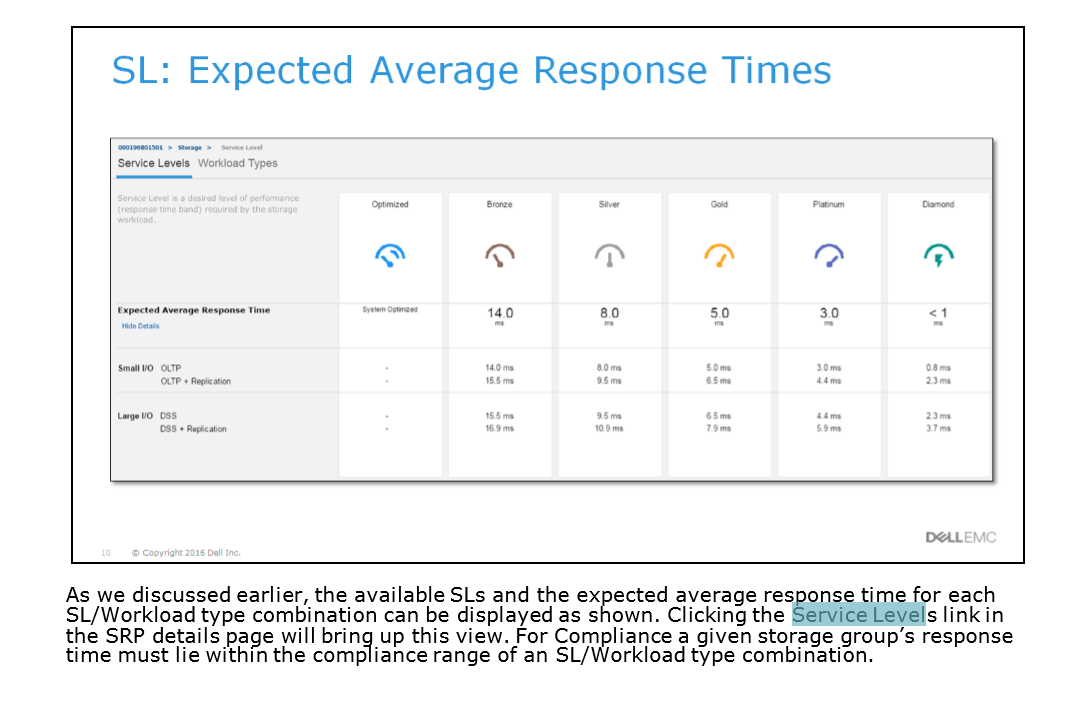
Affected Products
Unisphere for VMAX, Unisphere for PowerMaxArticle Properties
Article Number: 000022528
Article Type: How To
Last Modified: 01 Aug 2025
Version: 5
Find answers to your questions from other Dell users
Support Services
Check if your device is covered by Support Services.