NMM: Exchange GLR Database with the parameter IsExcludedFromProvisioning set to False
Summary: NMM Exchange - Granular Level Restore (GLR) Database with parameter IsExcludedFromProvisioning=False
This article applies to
This article does not apply to
This article is not tied to any specific product.
Not all product versions are identified in this article.
Symptoms
For GLR of an Exchange database, the "IsExcludedFromProvisioning" is set to FALSE
This "IsExcludedFromProvisioning" is an Exchange parameter to determine whether new mailboxes are created in this Exchange database automatically due to load balancing.
Cause
Exchange 2010 introduced a feature called Automatic Mailbox Provisioning. This feature automatically load balances the creation of new mailboxes across all available databases when a creation of a new mailbox account occurs. It is no longer mandatory to specify the mailbox database during mailbox creation. Exchange uses a provisioning agent to automatically select the appropriate mailbox database.
It is recommended that all large Exchange deployments use the Automatic Mailbox Provisioning system to randomly distribute mailboxes between mailbox databases. If you place users in specific mailbox databases based on attributes such as department, issues with that database can affect all users assigned to it. If the database fails to mount, the entire department becomes unavailable until the issue is resolved. If you assign users to mailbox databases by attributes such as department, any issue with that database affects all assigned users. If the database fails to mount, the entire department becomes unavailable.Automatic Mailbox Provisioning system distributes mailboxes randomly amongst databases but in case we want to exclude a mailbox database from having additional mailboxes provisioned such as a mailbox database which is dedicated to holding Archive mailboxes, Microsoft has included two attributes which can be configured against a Mailbox Database for this purpose called "IsExcludedFromProvisioning" and "IsSuspendedFromProvisioning".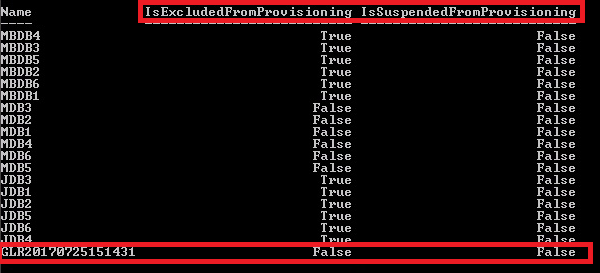
-IsExcludedFromProvisioning <$true | $false>
The
IsExcludedFromProvisioning parameter specifies that this database is permanently not considered by the mailbox provisioning load balancer.
If the
IsExcludedFromProvisioning parameter is enabled, new mailboxes are not added automatically to this database.
You can manually add a mailbox if your role permits.
-IsSuspendedFromProvisioning <$true | $false>
The
IsSuspendedFromProvisioning parameter specifies that this database is temporarily not considered by the mailbox provisioning load balancer.
If you assign users to mailbox databases based on attributes like department, any issue with that database affects all assigned users. If the database does not mount, the entire department becomes unavailable. In a multi‑admin environment, each administrator must make the intent of their configuration clear. This prevents another administrator from removing a permanent suspension unintentionally.
Resolution
This is an Exchange parameter and requires the Exchange admin to configure it according to mailbox creation and load balancing among Exchange Databases.
Additional Information

Affected Products
NetWorker, NetWorker Module for MicrosoftProducts
NetWorker FamilyArticle Properties
Article Number: 000052779
Article Type: Solution
Last Modified: 22 Jan 2026
Version: 6
Find answers to your questions from other Dell users
Support Services
Check if your device is covered by Support Services.