Dell EMC Unity: Expanding a VMware Datastore with a running VM fails (User Correctable)
Summary: Expanding a VMware Datastore in Unity that has a running VM throws an error - Failed: The storage server detected an internal failure in the VMware hypervisor. Please review the event logs on the VMware hypervisor side. (Error Code:0x5c0000c) ...
This article applies to
This article does not apply to
This article is not tied to any specific product.
Not all product versions are identified in this article.
Symptoms
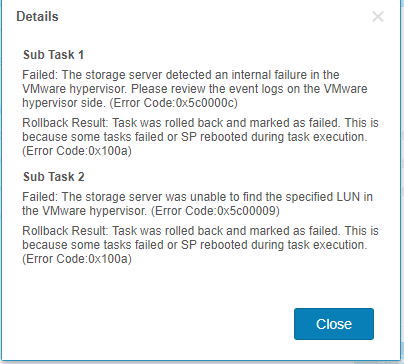
When expanding a VMware Datastore in Unity, while a VM is running on the Datastore, results in the following errors:
Overall status: Completed With Problems.
...
Manage host file system using block: Failed.
Details:
Failed: The storage server detected an internal failure in the VMware hypervisor. Please review the event logs on the VMware hypervisor side. (Error Code:0x5c0000c).
Failed: The storage server was unable to find the specified LUN in the VMware hypervisor. (Error Code:0x5c00009).
Rollback Result: Task was rolled back and marked as failed. This is because some tasks failed or SP rebooted during task execution. (Error Code: 0x100a).

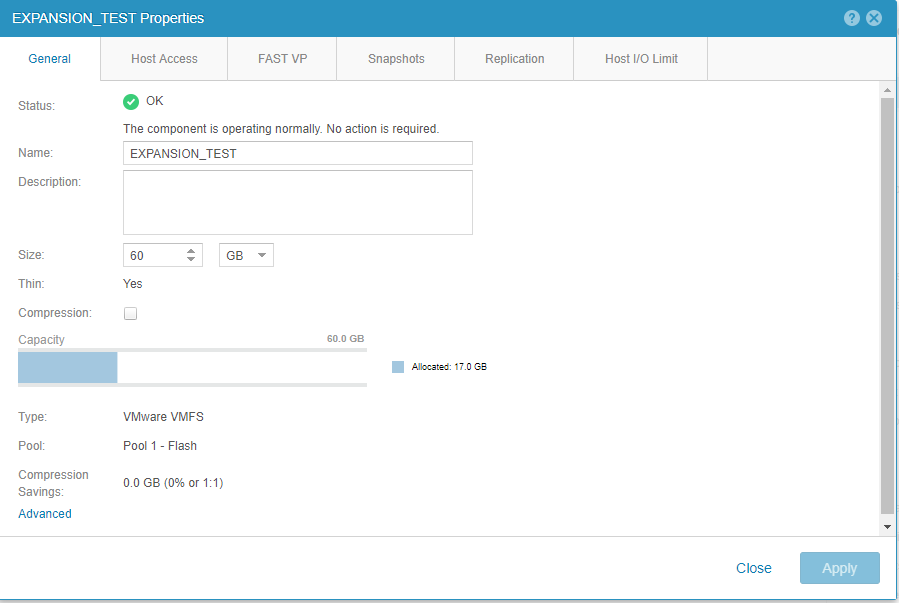
The Datastore's new capacity is reflected in Unisphere:
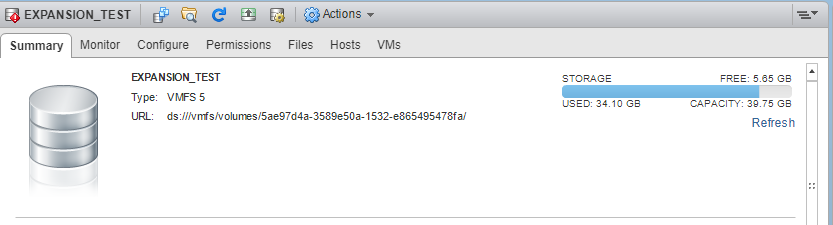
But not in vSphere:
Cause
Change in logic from vSphere 6.0 to vSphere 6.5.
Expand operation became asynchronous in vSphere 6.5, and vSphere observes the new LUN size too late (after an attempt to resize the filesystem).
Expand operation became asynchronous in vSphere 6.5, and vSphere observes the new LUN size too late (after an attempt to resize the filesystem).
Resolution
Error only occurs when expanding DS that has running VM. To reflect capacity increase on VSphere side, manually increase using "Increase Datastore Capacity" function in VSphere.
This issue has been fixed in Dell EMC Unity 4.4.X OE and above.
This issue has been fixed in Dell EMC Unity 4.4.X OE and above.
Affected Products
Dell EMC Unity FamilyProducts
Dell Unity 300, Dell EMC Unity 300F, Dell EMC Unity 350F, Dell EMC Unity XT 380, Dell EMC Unity XT 380F, Dell EMC Unity 400, Dell EMC Unity 400F, Dell EMC Unity 450F, Dell EMC Unity XT 480, Dell EMC Unity XT 480F, Dell EMC Unity 500
, Dell EMC Unity 500F, Dell EMC Unity 550F, Dell EMC Unity 600, Dell EMC Unity 600F, Dell EMC Unity 650F, Dell EMC Unity XT 680, Dell EMC Unity XT 680F, Dell EMC Unity XT 880, Dell EMC Unity XT 880F, Dell EMC Unity Family, Dell EMC Unity Hybrid
...
Article Properties
Article Number: 000057325
Article Type: Solution
Last Modified: 11 Dec 2025
Version: 3
Find answers to your questions from other Dell users
Support Services
Check if your device is covered by Support Services.