SC Storage Customer Notification: SupportAssist Enterprise Contact Information
Summary: This article is to assist Dell Storage Center system customers in configuring their SupportAssist with the correct information
This article applies to
This article does not apply to
This article is not tied to any specific product.
Not all product versions are identified in this article.
Instructions
The purpose of this document is to assist customers in configuring their SupportAssist Enterprise with the correct informationThe steps in this article are for customers to complete
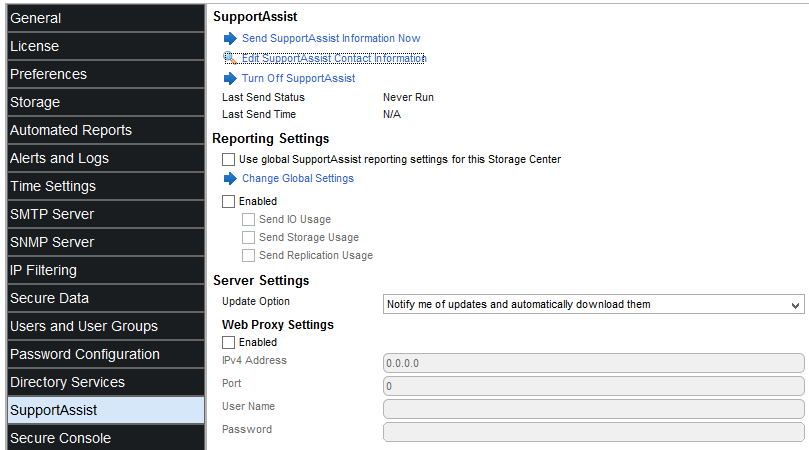
Provide Contact Information Page
The Provide Contact Information page allows you to enter contact information for use by SupportAssist. SupportAssist uses this information to contact you when an error or failure occurs. SupportAssist sends field replacement units (FRUs) to the address specified on this page.
NOTE: Keep this information up to date to avoid service interruptions with SupportAssist.
Field/Option Description
Details on how contact information is used When clicked, opens a help page that describes how SupportAssist uses the contact
information.
First Name Specifies the first name of the contact
Last Name Specifies the last name of the contact
Company Name Specifies the company name for the contact
Country or Territory Specifies the country or territory for the contact
Phone Number Specifies the phone number for the contact
Alternate Phone Number (Optional) Specifies an alternate phone number for the contact
Email Address Specifies an email address for the contact
Alternate Email Address (Optional) Specifies an alternate email address for the contact.
Yes, I would like to receive emails from SupportAssist When selected, an email notification is sent to the email
when issues arise, including hardware failure notifications address of record when a support alert is triggered
Preferred Contact Method Specifies the method in which the contact prefers to be contacted
Preferred Email Language Specifies the language in which emails are sent
SupportAssist Contact Representative Specifies the hours when the contact is available
Preferred Contact Time Zone Specifies the time zone for the contact
Address Line 1 Specifies the first line of the address for the contact
Address Line 2 (Optional) Specifies the second line of the address for the contact
Address Line 3 (Optional) Specifies the third line of the address for the contact
Address City/Town Specifies the city or town for the contact’s address
Address State/Province/Region Specifies the state, province, or region for the contact’s address
Address Country or Territory Specifies the country or territory for the contact’s address
Address ZIP or Postal Code Specifies the zip code or postal code for the contact’s address
Back When clicked, returns the wizard to the previous page
Next When clicked, advances the wizard to the next page
Edit Dell SupportAssist Contact Information (Storage Center 6.6 – 7.2.xx)
Use the Storage Center settings to edit Dell SupportAssist contact information.
Prerequisites
The Storage Center must be added to Storage Manager using a Storage Center user with the Administrator privilege.
Steps
- Click the Storage view.
- In the Storage view navigation pane, select a Storage Center.
- In the Summary tab, click Edit Settings. The Edit Storage Center Settings dialog box opens.
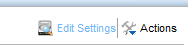
- Click the Dell SupportAssist tab.
- Click Edit Dell SupportAssist Contact Information. The Edit Dell SupportAssist Contact Information dialog box opens.
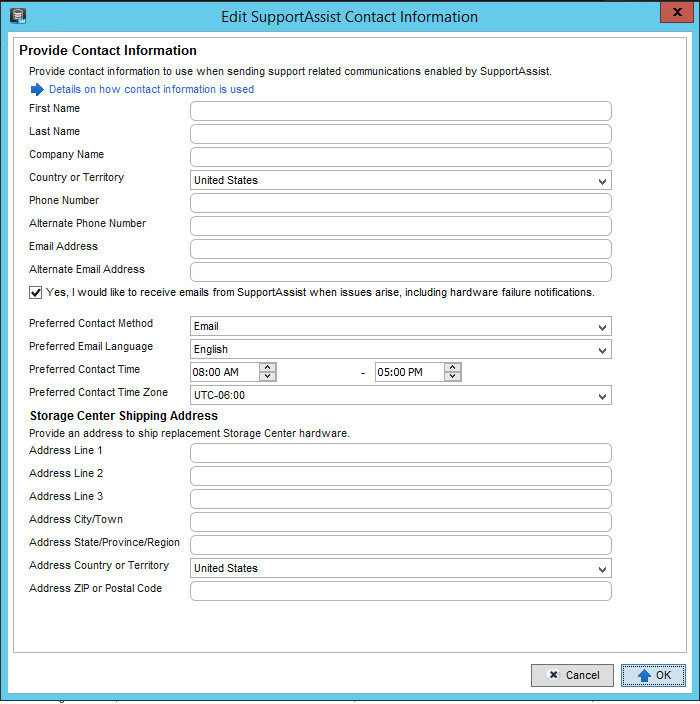
- Enter the name, phone number, and email information for the Dell SupportAssist contact representative.
- Select the Receive email notification... check box to be notified whenever a support alert is sent to Dell Technical Support.
- Enter the address information for the Dell SupportAssist contact representative.
- Select contact preferences.
- Preferred Contact Method
- Preferred Email Language
- Hours when the Dell SupportAssist contact representative is available
- Preferred Contact Time Zone
- Click OK.
Edit Dell SupportAssist Contact Information (Storage Center 7.3.xx and above)
Use the Storage Center settings to edit SupportAssist contact information.
- If you are using Unisphere Central, select a Storage Center from the drop-down list in the left navigation pane.
- Click Summary.

The Summary view is displayed.
- In the Summary tab, click Storage Center Settings

The Storage Center Settings dialog box opens.
- Click the SupportAssist tab.
- Click Edit Contact Information.
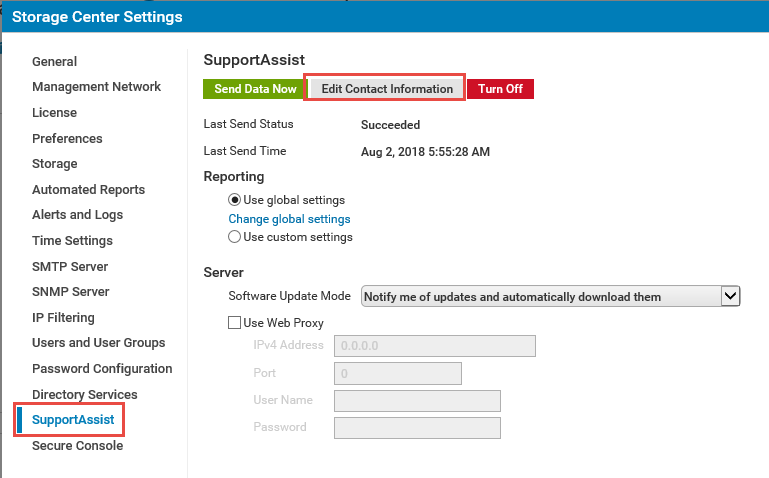
The Edit Contact Information dialog box opens.

- Enter the name, email, and phone number of the onsite contact in the General area.
- Specify contact preferences in the Contact Preferences area.
- Select the Send me emails from SupportAssist... checkbox to notify the onsite contact when a support alert is sent to technical support.
- Select a preferred contact method from the Type drop-down menu.
- Select a preferred language for emails from the Email Language drop-down menu.
- Specify the working hours of the onsite contact in the Time fields.
- Select the time zone for the onsite contact from the Time Zone drop-down menu.
- Specify the site address in the Onsite Address area.
- Click OK.
Privacy Statement Regarding Customer and Online User Information | Dell http://www.dell.com/learn/us/en/uscorp1/policies-privacy?c=us&l=en&s=corp
Affected Products
Compellent (SC, SCv & FS Series), Dell Compellent SC4020, Dell Storage SC8000, Dell Storage SCv2000, Dell Storage SCv2020, Dell Storage SCv2080, Dell Storage SC5020, Dell Storage SC5020F, Dell Storage SC7020, Dell Storage SC7020F, Dell Storage SC9000
, Dell Storage SCv3000, Dell Storage SCv3020
...
Article Properties
Article Number: 000114583
Article Type: How To
Last Modified: 14 Oct 2021
Version: 5
Find answers to your questions from other Dell users
Support Services
Check if your device is covered by Support Services.