Dell Data Protection Encryption Message is Displayed "Encryption Administrator Password"
Summary: Customer may report an "Encryption Administrator Password" message occurs on every startup or reboot on computers with Dell Encryption (formerly Dell Data Protection | Encryption) installed. ...
This article applies to
This article does not apply to
This article is not tied to any specific product.
Not all product versions are identified in this article.
Symptoms
Affected Products:
- Dell Encryption
- Dell Data Protection | Encryption
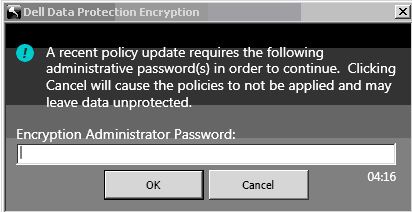
Figure 1: (English Only) Encryption Administrator Password
This issue occurs after changing any policy, password, or client user changes including adding a client user. Next to the Key Backup icon within the UI a yellow circle with an exclamation appears indicating Key Backup is required.
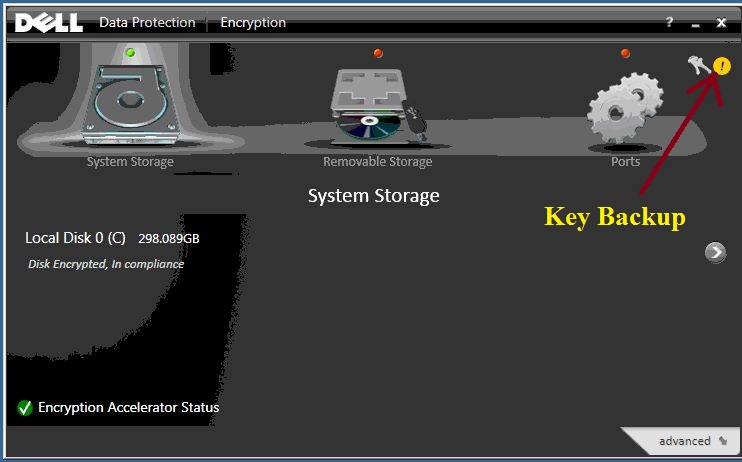
Figure 2: (English Only) Dell Data Protection | Encryption status
Cause
Not Applicable
Resolution
To eliminate the persistent message from being displayed, double-click the Key Backup icon and follow the on-screen instructions through completion.
To contact support, reference Dell Data Security International Support Phone Numbers.
Go to TechDirect to generate a technical support request online.
For additional insights and resources, join the Dell Security Community Forum.
Affected Products
Dell EncryptionArticle Properties
Article Number: 000124865
Article Type: Solution
Last Modified: 19 Apr 2026
Version: 9
Find answers to your questions from other Dell users
Support Services
Check if your device is covered by Support Services.