Windows 10 및 Windows 11 기능 업데이트를 사용하여 Dell Encryption Enterprise 및 Dell Encryption Personal을 테스트하는 방법
Summary: 이 문서에서는 Dell Encryption Enterprise(이전 Dell Data Protection | Enterprise Edition) 또는 Dell Encryption Personal(Dell Data Protection | Windows 10 및 Windows 11 기능 업데이트가 포함된 Personal Edition 제품 ...
This article applies to
This article does not apply to
This article is not tied to any specific product.
Not all product versions are identified in this article.
Instructions
영향을 받는 제품:
- Dell Encryption Enterprise
- Dell Encryption Personal
- Dell Data Protection | Enterprise Edition
- Dell Data Protection | Personal Edition
영향을 받는 버전:
- v8.18.0 이상
Dell Encryption Enterprise 또는 Dell Encryption Personal 테스트는 지원되는 Windows 10 기능 업데이트와 지원되지 않는 Windows 10 기능 업데이트에 따라 달라집니다. 지원되는 Windows 10 기능 업데이트에 대한 최신 정보는 Dell Data Security/Dell Data Protection Window 10 기능 업데이트 호환성을 참조하십시오.
지원됨
Dell Encryption Enterprise 또는 Dell Encryption Personal과 호환되는 Windows 10 및 Windows 11 기능 업데이트를 테스트하려면 Dell Encryption Enterprise/Dell Encryption Personal 모범 사례를 참조하십시오. Windows 10 기능 업데이트/마이그레이션을 참조하십시오.
지원되지 않음
경고:
- 지원되지 않는 버전의 Windows 10 및 Windows 11에서 Dell Encryption Enterprise 또는 Dell Encryption Personal을 사용하면 데이터 손실을 비롯한 부작용이 발생할 수 있습니다. Dell은 애플리케이션 호환성을 위해 비운영 디바이스에서 지원되지 않는 기능 업데이트를 테스트할 것을 권장합니다.
- 자세한 내용은 Windows as a Service
를 참조하십시오.
- Microsoft의 이 KB 문서에서는 Windows 10 및 Windows 11 릴리스의 출시일과 지원 날짜를 간략하게 설명합니다. https://docs.microsoft.com/en-us/windows/release-information/
- 자세한 내용은 Windows as a Service
- Dell ProSupport는 지원되지 않는 버전에 대한 기술 지원을 제공할 수 없습니다.
참가자 미리 보기를 포함하여 지원되지 않는 Windows 기능 업데이트 테스트는 다음에 따라 달라집니다.
- 설치 Windows 10 및 Windows 11의 Dell Encryption Enterprise 또는 Dell Encryption Personal
- 업데이트 Dell Encryption Enterprise 또는 Dell Encryption Personal이 설치된 디바이스의 Windows 10 및 Windows 11
Install
설치하는 동안 Dell Encryption Enterprise/Dell Encryption Personal v8.18.0 이상은 내부 마커에서 운영 체제 버전을 자동으로 확인합니다. 호환되는 일치 항목을 찾을 수 없는 경우 지원되지 않는 운영 체제 버전을 나타내는 오류 메시지와 함께 해당 디바이스에서 설치가 차단됩니다.
Dell Encryption은 지원되지 않는 운영 체제에 설치된 경우 아래 메시지를 표시합니다.
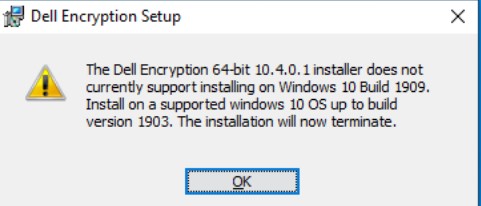
Dell Encryption Management Agent가 지원되지 않는 운영 체제에 설치되면 아래 메시지가 표시됩니다.

경고: 다음 단계는 Windows 레지스트리 편집입니다.
- 계속하기 전에 레지스트리를 백업하고 Windows
- 레지스트리를 편집하면 다음에 재부팅할 때 컴퓨터가 응답하지 않을 수 있습니다.
- 이 단계를 수행하는 데 문제가 있는 경우 Dell Data Security 국제 지원 전화번호로 문의하십시오.
로컬 관리자는 다음 레지스트리 키를 만들 수 있습니다.
HKEY_LOCAL_MACHINE\SOFTWARE\Dell\Dell Data Protection
DWORD: AllowedMaxVersion
Value (Decimal): 1909
이 예에서는 1909가 사용되며, 이를 통해 Dell Encryption Enterprise 또는 Dell Encryption Personal을 Windows 10 버전 1909(2019년 11월 업데이트) 이하에 설치할 수 있습니다.
업그레이드
운영 체제 업데이트 중에 Dell Encryption Enterprise 또는 Dell Encryption Personal v8.18.0 이상은 지원되는 버전의 내부 목록과 비교하여 운영 체제 버전을 자동으로 확인합니다. 일치하는 항목을 찾을 수 없는 경우 기능 업데이트가 차단되고 로그인한 사용자에게 알림이 표시됩니다.
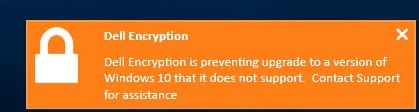
설치하려는 Windows 10 및 Windows 11 기능 업데이트의 빌드 번호를 찾기 위해 느린 링 빌드는 설치 이름 내에 빌드 번호를 표시합니다.
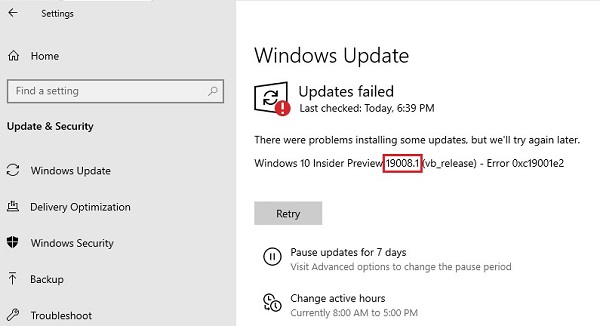
또한 Microsoft는 여기에서 다양한 릴리스 링에서 사용할 수 있는 빌드 목록을 유지 관리합니다 https://docs.microsoft.com/en-us/windows-insider/flight-hub/
경고: 다음 단계는 Windows 레지스트리 편집입니다.
- 계속하기 전에 레지스트리를 백업하고 Windows
- 레지스트리를 편집하면 다음에 재부팅할 때 컴퓨터가 응답하지 않을 수 있습니다.
- 이 단계를 수행하는 데 문제가 있는 경우 Dell Data Security 국제 지원 전화번호로 문의하십시오.
지원되지 않는 운영 체제에서 테스트할 수 있도록 정책 기반 암호화 블록을 덮어쓸 수 있습니다. 다음 레지스트리 키를 사용하면 무시할 수 있습니다.
HKLM\Software\Dell\Dell Data Protection\Encryption
REG_SZ: SupportedWindows10Upgrade
Value: <HighestSupportedBuildHere>
이 예제에서는 모든 Windows 10 및 Windows 11 빌드가 정책 기반 암호화를 사용하여 디바이스에 최대 10.0.22500.1을 설치할 수 있도록 허용합니다.
HKLM\Software\Dell\Dell Data Protection\Encryption
REG_SZ: SupportedWindows10Upgrade
Value: 10.0.22500.1
자체 암호화 드라이브 관리, BitLocker 관리 및 Dell의 소프트웨어 기반 전체 디스크 암호화 관리는 엔드포인트에 있는 기술에 따라 적절한 값을 수정하여 레지스트리가 덮어쓸 수 있는 항목을 차단합니다.
HKLM\SOFTWARE\Dell\Dell Data Protection\OsUpgradeSupportedVersions
REG_SZ: WinVersion_BLM
Value: <highestsupportedbuildhere>
HKLM\SOFTWARE\Dell\Dell Data Protection\OsUpgradeSupportedVersions
REG_SZ:WinVersion_SED
Value: <highestsupportedbuildhere>
HKLM\SOFTWARE\Dell\Dell Data Protection\OsUpgradeSupportedVersions
REG_SZ: WinVersion_FDE
Value: <highestsupportedbuildhere>
이 예제에서는 모든 Windows 10 및 Windows 11 빌드가 BitLocker 관리자를 사용하여 디바이스에 최대 10.0.22500.1을 설치할 수 있도록 허용합니다.
HKLM\Software\Dell\Dell Data Protection\Encryption
REG_SZ: WinVersion_BLM
Value: 10.0.22500.1
지원 부서에 문의하려면 Dell Data Security 국제 지원 전화번호를 참조하십시오.
온라인으로 기술 지원 요청을 생성하려면 TechDirect로 이동하십시오.
추가 정보 및 리소스를 보려면 Dell 보안 커뮤니티 포럼에 참여하십시오.
Additional Information
Videos
Affected Products
Dell EncryptionArticle Properties
Article Number: 000129461
Article Type: How To
Last Modified: 24 Jul 2025
Version: 14
Find answers to your questions from other Dell users
Support Services
Check if your device is covered by Support Services.