OptiPlex 9030 AIO (多合一):電腦視覺指南
Summary: 本文為 OptiPlex 9030 AIO (多合一) 系統的外部埠和功能的視覺化指南。
This article applies to
This article does not apply to
This article is not tied to any specific product.
Not all product versions are identified in this article.
Symptoms
 注意:如需每個位置的詳細說明,請至
 Cause
前視圖 (觸控)

(Fig.1.1 前視圖觸控)
攝影機模組的近視圖

(圖.1.2 攝影機的近視圖)
| 1 | 麥克風 | 2 | 攝影機護蓋切換 |
| 3 | 相機 |
前視圖 (非觸控)

(Fig.2 前視圖非觸控)
後視圖

(圖.3 後視圖)
| 1 | 後蓋鎖 | 2 | 電源連接器 |
| 3 | USB 2.0 連接器 x2 | 4 | 乙太網路連接器 (RJ45) |
| 5 | Kensington 安全插槽 | 6 | USB 3.0 連接器 x4 |
| 7 | 訊號線輸出/耳機/喇叭連接器 | 8 | DisplayPort 連接器 |
| 9 | 後蓋鎖 | 10 | 電源供應器 BIST 按鈕和 LED |
| 11 | VESA 底座連接器 | 12 | HDMI 輸入連接器 |
| 13 | HDMI 輸出連接器 |
左側檢視
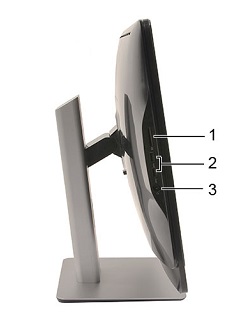
(圖 4 左側視圖)
| 1 | 4 合 1 記憶卡讀卡機 | 2 | USB 3.0 連接器 x2 |
| 3 | 耳機和麥克風組合連接器 |
右側檢視

(圖 5 右側視圖)
| 4 | CD/DVD-ROM 退出按鈕 | 5 | 調高音量按鈕 |
| 6 | 調低音量按鈕 | 7 | 螢幕顯示功能表按鈕 |
| 8 | 電源按鈕 |
Resolution
快速服務代碼和產品服務編號位置
快速服務代碼和產品服務編號位於電腦背面的黑色貼紙上。(貼紙的文字為白色。)此貼紙位於螢幕後側底部邊緣的中央。其部分會被後方底座蓋住。您可以在以下連結文章上看到卸下後腳架的詳細資料:
Affected Products
OptiPlex 9030 All-In-OneArticle Properties
Article Number: 000134795
Article Type: Solution
Last Modified: 29 Sep 2023
Version: 5
Find answers to your questions from other Dell users
Support Services
Check if your device is covered by Support Services.