Precision 7530 Windows 10 Driver Install Order
Summary: This article is a guide to the drivers required to run the Windows 10 operating system on a Dell Precision 7530 Mobile Workstation as it ships from Dell.
This article applies to
This article does not apply to
This article is not tied to any specific product.
Not all product versions are identified in this article.
Symptoms
A device driver or software driver is a computer program allowing higher-level computer programs to interact with a hardware device. For the Precision 7530 Mobile Workstation, all the drivers installations for their devices are similar except that some system may have more devices than the other.
After a clean installation of the Microsoft® Windows 10 operating system, you must install the following driver or software packages:
Table of Contents:
 |
||
Precision 7530 Mobile Workstation Driver installation guide
Microsoft® Windows 10
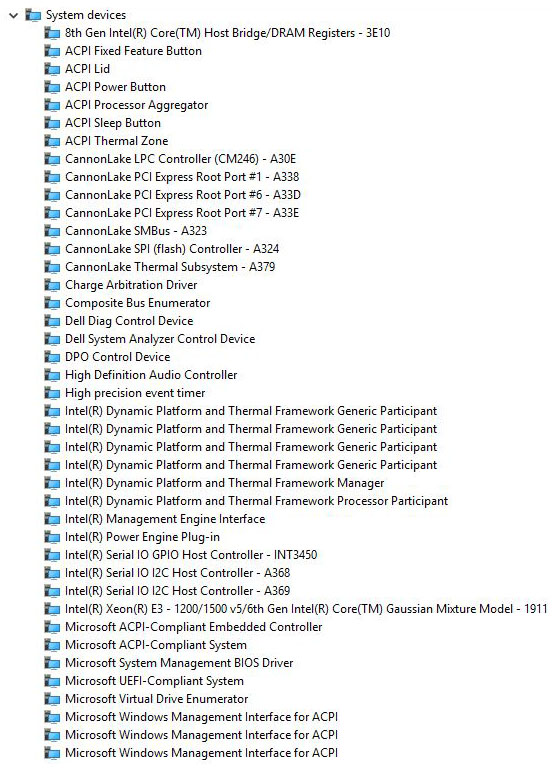
Note: Use this page as a reference for what the drivers should look like in Device Manager when installed. Drivers can be downloaded from the Dell Support Site.
Notice: See article ID: Drivers and Downloads FAQ for help with identifying Video controllers and other hardware components.
Note: The drivers installation for Windows 7, Windows 8.1, and Windows 10 are mostly identical. (Most of the device drivers are pre-installed during the Windows 8.1 and 10 installation process.) For the best results, we recommend installing the Intel Chipset driver utility first.
Cause
After a fresh copy of windows is installed, always install the Intel chipset driver utility first. After that, you can install the rest of the devices' drivers in any sequence. However we would recommend you follow the convention below.
| Categories | Driver Name | Windows 10 |
|---|---|---|
| Chipset Drivers | Intel Chipset Device Software Driver | ✔ |
| Chipset Drivers | Intel Management Engine Components Installer | ✔ |
| Chipset Drivers | Intel Dynamic Platform and Thermal Framework | ✔ |
| Chipset Drivers | Intel Serial I/O Driver | ✔ |
| Chipset Drivers | Intel HID Event Filter Driver | ✔ |
| Chipset Drivers | Intel Thunderbolt Controller Driver | ✔ |
| Chipset Drivers | ST Micro Accelerometer for Free Fall Data Protection | ✔ |
| Chipset Drivers | Realtek Memory Card Reader Driver | ✔ |
| Chipset Drivers | USB 3.0 | Optional as since Windows 8.1 the native USB 3.0 driver is installed by default. |
| Serial ATA | Intel Rapid Storage Technology Driver and Management Console | ✔ |
| Video Drivers | Intel UHD Graphics 600 P600 series Legacy Driver | ✔ |
| Video Drivers | nVidia Quadro P5200/P4200/P3200/P2000/P1000 Graphics Driver | ✔ |
| Video Drivers | AMD Radeon Pro WX4150/WX7100 Graphics Driver | ✔ |
| Audio Drivers | Realtek High Definition Audio Driver | ✔ |
| Audio Drivers | Waves MaxxAudio Pro | ✔ |
| Network Drivers | Intel l2xx/825xx Gigabit Ethernet Network Controller Driver | ✔ |
| Network Drivers | Intel 9260 9560 8265 7265 3165 WiFi Driver | ✔ |
| Network Drivers | Intel 9x60 826x 726x 3165 Bluetooth Driver | ✔ |
| Network Drivers | Qualcomm QCA61x4A QCA6174A-XR QCA9377 WifI Bluetooth Driver | ✔ |
| Security Drivers | Dell ControlVaultCDF | ✔ |
| Security Drivers | Dell ControlVault2 Driver and Firmware | ✔ |
| Input Drivers | Realtek IR Camera Driver (Optional) | ✔ |
| Input Drivers | Dell Touchpad Driver | ✔ |
Resolution
System Drivers
Note: The driver list is based from driver installation from the Dell Support Site on a basic Precision 7530 Mobile Workstation system without any additional optional cards fitted. Generally, Windows has comprehensive support for many items, but the following Dell™ - branded drivers and software must be installed for proper operation if the operating system has been removed and reinstalled:
Check if the chipset driver is installed by looking at Device Manager. If you cannot see it, then Install the latest chipset update from the Support Site.
Chipset > Intel Chipset Device Software Driver
Check if the driver is installed by looking at Device Manager. If you cannot see it then Install the latest Driver update.
Chipset > Intel Management Engine Components Installer
Check if the driver is installed by looking at Device Manager. If you cannot see it then Install the latest Driver update.
Chipset > Intel Dynamic Platform and Thermal Framework
Check if the driver is installed by looking at Device Manager. If you cannot see it then Install the latest Driver update.
Chipset > Intel Serial I/O Driver
Check if the driver is installed by looking at Device Manager. If you cannot see it then Install the latest Driver update.
Chipset > Intel HID Event Filter Driver
Check if the driver is installed by looking at Device Manager. If you cannot see it then Install the latest Driver update.
Chipset > ST Micro Accelerometer for Free Fall Data Protection
Check if the driver is installed by looking at Device Manager. If you cannot see it then Install the latest Driver update.
Chipset > Intel Thunderbolt Controller Driver
Check if the driver is installed by looking at Device Manager. If you cannot see it then Install the latest Driver update.
Chipset > Realtek PCIE Memory Card Reader Driver
| After Installation |
 |
Check if the Rapid Storage Driver is installed by looking at Device Manager. If you cannot see it then Install the latest Driver update.
Serial ATA > Intel Rapid Storage Technology Driver and Management Console
| After Installation |
 |
Check if the video driver is installed by looking at Device Manager. If you cannot see it then Install the latest Driver update from the Support Site.
Video > Intel UHD Graphics 600 P600 series Legacy Driver
| After Installation |
 |
Note: If the system supports a discrete graphics card, install the Intel® HD graphics driver first, followed by the discrete driver installation.
Check if the video driver is installed by looking at Device Manager. If you cannot see it then Install the latest Driver update from the Support Site.
(HDMI 2.0/DP 1.4)
Video > Radeon Pro WX4150 w/4GB GDDR5 Graphics Driver
Video > nVidia Quadro P1000 w/4GB GDDR5 Graphics Driver
Video > nVidia Quadro P2000 w/4GB GDDR5 Graphics Driver
Video > nVidia Quadro P 3200 w/6GB GDDR5 Graphics Driver
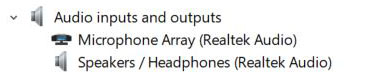
Check if the audio driver is installed by looking at Device Manager. If you cannot see it then Install the latest Driver update from the Support Site.
Audio > Realtek High Definition Audio Driver
| After Installation | |
 |
 |
Check if the audio application is installed by looking at Device Manager. If you cannot see it then Install the latest Driver update from the Support Site.
Audio > Waves MaxxAudio Pro
Check if the Network Controller driver is installed by looking at Device Manager. If you cannot see it then Install the latest Driver update from the Support Site.
Network > Intel l2xx/825xx Gigabit Ethernet Network Controller Driver
Before network drivers are installed, the Microsoft® Windows operating system does not recognize the integrated LOM and sets the device up as an Ethernet Controller under Other devices. Once you install the network drivers, it is recognized properly under Network adapters.
Check if the Wireless card drivers are installed by looking at Device Manager. If you cannot see it then Install the latest Driver update from the Support Site.
Network > Intel 9260 9560 8265 7265 3165 WiFi Driver
Network > Qualcomm QCA61x4A QCA6174A-XR QCA9377 WifI Bluetooth Driver
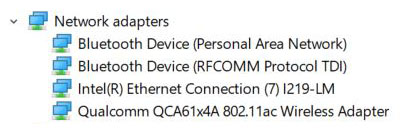
Check if the Bluetooth card drivers are installed by looking at Device Manager. If you cannot see it then Install the latest Driver update from the Support Site.
Network > Intel 9x60 826x 726x 3165 Bluetooth Driver
| After Installation |
 |
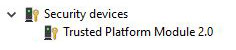
Check if the Security Software is installed by looking at Device Manager. If not Install the Driver Package from Support Site.
Security >Dell ControlVault2 Driver and Firmware
Security >Dell ControlVaultCDF
| After Installation | |
 |
 |
Check if the optional Camera driver is installed by looking at Device Manager. If you cannot see it then Install the latest touchpad driver from Support Site.
Mouse, Keyboard and Input Drivers>Realtek IR Camera Driver
Check if the touchpad driver is installed by looking at Device Manager. If you cannot see it then Install the latest touchpad driver from Support Site.
Mouse, Keyboard and Input Drivers>Dell Touchpad Driver
Affected Products
Precision 7530Article Properties
Article Number: 000144599
Article Type: Solution
Last Modified: 11 Nov 2024
Version: 6
Find answers to your questions from other Dell users
Support Services
Check if your device is covered by Support Services.