Isilon OneFS: Unable to modify share permission in WebUI after changing share path case sensitivity
Summary: After changing the case sensitivity of the share path, the WebUI cannot modify the share if the path does not exist.
This article applies to
This article does not apply to
This article is not tied to any specific product.
Not all product versions are identified in this article.
Symptoms
If attempting to modify the share permission after changing the case sensitivity of a share path, the share permissions do not get updated. This is because the path does not exist in the file system:
Path '/ifs/data/TesT' not found: No such file or directory
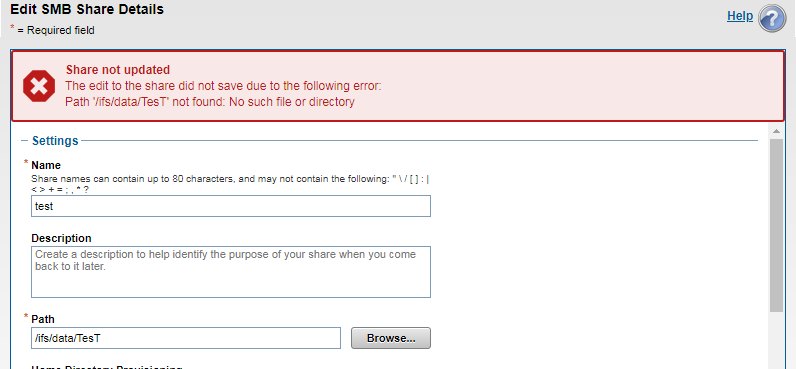
Below is the share view:
12freight-1# isi smb shares view test
                                     Share Name: test
                                           Path: /ifs/data/TesT
                                    Description:
                     Client-side Caching Policy: manual
Automatically expand user names or domain names: False
Automatically create home directories for users: False
                                      Browsable: True
Permissions:
Account  Account Type  Run as Root  Permission Type  Permission
----------------------------------------------------------------
Everyone wellknown     False        allow            read
nobody   user          False        allow            change
----------------------------------------------------------------
Total: 2
Share path exists, but case sensitivity is not matching which is treated as a completely separate path:
12freight-1# ls -al /ifs/data/TesT
ls: /ifs/data/TesT: No such file or directory
freight-1#

12freight-1# ls -al /ifs/data/test
total 39
drwxr-xr-x +   2 root  wheel   51 Mar 28 05:58 .
drwxrwxrwx    10 root  wheel  267 Mar 30 03:26 ..
-rw-r--r--     1 root  wheel    0 Mar 28 05:58 out.out
-rw-r--r--     1 root  wheel    0 Mar 28 05:58 test.txt
freight-1#
Cause
If a share path case sensitivity is changed, Isilon (unix) treats it as a different path though a Windows client may still see the share accessible.
Resolution
The share path and the file path on the Isilon side must match exactly because Isilon is case-sensitive.
Note: Changing the share name, path or permissions can be disruptive. We recommend testing any configuration changes prior to implementing any change in production.
Affected Products
PowerScale OneFSProducts
Isilon, PowerScale OneFS, Isilon X400Article Properties
Article Number: 000168147
Article Type: Solution
Last Modified: 30 Oct 2025
Version: 4
Find answers to your questions from other Dell users
Support Services
Check if your device is covered by Support Services.