Alienware X51 R3 Freezes When Booting or Opening Programs
Summary: Alienware X51 R3 systems may freeze randomly when booting into Windows or also when trying to open a program or application.
This article applies to
This article does not apply to
This article is not tied to any specific product.
Not all product versions are identified in this article.
Symptoms
 |
Description | This is due to a problem with the USB 3.1 Driver. | |
Supported Systems:
| Alienware X51 R3 | |||||||
Solution
-
Turn the system Off
-
Disconnect all USB devices
-
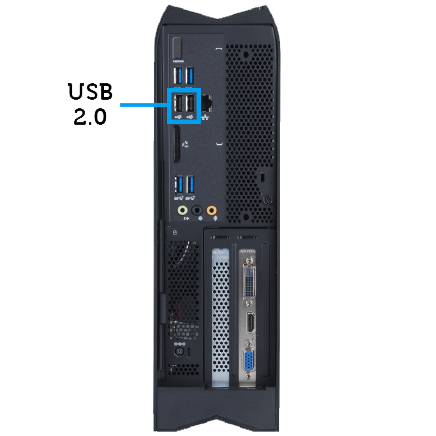
Connect your mouse and keyboard to the USB 2.0 Ports
-
Turn On the system
-
Uninstall the ASMedia USB 3.1 driver from Programs and Features
-
Download and Install the ASMedia USB 3.1 driver
-
Reconnect all your USB devices.
-
Update the system Bios to version 1.2.6 or higher
If the issue continues, please do the following:
- Turn the system on
- As the system turns on start tapping the F2 Key to access the system BIOS
- Once in the BIOS, go to the Advanced tab
- Go to Integrated Devices
- Go to PCIE Gen3 and press Enter
- Select Disable and press Enter
- Press F10 to save and exit
Cause
|
|
 |
 |
 |
 |

Resolution
 Out of warranty? Click here, enter your Service Tag, and view our offers.
Offers are only available for US, Canada, UK, and France PC Customers. Server and Storage not applicable
Affected Products
Alienware X51 R3Article Properties
Article Number: 000178417
Article Type: Solution
Last Modified: 06 May 2026
Version: 9
Find answers to your questions from other Dell users
Support Services
Check if your device is covered by Support Services.