PowerDVD non è in grado di riprodurre bluray o dvd su un notebook collegato a SE2422HM dopo la riattivazione dalla modalità di ibernazione
Summary: Il seguente articolo fornisce informazioni su cosa fare quando PowerDVD non è in grado di riprodurre un disco Bluray o DVD sul notebook collegato al monitor SE2422HM dopo la riattivazione dalla modalità di ibernazione. ...
This article applies to
This article does not apply to
This article is not tied to any specific product.
Not all product versions are identified in this article.
Symptoms
PowerDVD non è in grado di riprodurre un disco Bluray o DVD su un notebook collegato a SE2422HM dopo la riattivazione dalla modalità di ibernazione?
Durante la visione di contenuti video Bluray/DVD tramite PowerDVD su un notebook collegato alla porta DVI del monitor SE2422HM tramite cavo o adattatore da HDMI a DVI, PowerDVD non è in grado di riprodurre il video Bluray/DVD dopo aver messo il notebook in modalità di ibernazione e riattivato. Viene visualizzato un messaggio di errore HDCP (figura. 1). 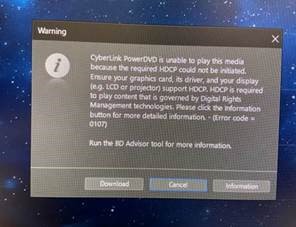
(Figura 1. Messaggio di errore HDCP
Piattaforme interessate:
- Inspiron 3501
- Inspiron 7706
- Vostro 3500
Cause
La causa è l'autenticazione HDCP non riuscita.
Resolution
Scollegare e ricollegare il cavo o l'adattatore HDMI a DVI.
Affected Products
Inspiron 3501, Inspiron 7706 2-in-1, Vostro 3500Article Properties
Article Number: 000188256
Article Type: Solution
Last Modified: 24 Apr 2025
Version: 6
Find answers to your questions from other Dell users
Support Services
Check if your device is covered by Support Services.