최대 절전 모드에서 해제된 후 SE2422HM에 연결된 노트북에서 PowerDVD가 Bluray 또는 DVD 디스크를 재생할 수 없음
Summary: 다음 문서에서는 최대 절전 모드에서 해제된 후 SE2422HM 모니터에 연결된 노트북에서 PowerDVD가 Bluray 또는 DVD 디스크를 재생할 수 없는 경우 수행할 작업을 설명합니다.
This article applies to
This article does not apply to
This article is not tied to any specific product.
Not all product versions are identified in this article.
Symptoms
최대 절전 모드에서 해제된 후 PowerDVD가 SE2422HM에 연결된 노트북에서 Bluray 또는 DVD 디스크를 재생할 수 없습니까?
HDMI에서 DVI 케이블 또는 어댑터로 SE2422HM 모니터 DVI 포트에 연결된 노트북에서 PowerDVD를 사용하여 Bluray/DVD 비디오 콘텐츠를 시청하는 동안, 노트북을 최대 절전 모드로 전환하고 다시 절전 모드로 전환한 후 PowerDVD가 Bluray/DVD 비디오를 재생할 수 없습니다. HDCP 오류 메시지가 표시됩니다(그림). 1). 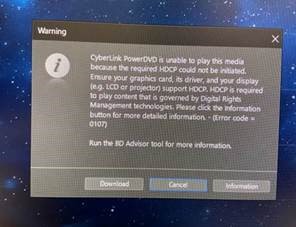
(그림 1. HDCP 오류 메시지)
해당되는 플랫폼:
- Inspiron 3501
- Inspiron 7706
- Vostro 3500
Cause
HDCP 인증 실패가 원인입니다.
Resolution
HDMI를 뽑고 DVI 케이블 또는 어댑터에 다시 연결합니다.
Affected Products
Inspiron 3501, Inspiron 7706 2-in-1, Vostro 3500Article Properties
Article Number: 000188256
Article Type: Solution
Last Modified: 24 Apr 2025
Version: 6
Find answers to your questions from other Dell users
Support Services
Check if your device is covered by Support Services.