BIOS Password Required to Run ePSA from F12 Boot Once Menu on Latitude xx20 Laptops
Summary: The following article provides information about a change to the F12 or One-Time boot menu. The change requires you to have the BIOS Administrator password to run the enhanced Pre-Boot System Assessment (ePSA) diagnostics from the splash screen menu. ...
This article applies to
This article does not apply to
This article is not tied to any specific product.
Not all product versions are identified in this article.
Symptoms
You cannot run ePSA Diagnostics on a Latitude xx20 without the BIOS Administrator Password
Dell has updated the One-Time boot menu on the 12th generation of Latitude xx20 laptops. It now requires that you enter the BIOS Administrator Password when booting to the ePSA diagnostics from the boot menu.
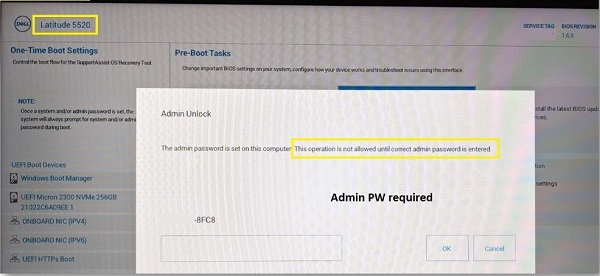
The previous generations of Latitude laptops do not require you to enter the BIOS Administrator Password. (For example: The 11th generation Latitude xx10.) There was no password required to start the ePSA diagnostics from the boot menu in the older laptops.
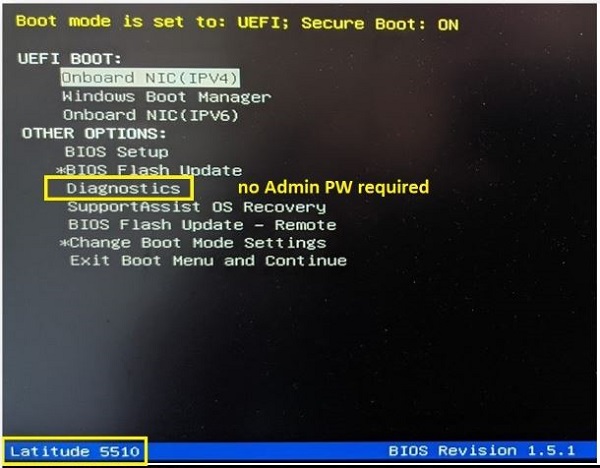
Latitude laptops specific to the 12th Latitude generation:
- Latitude 3320, 3420, and 3520 laptops
- Latitude 5320, 5420, and 5520 laptops
- Latitude 7320, 7420, and 7520 laptops
- Latitude 9420 and 9520 laptops
Cause
The one-time boot menu and the ePSA diagnostics are working as designed.
Resolution
The Engineering team confirms that this is the expected behavior for these laptops. This generation of Latitude laptops is designed to work like this.
The following instructions are for those of you who must run the ePSA diagnostics to identify a fault, but you do not know the password. These steps do not give you access to BIOS screens:
-
Do not boot the laptop into the One-Time F12 Menu and then try to enter the diagnostics.
-
Turn the laptop off.
-
Hold down the Fn key on your keyboard and press down the Power Button.
-
The laptop should boot to the ePSA diagnostics without asking for a password or booting to the Dell Splash Screen.
Note: The BIOS Administrator password ships blank by default and the people who receive the laptop from Dell must choose to set the password. Dell has no way to tell what you have set the password to.
Affected Products
Latitude 3320, Latitude 5320, Latitude 7320, Latitude 3420, Latitude 7420, Latitude 9420, Latitude 3520, Latitude 5520, Latitude 7520, Latitude 9520, Latitude 5420Article Properties
Article Number: 000188626
Article Type: Solution
Last Modified: 04 Apr 2025
Version: 6
Find answers to your questions from other Dell users
Support Services
Check if your device is covered by Support Services.