AppSync:在 UI 中上传 .xml 许可证文件时收到错误:由于“无效的许可证文件”,添加许可证失败
Summary: 在 UI 中上传 .xml 许可证文件时收到错误:由于“无效的许可证文件”,添加许可证失败。
This article applies to
This article does not apply to
This article is not tied to any specific product.
Not all product versions are identified in this article.
Symptoms
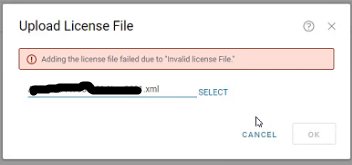
在 AppSync UI 中,在 Settings > License > Upload 中上传 .xml 许可证时,收到错误:
由于“无效的许可证文件”,添加许可证失败
Cause
第一个场景是许可证文件中缺少整个部分。
应该有一个锁定 ID 部分,如下所示:
		HOSTID

		value
第二种情况是不恰当地发现 LockingIdCode 是 XIOD,如下所示:
XIOID
何时应为 HOSTID
HOSTID
Resolution
内部许可生成机制已更新,以确保填充锁定 ID 部分。
需要新许可证。从许可团队获取新许可证。
Additional Information
AppSync 4.2 及更高版本支持 XML 类型许可证。
Affected Products
AppSyncProducts
Data Protection, Data Backup & Protection SoftwareArticle Properties
Article Number: 000193800
Article Type: Solution
Last Modified: 10 Sep 2025
Version: 4
Find answers to your questions from other Dell users
Support Services
Check if your device is covered by Support Services.