AppSync:在 UI 中上傳 .xml 授權檔案時收到錯誤:新增授權失敗,因為「不正確授權檔案」
Summary: 在 UI 中上傳 .xml 授權檔案時收到錯誤:新增授權失敗,因為「不正確授權檔案」。
This article applies to
This article does not apply to
This article is not tied to any specific product.
Not all product versions are identified in this article.
Symptoms
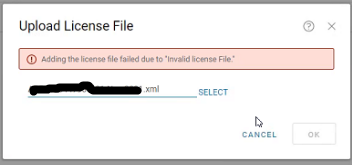
在 AppSync UI 中,在「設定」中上傳 .xml 授權>授權>上傳時,會收到錯誤:
新增授權失敗,因為「不正確授權檔案」
Cause
第一個案例是整個區段在授權檔案中遺失。
應有如下所示的 LockingID 區段:
		HOSTID

		value
第二個案例是不當發現 LockingIdCode 是 XIOD,如下所示:
XIOID
何時應為 HOSTID
HOSTID
Resolution
內部授權產生機制已更新,以確保已填入鎖定 ID 區段。
需要新的授權。向授權團隊取得新授權。
Additional Information
AppSync 4.2 及更新版本支援 XML 類型授權。
Affected Products
AppSyncProducts
Data Protection, Data Backup & Protection SoftwareArticle Properties
Article Number: 000193800
Article Type: Solution
Last Modified: 10 Sep 2025
Version: 4
Find answers to your questions from other Dell users
Support Services
Check if your device is covered by Support Services.