Dell Pro 鍵盤與滑鼠KM5221W無法運作
Summary: 下列文章提供 Dell Pro 鍵盤和滑鼠 (KM5221W) 問題的相關資訊。鍵盤和滑鼠無法運作,並回報硬體鎖不相符。
This article applies to
This article does not apply to
This article is not tied to any specific product.
Not all product versions are identified in this article.
Symptoms
Cause
這是因為同步處理錯誤所導致。
Resolution
下列指示為重新同步或放下並配對無線鍵盤和滑鼠的步驟。(使用 Dell Peripheral Manager 公用程式):
-
電腦上是否已安裝 Dell Peripheral Manager?
-
在電腦上安裝最新的 Dell Peripheral Manager 公用程式 (如果尚未安裝的話)。若要下載和安裝公用程式,請參閱:如何下載和安裝 Dell 驅動程式和韌體
-
如果公用程式已安裝在您的電腦上,請前往下一個步驟。
-
-
開啟公用程式。
-
將無線轉接器重新裝回電腦。
-
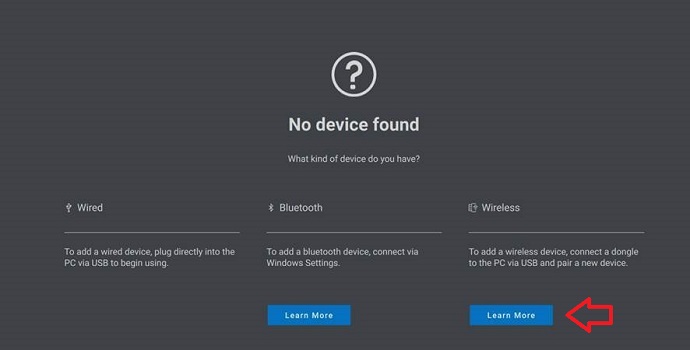
如果顯示 「找不到任何裝置 」或 「裝置 」頁面,請按照以下指示操作:
-
如果找不到任何裝置,請按一下無線標題下的深入瞭解:
-
對於裝置,按 一下新增裝置:

-
按 一下立即新增 以新增額外的無線及/或無線及/或無線射頻 (RF) 裝置:

-
按照畫面中的指示配對 裝置:

-
如需 Dell Peripheral Manager 公用程式的詳細資訊,請參閱下列文章:
Affected Products
Alienware, Dell All-in-One, Dell Pro All-in-One, Dell Pro Max Micro, Dell Pro Max Slim, Dell Pro Max Tower, Dell Pro Micro, Dell Pro Slim, Dell Pro Tower, Dell Slim, Dell Tower, Inspiron, OptiPlex, Vostro, XPS, G Series, Chromebook, G Series
, Alienware, Dell Plus, Dell Pro, Dell Pro Max, Dell Pro Plus, Dell Pro Premium, Inspiron, Latitude, Dell Pro Rugged, Vostro, XPS, Fixed Workstations, Mobile Workstations, Dell Pro Max Micro XE FCM2250, Dell Pro Keyboard and Mouse KM5221W
...
Article Properties
Article Number: 000194959
Article Type: Solution
Last Modified: 07 Nov 2025
Version: 7
Find answers to your questions from other Dell users
Support Services
Check if your device is covered by Support Services.