PowerStore:使用 LDAP 認證登入 PowerStore Manager 時逾時
Summary: Error message: Unable to load system configuration data.Contact your service provider for assistance: Error: 要求逾時
This article applies to
This article does not apply to
This article is not tied to any specific product.
Not all product versions are identified in this article.
Symptoms
使用者可以間歇性登入,但大多數時候登入會失敗。
錯誤訊息為「無法載入系統組態資料。Contact your service provider for assistance: Error: 要求逾時。」

圖 1:錯誤訊息的螢幕擷取畫面:「無法載入系統組態資料。Contact your service provider for assistance: Error: 要求逾時。」
錯誤訊息為「無法載入系統組態資料。Contact your service provider for assistance: Error: 要求逾時。」
圖 1:錯誤訊息的螢幕擷取畫面:「無法載入系統組態資料。Contact your service provider for assistance: Error: 要求逾時。」
Cause
未啟用全域目錄伺服器。
Resolution
啟用全域目錄伺服器。
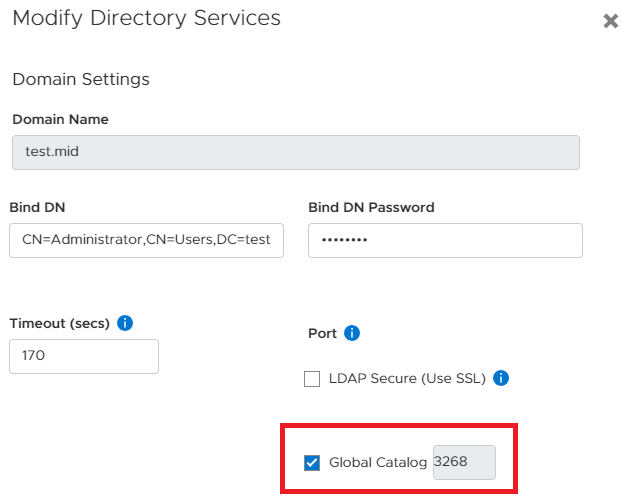
圖 2:啟用全域目錄伺服器
如果問題仍然存在,請將巢狀群組搜尋層級減少,例如 2。編號 0 表示不限數量的巢狀群組:
設定>使用者>目錄服務>編輯 LDAP 組態>進階設定。

圖 3:減少目錄服務中的巢群組搜尋次數。
圖 2:啟用全域目錄伺服器
如果問題仍然存在,請將巢狀群組搜尋層級減少,例如 2。編號 0 表示不限數量的巢狀群組:
設定>使用者>目錄服務>編輯 LDAP 組態>進階設定。
圖 3:減少目錄服務中的巢群組搜尋次數。
Affected Products
PowerStore 1000X, PowerStore 1000T, PowerStore 3000X, PowerStore 3000T, PowerStore 5000X, PowerStore 5000T, PowerStore 500T, PowerStore 7000X, PowerStore 7000T, PowerStore 9000X, PowerStore 9000TArticle Properties
Article Number: 000200079
Article Type: Solution
Last Modified: 28 Jun 2023
Version: 3
Find answers to your questions from other Dell users
Support Services
Check if your device is covered by Support Services.