PowerStore:LDAP認証情報を使用してPowerStore Managerにログインするときのタイムアウト
Summary: Error message: Unable to load system configuration data.Contact your service provider for assistance: Error: リクエストがタイムアウトしました
This article applies to
This article does not apply to
This article is not tied to any specific product.
Not all product versions are identified in this article.
Symptoms
ユーザーは断続的にログインできますが、ほとんどの場合、ログインに失敗します。
エラー メッセージは、「Unable to load system configuration data.Contact your service provider for assistance: Error: リクエストがタイムアウトしました。」

図1: エラー メッセージ「Unable to load system configuration data.Contact your service provider for assistance: Error: リクエストがタイムアウトしました。」
エラー メッセージは、「Unable to load system configuration data.Contact your service provider for assistance: Error: リクエストがタイムアウトしました。」
図1: エラー メッセージ「Unable to load system configuration data.Contact your service provider for assistance: Error: リクエストがタイムアウトしました。」
Cause
グローバル カタログ サーバーが有効になっていません。
Resolution
グローバル カタログ サーバーを有効にします。

図2:グローバル カタログ サーバーの有効化
問題が解決しない場合は、ネストされたグループ検索レベルを下げます(例:2)。number 0 は、ネストされたグループの数が無制限です。
Settings > Users > Directory Services > EDIT LDAP CONFIGURATION > ADVANCED SETTINGS です。
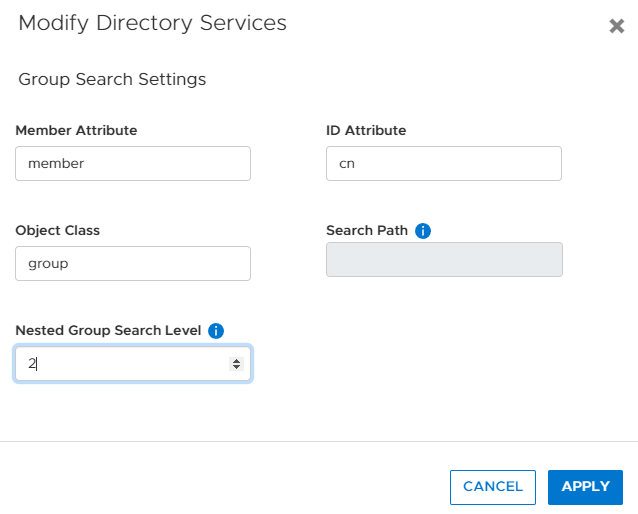
図3:ディレクトリ サービスでのネストされたグループ検索の数を減らす。
図2:グローバル カタログ サーバーの有効化
問題が解決しない場合は、ネストされたグループ検索レベルを下げます(例:2)。number 0 は、ネストされたグループの数が無制限です。
Settings > Users > Directory Services > EDIT LDAP CONFIGURATION > ADVANCED SETTINGS です。
図3:ディレクトリ サービスでのネストされたグループ検索の数を減らす。
Affected Products
PowerStore 1000X, PowerStore 1000T, PowerStore 3000X, PowerStore 3000T, PowerStore 5000X, PowerStore 5000T, PowerStore 500T, PowerStore 7000X, PowerStore 7000T, PowerStore 9000X, PowerStore 9000TArticle Properties
Article Number: 000200079
Article Type: Solution
Last Modified: 28 Jun 2023
Version: 3
Find answers to your questions from other Dell users
Support Services
Check if your device is covered by Support Services.