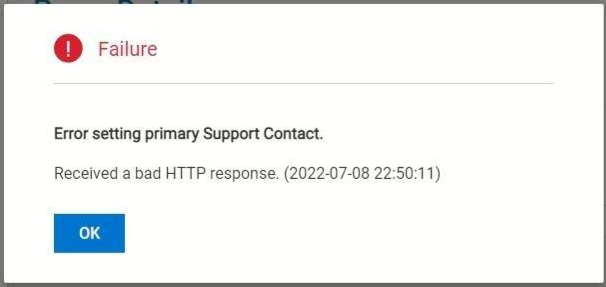
PowerVault ME5: Error setting primary Support Contact. Received a bad HTTP response
Summary: When configuring SupportAssist, then checking the connection using test connectivity after setting the primary contact information, "Received a bad HTTP response" indicates either DNS queries failed (this is the most common reason) or secure key exchange with the Dell endpoint has failed. ...
This article applies to
This article does not apply to
This article is not tied to any specific product.
Not all product versions are identified in this article.
Symptoms
When you attempt to run Test Connectivity on Maintenance > SupportAssist, an administrator may receive the following Failure dialog with the message "Error setting primary Support Contact. Received a bad HTTP response"
Cause
This message has been observed when SupportAssist attempts to connect to the Dell endpoint and one of the following conditions is true.
- The DNS server IP and search domain have not been entered correctly.
- The DNS server is unreachable.
- The access key and PIN has never been submitted by the administrator when enabling SupportAssist.
- The access key and PIN values are entered incorrectly.
- The access key and PIN used has been generated for another PowerVault ME5 service tag.
- The access key and PIN used has expired 7 days after it was generated.
Resolution
PowerVault administrators must configure PowerVault ME5 array with a DNS server IP address that can resolve the following Dell endpoint hostnames.
| ME5 SupportAssist direct connection endpoint hostnames | Protocol/Port |
| esrs3-core.emc.com | outbound TCP/443 |
| esrs3-coredr.emc.com | outbound TCP/443 |
PowerVault ME5 series administrators who want to enable SupportAssist must observe the following pre-requisites to successfully use the service.
| Configure | Description | |
| 1 | DNS | Configure ME5 to use DNS servers to resolve the endpoint hostnames. See Configuring DNS settings section in the ME5 administrators guide. |
If there is a firewall between the management port and DNS. DNS lookup queries use TCP port 53. |
||
| Administrators could use Google DNS servers 8.8.8.8 & 8.8.4.4. Be aware some organizations network security policies may not permit access to open internet DNS servers. | ||
| 2 | Management Network | Connect and configure ME5 controller management ports on networks with a routable network path to the endpoint. |
| Controller A management port MUST be connected to the network. SupportAssist service defaults to controller A. It reverts to controller B when A is offline or restarted. | ||
| 3 | If using direct connection endpoint | Minimum controller firmware ME5.1.1.0.5. Dell recommends to update to latest available controller firmware. Download latest firmware from dell.com/support |
| There must be an IP network route from the ME5 management port to the company internet gateway or proxy server | ||
| If using gateway appliance endpoint | There must be an IP network route from the ME5 management port to the SCG/VE appliance. Refer to PowerVault ME5: How to configure SupportAssist to Connect via Gateway Server | |
| Use port 9443 when configuring SupportAssist to connect to a SCG/VE appliance. Do NOT use port 5700, this is for management only. | ||
| 4 | Firewall | Direct connections must allow outbound TCP connections on port 443 to Dell endpoints. Hostnames are esrs3-core.emc.com & esrs3-coredr.emc.com |
| Company internal networks must open TCP port 9443 to enable ME5 SupportAssist connect to an SCG/VE appliance. | ||
| Network address translation (NAT) is not supported. | ||
| If using SSL/TLS decryption appliances, add an exception for Dell endpoints. hostnames are esrs3-core.emc.com & esrs3-coredr.emc.com | ||
| 5 | EULA | To enable SupportAssist service, administrator must accept the end user license agreement |
| 6 | Access key & PIN (AK&P) | AK&P is only required on arrays that shipped from Dell factory prior to April 2023 that have not already been configured or where the ESE service has been reset to default by Dell technical support. Since April 2023 the access key has been pre-loaded in the factory for PowerVault ME5 systems and is not required on ME5 arrays that currently ship. For more information refer to PowerVault ME5: How to Generate an Access Key and Pin to Enable SupportAssist |
| 7 | APEX AIOps (CloudIQ) | Optional. When SupportAssist can send telemetry. Consider signing on to http://apex-aiops.dell.com/ and onboarding your PowerVault ME series array. Dell CloudIQ is available as an app for Android and IOS smartphones. |
| APEX AIOps Infrastructure Observability service is free to use with ProSupport or ProSupport Plus warranty cover on PowerVault ME and other Dell infrastructure products. For more see APEX AIOps Observability: General Procedures to Onboard PowerVault ME Series Arrays |
If the above information does not help enable SupportAssist take the following steps.
- Record the error or take a screenshot of the error.
- Gather a support bundle from the array. For instructions see PowerVault ME5: How to collect PowerVault support logs
- Contact Dell technical support for further assistance.
Affected Products
ME Series, PowerVault ME5012, PowerVault ME5024, PowerVault ME5084Article Properties
Article Number: 000202076
Article Type: Solution
Last Modified: 06 Mar 2025
Version: 6
Find answers to your questions from other Dell users
Support Services
Check if your device is covered by Support Services.