Dell OpenManage : How to Resolve Cluster Profile Not Created or Cluster Not Associated to a Cluster Profile Message in OMIVV and OMEVV.
Summary: Cluster Profiles in OpenManage Integration for VMware vCenter (OMIVV) play a role regarding systems updates in environments that leverage the LifeCycle Manager (LCM) in VMware vCenter 7 and above. The information contained on this How-To applies to both OpenManage Integration for VMware vCenter (OMIVV) and OpenManage Enterprise Integration for VMware vCenter (OMEVV). ...
This article applies to
This article does not apply to
This article is not tied to any specific product.
Not all product versions are identified in this article.
Instructions
Scope:
OpenManage Integration for VMware vCenter (OMIVV) logs may show the following message:
Cluster profile is either not created, or Cluster is not associated to a cluster profile. Create a cluster profile, associate it to a cluster that has hosts inventoried in OMIVV, and then wait for drift detection job to run.

A variation of the message appears when using the OpenManage Enterprise Integration for VMware vCenter (OMEVV) plug-in:
Baseline Profile is either not created, or cluster is not associated to a Baseline Profile. Create a Baseline Profile, associated to a cluster that has hosts by OMEVV, and then wait for the drift detection job to run.
Description
The question may arise whether a cluster profile is required. The answer depends on how OMIVV and OMEVV are leveraged in the environment.
Custer profiles in OMIVV consist of a Repository Profile and System Profile to provide additional functionality in Cluster Aware updating. VSAN environments and Drift reports that compare system inventory to the baselines associated with the Cluster Profile rely on this feature.
Will firmware updates work without a Cluster Profile?
Yes, OMIVV can update hosts individually in a vCenter environment without a cluster profile.
Yes, OMIVV can update hosts individually in a vCenter environment without a cluster profile.
For Cluster Aware updating, and particularly, integration with vCenter 7 LCM capabilities, it is required that a cluster profile is associated.
For example, on VMware vCenter LifeCycle Manager (LCM), once the hardware provider is selected (OMIVV or OMEVV), it relies on the cluster profile to provide the pertinent firmware or driver information. If a Cluster (Baseline) profile is missing, the screen shows as follows:
A cluster profile can be created in OMIVV under vCenter > OMIVV Plug-in view > Compliance & Deployment > Cluster Profile. 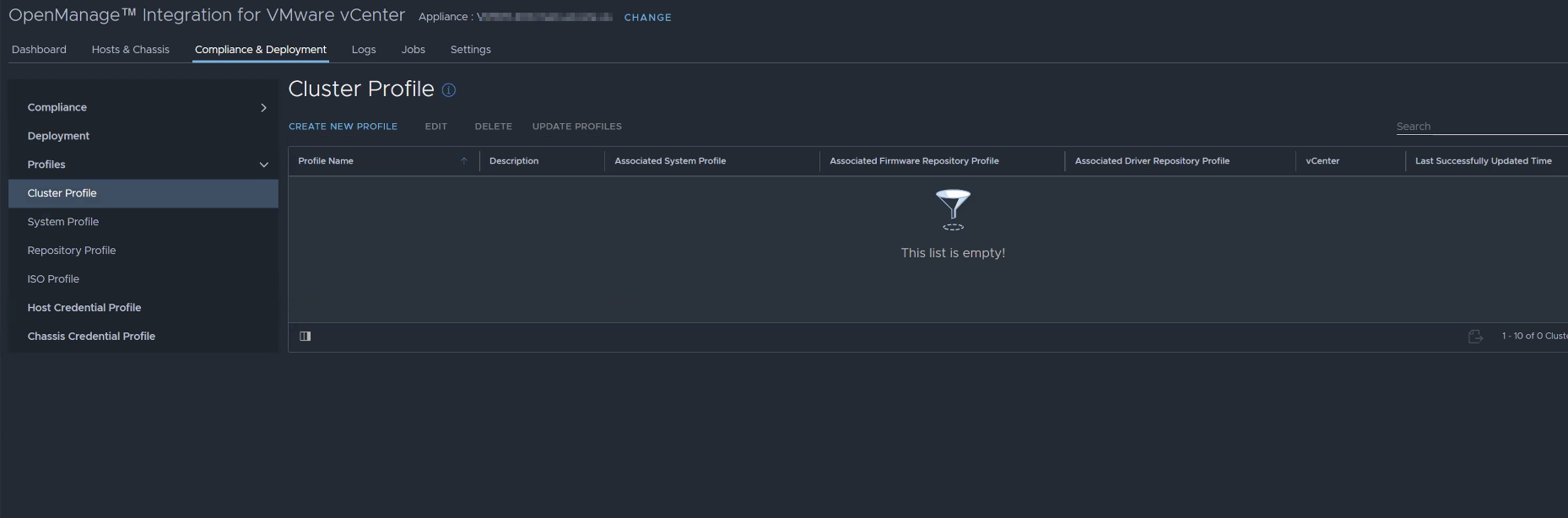
A cluster profiler can be created in OMEVV under vCenter > OMIVV Plug-in view > Compliance & Profile > Baseline Profile. 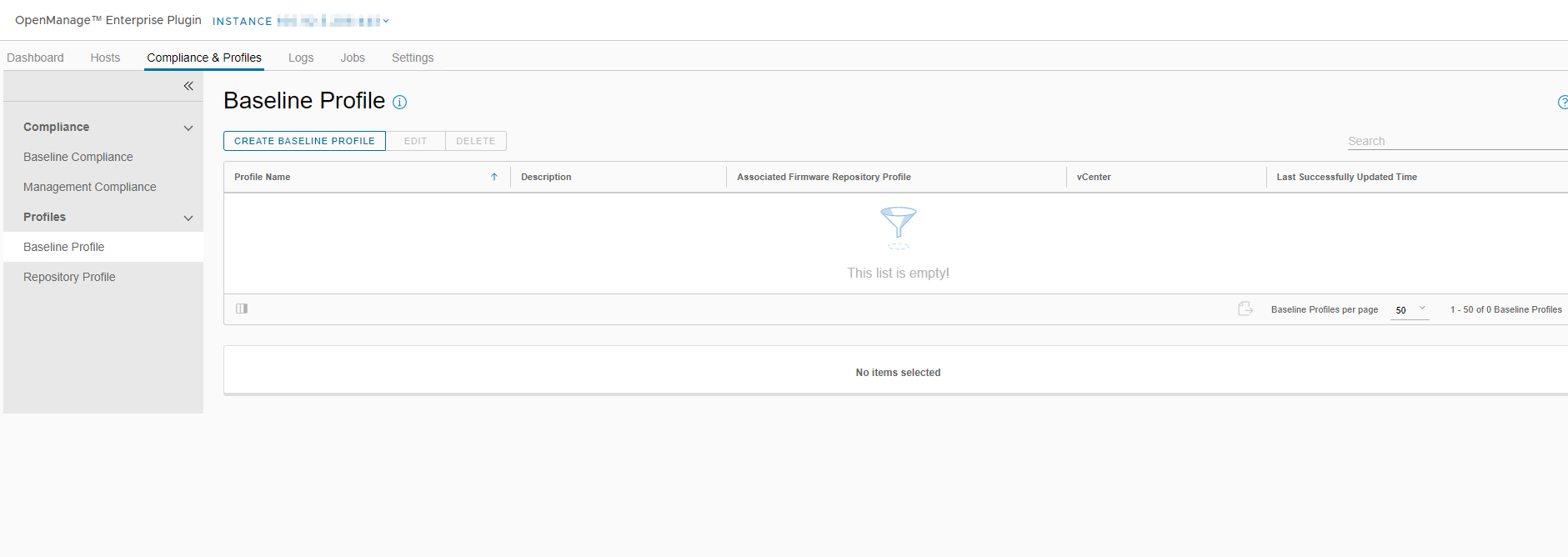
The requirement for a Cluster or Baseline Profile is that at least one host in the cluster is inventoried, which requires the following:
- Host Connection Profile associated to the host for discovery and inventory.
- A valid OMIVV or DRAC Advanced+ license for OMEVV. For information regarding differences in licensing, see the following article: OpenManage Enterprise Integration for VMware vCenter Licenses
- Firmware repository profile, either with the Dell online Catalog (for non-VSAN) or offline catalog (presented using a network share).
NOTE: For VSAN, an offline repository is required to create a cluster profile. A repository can be created with Dell Repository Manager (DRM), placed on a CIF or NFS share, and used as a Repository Profile mapped to the Cluster Profile. For more information, go to Dell Repository Manager-DRM
Affected Products
C Series, HS Series, Modular Infrastructure, Rack Servers, Tower Servers, XE Servers, XR Servers, OpenManage Enterprise Integration for VMware vCenter, OpenManage Integration for VMware vCenter, PowerEdge XR2, Poweredge C4140, PowerEdge C6400
, PowerEdge C6420, PowerEdge C6520, PowerEdge C6525, PowerEdge C6600, PowerEdge C6615, PowerEdge C6620, PowerEdge FC640, PowerEdge FX2/FX2s, PowerEdge HS5610, PowerEdge HS5620, PowerEdge M1000E, PowerEdge M640, PowerEdge M640 (for PE VRTX), PowerEdge M7701, PowerEdge M7725, PowerEdge MX5016s, PowerEdge MX7000, PowerEdge MX740C, PowerEdge MX750c, PowerEdge MX760c, PowerEdge MX840C, PowerEdge R240, PowerEdge R250, PowerEdge R260, PowerEdge R340, PowerEdge R350, PowerEdge R360, PowerEdge R440, PowerEdge R450, PowerEdge R470, PowerEdge R540, PowerEdge R550, PowerEdge R570, PowerEdge R640, PowerEdge R6415, PowerEdge R650, PowerEdge R650xs, PowerEdge R6515, PowerEdge R6525, PowerEdge R660, PowerEdge R660xs, PowerEdge R6615, PowerEdge R6625, PowerEdge R670, PowerEdge R740, PowerEdge R740XD, PowerEdge R740XD2, PowerEdge R7415, PowerEdge R7425, PowerEdge R750, PowerEdge R750XA, PowerEdge R750xs, PowerEdge R7515, PowerEdge R7525, PowerEdge R760, PowerEdge R760XA, PowerEdge R760xd2, PowerEdge R760xs, PowerEdge R7615, PowerEdge R7625, PowerEdge R770, PowerEdge R7715, PowerEdge R7725, PowerEdge R840, PowerEdge R860, PowerEdge R940, PowerEdge R940xa, PowerEdge R960, PowerEdge T140, PowerEdge T150, PowerEdge T160, PowerEdge T340, PowerEdge T350, PowerEdge T360, PowerEdge T40, PowerEdge T440, PowerEdge T550, PowerEdge T560, PowerEdge T640, POWEREDGE VRTX, PowerEdge XE2420, PowerEdge XE7100, PowerEdge XE7420, PowerEdge XE7440, PowerEdge XE7745, PowerEdge XE8640, PowerEdge XE9640, PowerEdge XE9680, PowerEdge XR11, PowerEdge XR12, PowerEdge XR4000r, PowerEdge XR4000w, PowerEdge XR4000z, PowerEdge XR4510c, PowerEdge XR4520c, PowerEdge XR5610, PowerEdge XR7620, PowerEdge XR8000r, PowerEdge XR8610t, PowerEdge XR8620t
...
Article Properties
Article Number: 000202857
Article Type: How To
Last Modified: 27 Jun 2025
Version: 8
Find answers to your questions from other Dell users
Support Services
Check if your device is covered by Support Services.