PowerEdge: PERC11 or 10 HII configuration utility and iDRAC do not support array expansion
Summary: PowerEdge RAID Controller (PERC11, PERC10), Human Interface Infrastructure (HII) configuration utility, and iDRAC do not support array expansion.
This article applies to
This article does not apply to
This article is not tied to any specific product.
Not all product versions are identified in this article.
Symptoms
When the hard drives in a disk group are replaced with larger disks, the Expand Virtual Disk option is not available in the PERC HII Configuration Utility: System Setup -> PERC Setup -> VD Operation drop down list: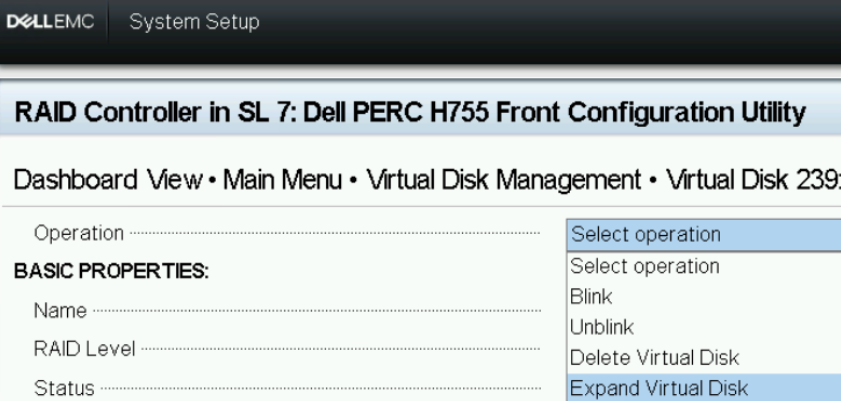
Figure 1: HII configuration Utility--VD Operation
The Edit Disk Capacity option is available in the iDRAC WebGUI->Storage->Virtual Disks -> VD Actions drop down list:
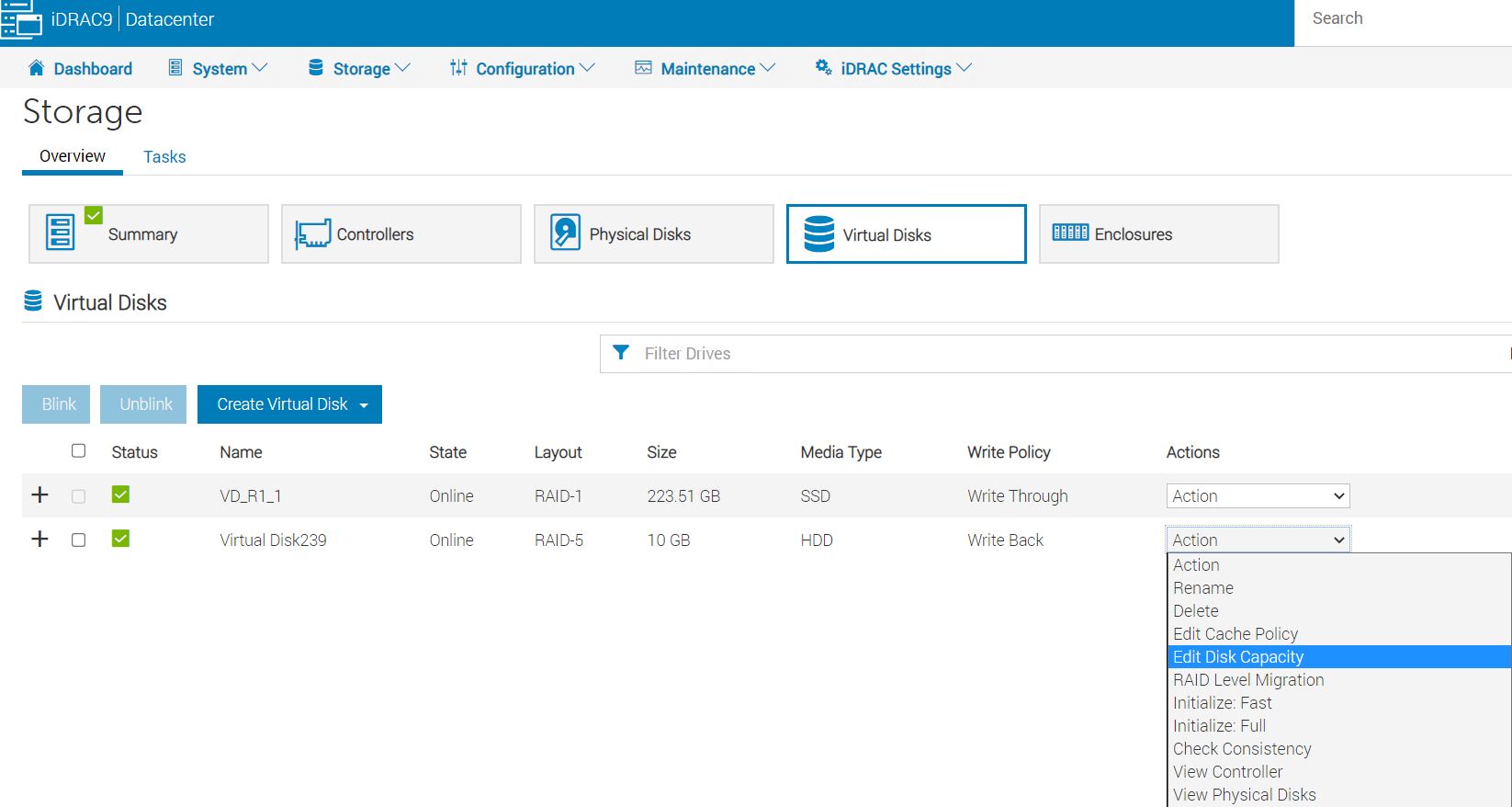
Figure 2: iDRAC WebGUI->Storage->Virtual Disk
The Available Space shows 0.00 GB After selecting Edit Disk Capacity:
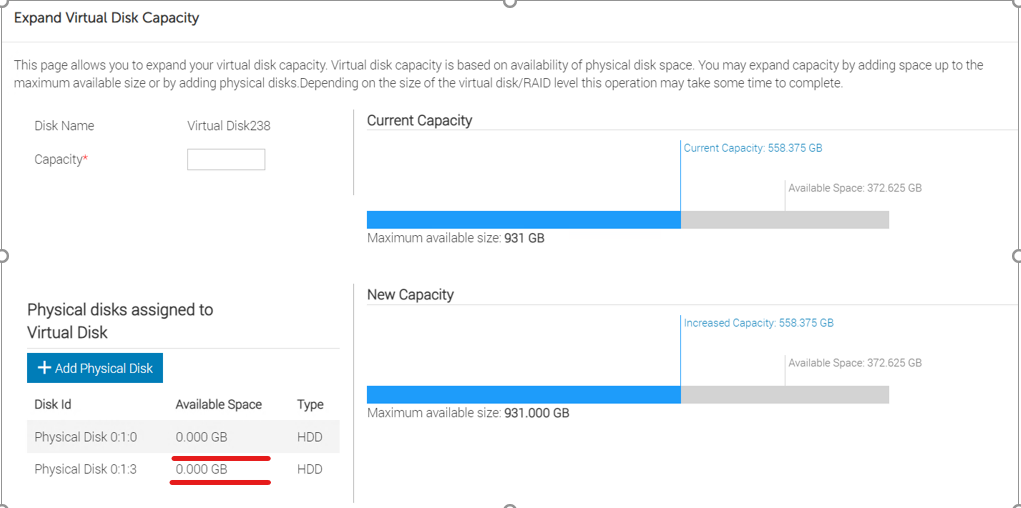
Figure 3: iDRAC WebGUI->Expand Virtual Disk Capacity page.
The operation fails when trying to expand the virtual disk capacity by entering the maximum available size in the Capacity field: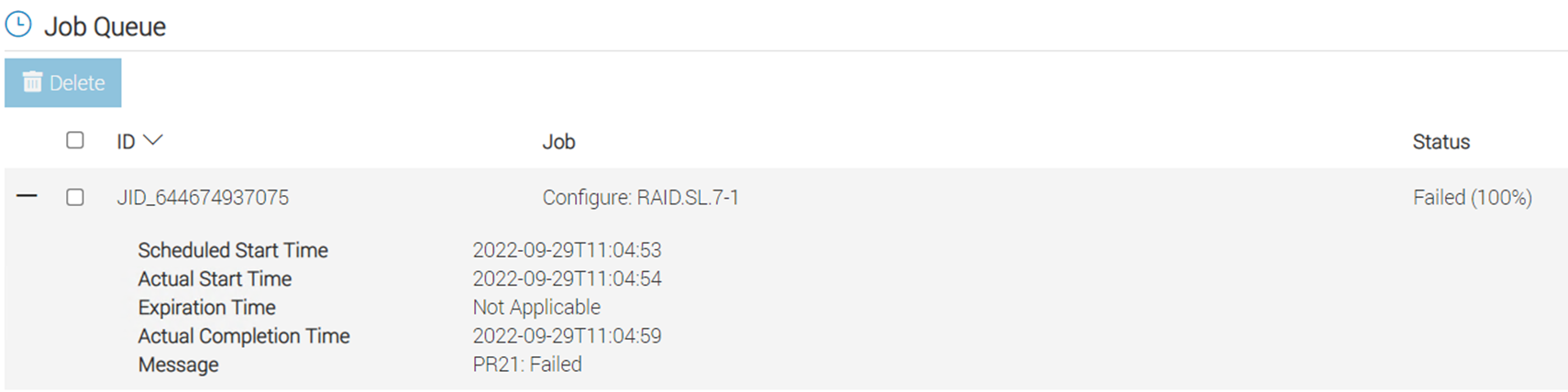
Figure 4: Job Queue Error message
If there is available space in an existing array, use the PERCCLI utility to expand.
PERCCLI /cx/vx show expansion shows the available space under NoArrExp.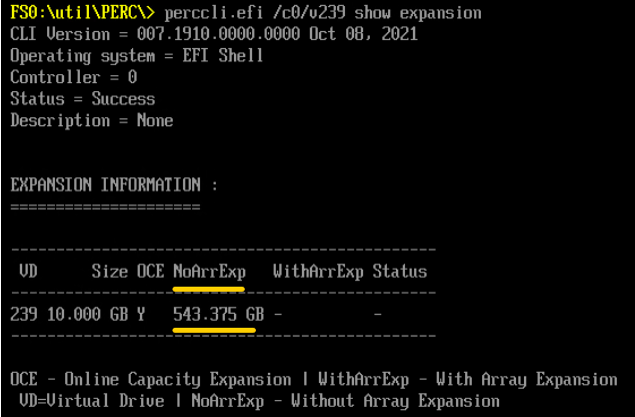
Figure 5: PERCCLI output NoArrExp
However, if the hard drives in a disk group have been replaced with larger disks, the available space appears under WithArrExp in the PERCCLI /cx/vx show expansion output: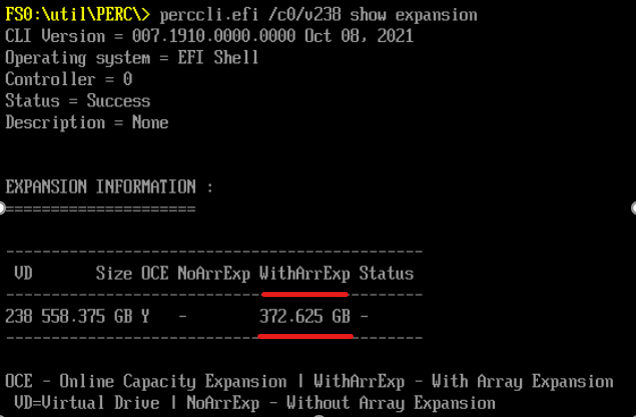
Figure 6: PERCCLI output WithArrExp
Cause
The PERC HII Configuration Utility and iDRAC do not support expanding the array capacity.
Resolution
Expanding the array capacity using the Dell PERCCLI utility:
1. Run "perccli /cx/vx show expansion" to determine the available expansion space.

2. Then run "perccli /cx/vx expand Size=<xx> expandarray" to perform the array expansion.

            The expand command will expand the virtual drive within the existing array if there is available space, or expand into additional capacity if the drives have been replaced with larger ones.
            The <xx> size value is specified in MB.
            If the "expandarray" option is specified, the full array capacity will be expanded.
            If this option is not specified, only the virtual drive capacity will be expanded rather than the full array.
After replacing all array members with larger drives, use the PERCCLI utility to expand the existing virtual disk to a larger size using the expandarray parameter.
This behavior is also documented in the PERC11 User's Guide under the 'Features of PowerEdge RAID Controller 11'-> 'reconfiguring virtual disks' section:
https://www.dell.com/support/home/en-us/product-support/product/perc-h755/docs
Affected Products
OEMR R240, OEMR R250, OEMR XE R250, OEMR R260, OEMR XE R260, OEMR R340, OEMR R350, OEMR XE R350, OEMR R360, OEMR XE R360, OEMR R440, PowerEdge XR2, OEMR R450, OEMR R540, OEMR R550, OEMR R640, OEMR XL R640, OEMR R6415, OEMR R650, OEMR R650xs
, OEMR R6515, OEMR R6525, OEMR R660, OEMR XL R660, OEMR R660xs, OEMR R6615, OEMR R6625, OEMR R740, OEMR XL R740, OEMR R740xd, OEMR XL R740xd, OEMR R740xd2, OEMR R7415, OEMR R7425, OEMR R750, OEMR R750xa, OEMR R750xs, OEMR R7515, OEMR R7525, OEMR R760, OEMR R760xa, OEMR R760XD2, OEMR XL R760, OEMR R760xs, OEMR R7615, OEMR R7625, OEMR R840, OEMR R860, OEMR R940, OEMR R940xa, OEMR R960, OEMR T140, OEMR T150, OEMR T340, OEMR T350, OEMR T360, OEMR T440, OEMR T550, OEMR T560, OEMR T640, OEMR XL T640, OEMR XL R240, OEMR XL R340, OEMR XL R660xs, OEMR XL R6615, OEMR XL R6625, OEMR XL R760xs, OEMR XL R7615, OEMR XL R7625, OEMR XR11, OEMR XR12, PowerEdge RAID Controller H745, PowerEdge RAID Controller H745P MX, PowerEdge RAID Controller H750 Adapter SAS, PowerEdge RAID Controller H755 Adapter, PowerEdge RAID Controller H755 MX Adapter, PowerEdge RAID Controller H755N Front NVMe, PowerEdge RAID Controller H755 Front SAS, Poweredge C4140, PowerEdge C6420, PowerEdge C6520, PowerEdge C6525, PowerEdge C6615, PowerEdge C6620, PowerEdge FC640, PowerEdge HS5610, PowerEdge HS5620, PowerEdge M640, PowerEdge M640 (for PE VRTX), PowerEdge MX740C, PowerEdge MX750c, PowerEdge MX760c, PowerEdge MX840C, PowerEdge R240, PowerEdge R250, PowerEdge R260, PowerEdge R340, PowerEdge R350, PowerEdge R360, PowerEdge R440, PowerEdge R450, PowerEdge R540, PowerEdge R550, PowerEdge R640, PowerEdge R6415, PowerEdge R650, PowerEdge R650xs, PowerEdge R6515, PowerEdge R6525, PowerEdge R660, PowerEdge R660xs, PowerEdge R6615, PowerEdge R6625, PowerEdge R740, PowerEdge R740XD, PowerEdge R740XD2, PowerEdge R7415, PowerEdge R7425, PowerEdge R750, PowerEdge R750XA, PowerEdge R750xs, PowerEdge R7515, PowerEdge R7525, PowerEdge R760, PowerEdge R760XA, PowerEdge R760xd2, PowerEdge R760xs, PowerEdge R7615, PowerEdge R7625, PowerEdge R840, PowerEdge R860, PowerEdge R940, PowerEdge R940xa, PowerEdge R960, PowerEdge RAID Controller H740P, PowerEdge T140, PowerEdge T150, PowerEdge T160, PowerEdge T340, PowerEdge T350, PowerEdge T360, PowerEdge T440, PowerEdge T550, PowerEdge T560, PowerEdge T640, PowerEdge XR11, PowerEdge XR12
...
Article Properties
Article Number: 000203958
Article Type: Solution
Last Modified: 15 May 2026
Version: 6
Find answers to your questions from other Dell users
Support Services
Check if your device is covered by Support Services.