Unisphere for PowerMax: Unable to Add NTP IP Using vApp Manager, Fails with Error "NTP update failed"
Summary: Unable to add Network Time Protocol (NTP) IP using vApp Manager, fails with error "NTP update failed."
This article applies to
This article does not apply to
This article is not tied to any specific product.
Not all product versions are identified in this article.
Symptoms
Unable to add NTP IP using Embedded/E-Management vApp Manager (EEM). Operation fails with error
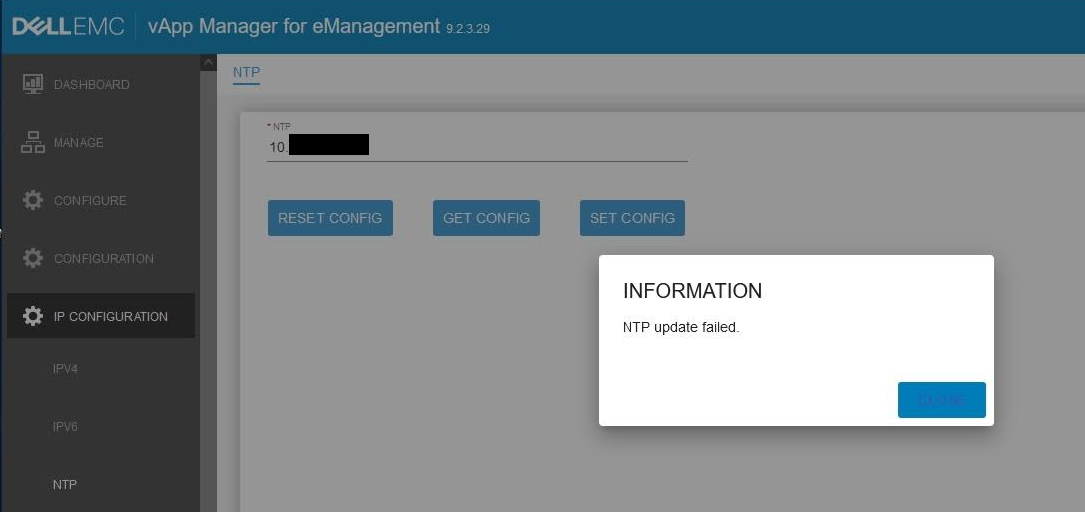 Checked vappmgr.log:
"NTP update failed"
2022-09-22 12:30:13,728 INFO  [com.emc.em.vappmgr.jaxrs.resources.ApplicationResource] (default task-3) Processed com.emc.em.vappmgr.commands.NTPCommand
2022-09-22 12:30:13,728 INFO  [com.emc.em.vappmgr.jaxrs.resources.ApplicationResource] (default task-3) Current User : C:b1d90714-b493-42f8-xxxx-xxxxxxxx\seconfig
2022-09-22 12:30:13,728 INFO  [com.emc.em.vappmgr.handlers.NTPHandler] (default task-3) Setting NTP value for server10.x.x.x
2022-09-22 12:30:13,728 INFO  [com.emc.em.vappmgr.ntp.NTPUpdateExec] (default task-3) NTP Update EJB Initilalized
2022-09-22 12:30:13,728 INFO  [com.emc.em.vappmgr.ntp.NTPUpdateExec] (default task-3) Executing Disk Usage Command..
2022-09-22 12:30:13,728 INFO  [com.emc.em.vappmgr.util.SystemCommandExecutionUtil] (default task-3)  CommandArray :[/opt/emc/vapp/bin/ntpconfig.sh, -set_ntpvalue, 10.x.x.x]
2022-09-22 12:30:13,728 INFO  [com.emc.em.vappmgr.util.SystemCommandExecutionUtil] (default task-3)  Working Directory :
2022-09-22 12:30:13,729 INFO  [com.emc.em.vappmgr.util.SystemCommandExecutionUtil] (default task-3)  Redirect Error :false
2022-09-22 12:30:13,729 INFO  [com.emc.em.vappmgr.util.SystemCommandExecutionUtil] (default task-3)  Redirect Error setting :false
2022-09-22 12:30:19,104 INFO  [com.emc.em.vappmgr.util.SystemCommandExecutionUtil] (default task-3)  Exit Status [1]
2022-09-22 12:30:19,105 INFO  [com.emc.em.vappmgr.util.SystemCommandExecutionUtil] (default task-3)  Output [NTP update failed.
2022-09-22 12:30:19,105 INFO  [com.emc.em.vappmgr.util.SystemCommandExecutionUtil] (default task-3)  Error []
2022-09-22 12:30:19,105 INFO  [com.emc.em.vappmgr.handlers.NTPHandler] (default task-3) Sending failure response for NTP
Cause
Trying to add NTP IP in EEM vApp UI.
This error usually occurs when the NTP IP is not pingable from the vApp server. You may also see the same error with nethost addition as well.
This error usually occurs when the NTP IP is not pingable from the vApp server. You may also see the same error with nethost addition as well.
Resolution
Try to ping NTP IP. The ping fails as expected:
MGMT-0:/opt/emc/vapp/jboss/domain/servers/server-0/log # ping 10.x.x.x
PING 10.x.x.x (10.x.x.x) 56(84) bytes of data.
^C
--- 10.x.x.x ping statistics ---
14 packets transmitted, 0 received, 100% packet loss, time 13300ms
This is a network issue. Engage the network team to ensure that the firewall allows connection between EEM vApp and NTP. Once the NTP IP is pingable from the vApp end, we can add NTP IP successfully.
Note: When Embedded/E-Management vApp is in use, engage Dell Technical Support. Dell Support can dial into the array and test the ping.
Affected Products
Unisphere for PowerMaxArticle Properties
Article Number: 000204044
Article Type: Solution
Last Modified: 11 Jul 2024
Version: 3
Find answers to your questions from other Dell users
Support Services
Check if your device is covered by Support Services.