Avamar: NDMP Cannot browse Isilon if basic authentication for web access is disabled.
Summary: Avamar: NDMP browsing of Isilon only shows /ifs if basic authentication for web access is disabled.
This article applies to
This article does not apply to
This article is not tied to any specific product.
Not all product versions are identified in this article.
Symptoms
When browsing Isilon volumes, only /ifs is shown, but no subfolders.
- User browsing credentials are correct
- The user is not disabled or locked out.
- The behavior affects both the root account and the browse user account.
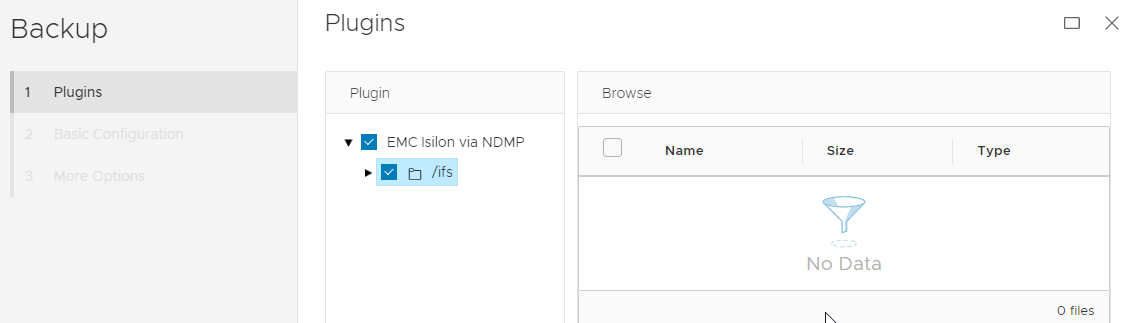
From the NDNP node or Isilon node, run the command with the root or browse user. Change <Isilon-IP-Or-Name> to the real IP or name of Isilon:
curl -vk -u "root" X GET "https://<Isilon-IP-Or-Name>:8080/namespace/ifs/"
Or
curl -vk -u "av-browse-admin" X GET "https://<Isilon-IP-Or-Name>:8080/namespace/ifs/"
This returns 401 Unauthorized error:
# curl -vk -u "root" X GET "https://<Isilon-IP-Or-Name>:8080/namespace/ifs/"
Enter host password for user 'root':
...
*  SSL certificate verify result: self signed certificate (18), continuing anyway.
* Server auth using Basic with user 'root'
> GET /namespace/ifs/ HTTP/1.1
> Host: hostname:8080
> Authorization: Basic cm9vdDpSbzA3QGRtIW5taGxy
> User-Agent: curl/7.60.0
> Accept: */*
>
< HTTP/1.1 401 Unauthorized
...

{"errors":[{"message":"Authorization required"}]}
Cause
This is a known limitation with Avamar NDMP plug-in for Isilon in Avamar 19.7 and lower.
It occurs when web basic authentication is disabled.
To verify that Isilon authentication setting, run the following procedure:
- SSH into the Isilon server
- Run the following command
# isi_gconfig -t web-config |grep basic
This output shows that basic authentication is disabled.auth_basic (bool) = false
Compared to
This output shows that basic authentication is enabled.auth_basic (bool) = true
Resolution
This issue is resolved in Avamar 19.8 NDMP per the Avamar 19.8 release notes:
Workaround #1
- Connect to Isilon, and check the basic authentication:
# isi_gconfig -t web-config |grep basic
- This output shows basic auth is disabled:
auth_basic (bool) = false
- Enable basic authentication for web access:
# isi_gconfig -t web-config auth_basic=true
Workaround #2
- Connect to the NDMP accelerator node.
- Create a bash wrapper script for curl binary
- Rename the /usr/bin/curl binary
mv /usr/bin/curl /usr/bin/curl.orig
- Create a bash shell wrapper script using original curl file path
/usr/bin/curl
vi /usr/bin/curl
#!/bin/bash
#created from KB 000204249

if [[ "$*" == *--config* ]]
then
        cat "$2" > /tmp/curl-output.txt
        IFS=":" read -r username password  <<< `cat /tmp/curl-output.txt | awk  '/user/{print $NF }'`
        server=`cat /tmp/curl-output.txt | awk -F':8080' '/url\ /{print ($1)":8080"}'| awk -F'"' '{print $2}'`
        url=`cat /tmp/curl-output.txt | grep url | awk '{print $2}'| awk -F'"' '{print $2}'`

generate_post_data()
{
  cat <<EOF
{
        "username": "$username",
        "password": "$password",
        "services": ["platform", "namespace"]
}
EOF
}

        # get cookie isisessid  and isicsrf
        /usr/bin/curl.orig -ikv -o /tmp/out.curl -H 'Content-Type: application/json' -d "$(generate_post_data)" $server/session/1/session 2>/dev/null
        read -r isisessid isicsrf <<< `cat   /tmp/out.curl   | awk -F'=' '/isisessid|isicsrf/{print ($2) }' | awk -F';' '{print $1}'`
#browse ndmp using isisessid and isicsrf
/usr/bin/curl.orig -k -b "isisessid=$isisessid" -H "X-CSRF-Token:$isicsrf" --referer $server $url

rm /tmp/curl-output.txt
rm /tmp/out.curl
else
#passthrough for normal curl command when --config is not passed
        exec /usr/bin/curl.orig "$@"
fi
- Set execute permission on the new curl wrapper.
chmod 755 /usr/bin/curl
- This should allow browsing even with advanced authentication configuration enabled.
Additional Information
If the issue persists, check these articles for further troubleshooting:
Avamar browse Isilon only sees /ifs, not lower directories.
Avamar: How to Enable, Reset, Unlock, or Create Avamar Browse Admin Isilon Account.
You can still backup or restore Isilon, even if you cannot browse the file system.
You can manually type the full path of the volume in the dataset for backup, or in the restore destination for restore activity.
Affected Products
Avamar ServerArticle Properties
Article Number: 000204249
Article Type: Solution
Last Modified: 08 Aug 2025
Version: 4
Find answers to your questions from other Dell users
Support Services
Check if your device is covered by Support Services.