使用 Dell Encryption 時出現「此應用程式的一部分已遭到封鎖」錯誤
Summary: Dell Encryption Enterprise 和 Dell Encryption Personal 可能會發生智慧型應用程式控制提示,表示「此應用程式的一部分已遭到封鎖」。
This article applies to
This article does not apply to
This article is not tied to any specific product.
Not all product versions are identified in this article.
Symptoms
Microsoft 在 Windows 11 中推出了名為「智慧型應用程式控制」的新安全性功能。智慧型應用程式控制功能的推出,是為了在啟用了智慧型應用程式控制的 Windows 11 電腦上識別並防止惡意軟體執行。啟用後,可能會導致 Dell Encryption Enterprise (先前稱為 Dell Data Protection | Enterprise Edition) 或 Dell Encryption Personal (先前稱為 Dell Data Protection | Personal Edition) 的某些部份無法依預期執行,或是遭到封鎖。智慧型應用程式控制可封鎖惡意或不受信任的應用程式,在新威脅和新興威脅中大幅提高保護能力。智慧型應用程式控制也有助於封鎖可能不需要的應用程式。這些應用程式可能會導致您的裝置運作緩慢、顯示非預期的廣告、提供不想要的額外軟體,或是執行其他預期外的操作。
智慧型應用程式控制可搭配您的其他安全性軟體使用,例如 Microsoft Defender 或其他非 Microsoft 的防毒工具,讓您獲得額外保護。
受影響的產品:
- Dell Encryption Enterprise
- Dell Encryption Personal
- Dell Data Protection | Enterprise Edition
- Dell Data Protection | Personal Edition
受影響的版本:
- v11.5.0 和更舊版本
受影響的作業系統:
- Windows 11 版本 22H2 及更新版本
Cause
嘗試在已啟用 Windows Smart App Control 的 Windows 11 電腦上安裝或執行 Dell Encryption 安裝程式時,安裝可能會失敗,或部分產品在安裝後無法執行。在安裝 Dell Encryption 後或電腦升級至 Windows 11 版本 22H2 後,右下角的彈出式通知可能會指出 Dell Encryption 的元件故障。
負責加密外部媒體的EmeService.exe可能會出現錯誤,表示其遭到封鎖。
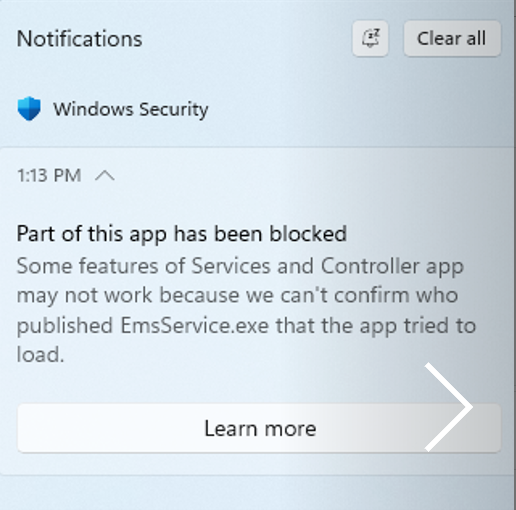
如 cmgad.exe、cmgau.exe 和 Diagnosticinfo.exe 等某些 Dell Encryption 管理工具也可能遭到封鎖,無法執行。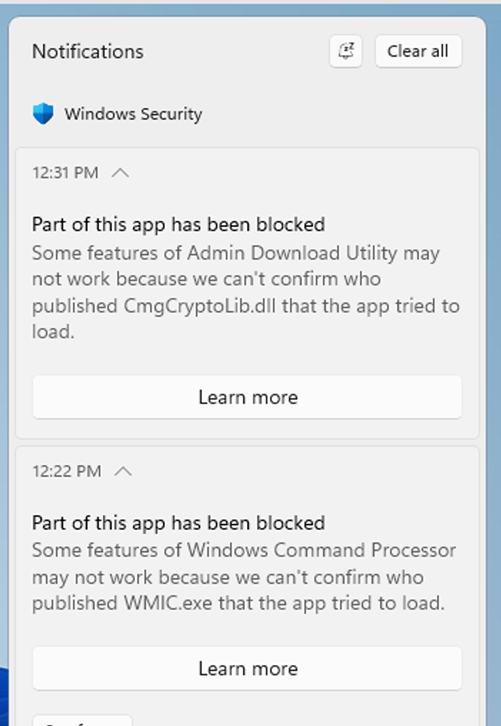
Resolution
先升級至 Dell Encryption Enterprise 11.6.0 或 Dell Encryption Personal 11.6.0 後,再啟用智慧型應用程式控制。11.6.0 已經過智慧型應用程式控制驗證,且不會在啟用智慧型應用程式控制時產生錯誤。
因應措施:
當使用者擁有適當權限且 GPO 未強制執行設定時,可以停用智慧型應用程式控制。
若要啟用或停用智慧型應用程式控制,請先按一下 Windows 的「開始」按鈕。開始打字 Smart App Control 在搜尋欄位中。按一下 智慧型應用程式控制 ,以查看智慧型應用程式控制的狀態,以及啟用或停用的選項。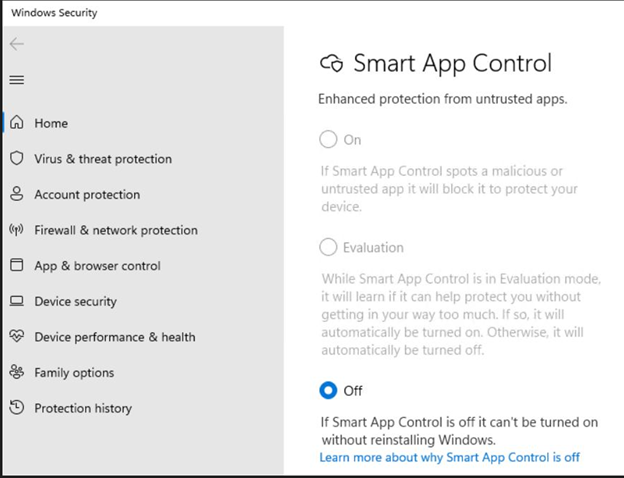
Affected Products
Dell EncryptionProducts
Dell EncryptionArticle Properties
Article Number: 000204621
Article Type: Solution
Last Modified: 28 Feb 2025
Version: 6
Find answers to your questions from other Dell users
Support Services
Check if your device is covered by Support Services.