Part of This App Has Been Blocked Error Using Dell Encryption
Summary: Dell Encryption Enterprise and Dell Encryption Personal may encounter a Smart App Control prompt stating that "Part of this app has been blocked."
This article applies to
This article does not apply to
This article is not tied to any specific product.
Not all product versions are identified in this article.
Symptoms
Microsoft has introduced a new security feature in Windows 11 called Smart App Control. Smart App Control was introduced to identify and prevent malicious software from running on Windows 11 PCs with Smart App Control enabled. If enabled, it may cause some parts of Dell Encryption Enterprise (formerly Dell Data Protection | Enterprise Edition) or Dell Encryption Personal (formerly Dell Data Protection | Personal Edition) not to work as expected or be blocked. Smart App Control adds significant protection from new and emerging threats by blocking apps that are malicious or untrusted. Smart App Control also helps to block potentially unwanted apps. These are apps that may cause your device to run slowly, display unexpected ads, offer extra software that you do not want, or do other things that you do not expect.
Smart App Control works alongside your other security software, such as Microsoft Defender or non-Microsoft anti-virus tools, for added protection.
Affected Products:
- Dell Encryption Enterprise
- Dell Encryption Personal
- Dell Data Protection | Enterprise Edition
- Dell Data Protection | Personal Edition
Affected Versions:
- v11.5.0 and Earlier
Affected Operating Systems:
- Windows 11 Version 22H2 and Later
Cause
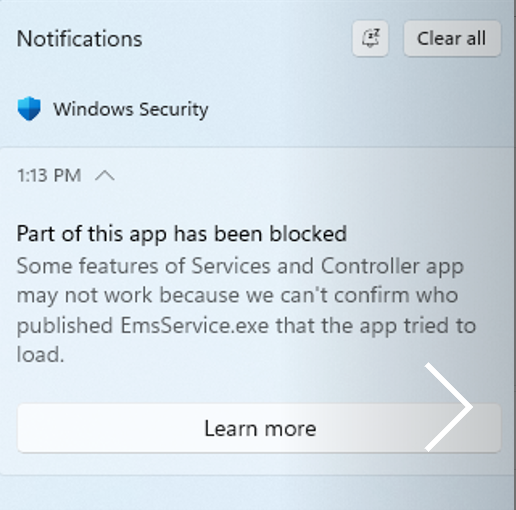
When attempting to install or run the Dell Encryption installer on a Windows 11 computer that has Windows Smart App Control enabled, the installation may fail, or parts of the product may be blocked from running after installation. A toaster notification in the bottom-right corner may indicate a failure of a component of Dell Encryption either after it is installed, or after the computer has been upgraded to Windows 11 version 22H2.
EmeService.exe, which is responsible for encrypting external media, may present an error indicating it was blocked.
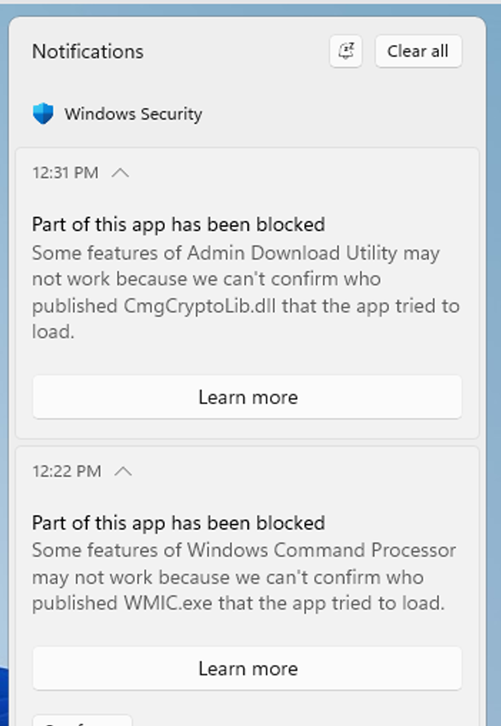
Some Dell Encryption admin tools, such as cmgad.exe, cmgau.exe, and Diagnosticinfo.exe may also get blocked from running.
Resolution
Upgrade to Dell Encryption Enterprise 11.6.0 or Dell Encryption Personal 11.6.0 before enabling Smart App Control. 11.6.0 has been validated with Smart App Control and does not generate errors with Smart App Control enabled.
Workaround:
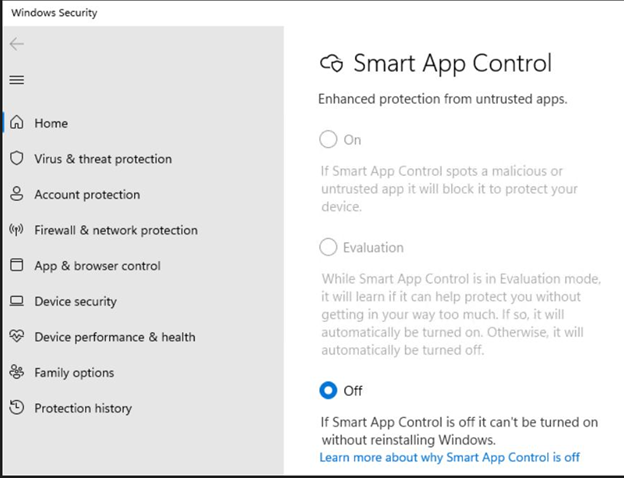
Smart App Control can be disabled when the user has proper permissions and the settings are not enforced by GPO.
To enable or disable Smart App Control, first click the Windows Start button. Start typing Smart App Control in the search field. Click Smart App Control to see the status of Smart App Control and options to either enable or disable it.
Affected Products
Dell EncryptionArticle Properties
Article Number: 000204621
Article Type: Solution
Last Modified: 15 May 2026
Version: 7
Find answers to your questions from other Dell users
Support Services
Check if your device is covered by Support Services.