NetWorker: NMC Service and Accessibility Issues (General Troubleshooting Guide)
Summary: This KB provides an overview of how to approach and resolve general issues that are observed with NMC services and accessibility.
This article applies to
This article does not apply to
This article is not tied to any specific product.
Not all product versions are identified in this article.
Instructions
This KB can be followed if the NetWorker Management Console (NMC) server is installed on a NetWorker server or standalone host. Before proceeding, confirm the environment details.
Initial Steps
- Is NMC installed on a NetWorker server or a standalone host?
- Collect Environmental details: NetWorker: Methods for Identifying NetWorker Software version
- Is the NMC service running:
- Linux:
systemctl status gst
- Linux:
[root@networker-mc]:~# systemctl status gst
● gst.service - NetWorker Management Console
   Loaded: loaded (/usr/lib/systemd/system/gst.service; enabled; vendor preset: disabled)
   Active: active (running) since Wed 2022-12-14 00:00:07 EST; 9h ago
  Process: 2318358 ExecStop=/opt/lgtonmc/etc/gst_linux.sh stop (code=exited, status=0/SUCCESS)
  Process: 2318409 ExecStart=/opt/lgtonmc/etc/gst_linux.sh start (code=exited, status=0/SUCCESS)
 Main PID: 2318433 (gstd)
    Tasks: 43 (limit: 99536)
   Memory: 66.5M
   CGroup: /system.slice/gst.service
           ├─2318433 /opt/lgtonmc/bin/gstd
           ├─2318445 /opt/lgtonmc/apache/bin/httpd -f /opt/lgtonmc/apache/conf/httpd.conf
           ├─2318447 /opt/lgtonmc/apache/bin/httpd -f /opt/lgtonmc/apache/conf/httpd.conf
           ├─2318495 /opt/lgtonmc/postgres/11.16/bin/postgres -D /nsr/nmc/nmcdb/pgdata
           ├─2318496 postgres: logger
           ├─2318498 postgres: checkpointer
           ├─2318499 postgres: background writer
           ├─2318500 postgres: walwriter
           ├─2318501 postgres: autovacuum launcher
           ├─2318502 postgres: stats collector
           ├─2318503 postgres: logical replication launcher
           └─2318518 postgres: lgtogst lgto_gst ::1(54074) idle

Dec 14 00:00:07 networker-mc.emclab.local systemd[1]: Starting NetWorker Management Console...
Dec 14 00:00:07 networker-mc.emclab.local systemd[1]: Started NetWorker Management Console.
- Windows: In services.msc, The EMC GST Database, EMC GST Service, and EMC GST Web Service should be running.
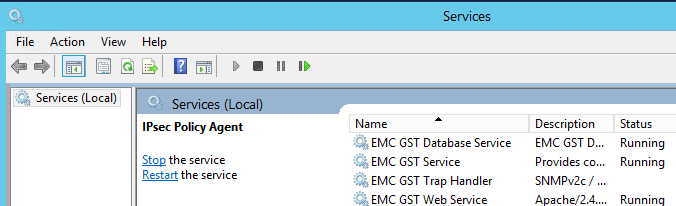
NOTE: If services are not running can they be started?
Linux:
Windows:
systemctl start gst
Windows:
net start gstd
Monitor gstd.raw for messaging regarding startup.
Linux:
/opt/lgtonmc/logs/gstd.raw
Windows:
[Install Drive]:\Program Files\EMC NetWorker\Management\GST\logs\gstd.raw
- Can the NMC client access the NMC server?
- Windows PowerShell:
tnc nmc-server-hostname -port 9000
tnc nmc-server-hostname -port 5432
NOTE: If NMC services are running but the NMC port cannot be reached from one system, is it accessible from another system? If network issues are observed, the site network administrator should be engaged for further review.
Issues and Symptoms
These are possible symptoms, sometimes all or only some of the symptoms are applicable.
- (Windows) NMC server was upgraded, missing dependencies resulted in NMC server service crash. See the Installing the NMC server software on Windows section of the NetWorker Installation Guide. https://www.dell.com/support/product-details/product/networker/docs
- NMC logins fail, regardless of user account used; Error:
There is a problem contacting the server, nmc_server_name. Please verify that the server is running.
NOTE: If the configuration is using external authentication (AD/LDAP), confirm that the issue is observed using the default Administrator account.
gstd.rawcontains messaging indicating a service or database problem:
31581 MM/DD/YYYY HH:MM:SS PM  2 0 0 3531872064 12693 0 nmc_server_name gstd NSR warning *** gstd starting at DDD MMM ## HH:MM:SS YYYY
0 MM/DD/YYYY HH:MM:SS PM  1 5 0 3531872064 12693 0 nmc_server_name gstd NSR notice @(#) Product:      NetWorker
0 MM/DD/YYYY HH:MM:SS PM  1 5 0 3531872064 12693 0 nmc_server_name gstd NSR notice @(#) Release:      #.#.#.#.build.###
0 MM/DD/YYYY HH:MM:SS PM  1 5 0 3531872064 12693 0 nmc_server_name gstd NSR notice @(#) Build number: ###
0 MM/DD/YYYY HH:MM:SS PM  1 5 0 3531872064 12693 0 nmc_server_name gstd NSR notice @(#) Build date:   DDD MMM ## HH:MM:SS TZ YYYY
0 MM/DD/YYYY HH:MM:SS PM  1 5 0 3531872064 12693 0 nmc_server_name gstd NSR notice @(#) Build arch.:  architecture
0 MM/DD/YYYY HH:MM:SS PM  1 5 0 3531872064 12693 0 nmc_server_name gstd NSR notice @(#) Build info:   DBG=0,OPT=-O2 -fno-strict-aliasing
0 MM/DD/YYYY HH:MM:SS PM  1 5 0 3531872064 12693 0 nmc_server_name gstd NSR notice MM/DD/YYYY HH:MM:SS Internal error: could not create database process.
0 MM/DD/YYYY HH:MM:SS PM  1 5 0 3531872064 12693 0 nmc_server_name gstd NSR notice MM/DD/YYYY HH:MM:SS  Internal error: could not create database process.
0 MM/DD/YYYY HH:MM:SS PM  1 5 0 3531872064 12693 0 nmc_server_name gstd NSR notice MM/DD/YYYY HH:MM:SS  Internal error: could not release database handle.
0 MM/DD/YYYY HH:MM:SS PM  1 5 0 3531872064 12693 0 nmc_server_name gstd NSR notice MM/DD/YYYY HH:MM:SS  Internal error: could not stop database process.
0 MM/DD/YYYY HH:MM:SS PM  1 5 0 3531872064 12693 0 nmc_server_name gstd NSR notice MM/DD/YYYY HH:MM:SS  FATAL ERROR: could not stop database process
0 MM/DD/YYYY HH:MM:SS PM  1 5 0 3531872064 12693 0 nmc_server_name gstd NSR notice MM/DD/YYYY HH:MM:SS  Internal error: could not stop database process.
0 MM/DD/YYYY HH:MM:SS PM  1 5 0 3531872064 12693 0 nmc_server_name gstd NSR notice MM/DD/YYYY HH:MM:SS  Internal error: could not stop database process.
0 MM/DD/YYYY HH:MM:SS PM  1 5 0 3531872064 12693 0 nmc_server_name gstd NSR notice MM/DD/YYYY HH:MM:SS  The most recently called subfunction returned error 2.
4690 MM/DD/YYYY HH:MM:SS PM  2 0 0 3531872064 12693 0 nmc_server_name gstd NSR warning library error 22 os error 0
Linux:
Windows:
How to enable real-time log rendering: NetWorker: How to automatically render daemon.raw to daemon.log in real time
How to use the Raw Renderer (Support) tool: NetWorker Support: How to use the "Raw Renderer" tool to render .raw log files
/opt/lgtonmc/logs/gstd.raw
Windows:
..\Program Files\EMC NetWorker\Management\GST\logs\gstd.raw
How to enable real-time log rendering: NetWorker: How to automatically render daemon.raw to daemon.log in real time
How to use the Raw Renderer (Support) tool: NetWorker Support: How to use the "Raw Renderer" tool to render .raw log files
- NetWorker server services are up, server functionality can be observed using
nsrwatchcommand on the NetWorker server, from the NetWorker Web User Interface (NWUI) (if installed), or from another NMC server with network and access rights to the NetWorker server. - Inadequate resources or unoptimized configurations. See the NetWorker kernel parameter requirements and Memory requirements for the NetWorker server and NetWorker Management Console sections of the NetWorker Performance Optimization and Planning Guide. https://www.dell.com/support/product-details/product/networker/docs
Options for Returning Functionality Based on Operating System:
Linux
Recoverpsm
recoverpsm is a NetWorker command which can be used to restore the nmcdb: NetWorker: How to Recover the NMC database?
This retains any reporting data, NMC Roles, and other systems (other servers, Data Domains, and so on) added into the NMC Enterprise window.
Reconfigure
If the NMC service still fails to start after performing a
recoverpsm, run the configuration script:
1. Stop any NMC services running:
2. Rename the nmcdb directory:
3. Run the configuration script:
systemctl stop gst
2. Rename the nmcdb directory:
mv /nsr/nmc/nmcdb /nsr/nmc/nmcdb.bak
3. Run the configuration script:
/opt/lgtonmc/bin/nmc_config
NOTE: Create a new certificate. If prompted that ports are in use, enter `no` when asked if you want to use a nondefault port.
Common potential issue: NetWorker: gst_config fails with "/opt/lgtonmc/bin/gstdbinit -U postgres -n 5432 /nsr/nmc/nmcdb failed!"
Common potential issue: NetWorker: gst_config fails with "/opt/lgtonmc/bin/gstdbinit -U postgres -n 5432 /nsr/nmc/nmcdb failed!"
If
nmc_config completes successfully, connect to NMC using the Administrator account. If the NMC previously had AD/LDAP configured, add the AD/LDAP users or group DNs to the Setup->Users and Roles->NMC Roles window. The user or group DNs can typically be found from the NetWorker server Server->User Groups; check "Application Administrators" and "Security Administrators." The user or group DNs are in the "External Roles" field. See: NetWorker: How To Set up AD/LDAP Authentication
This method loses any stored Reporting data.
Reinstall
If
recoverpsm or reconfigure options do not work, uninstall and reinstall the NMC with fresh folder paths:
1. Stop any NMC services running:
2. Identify the NMC package:
3. Uninstall NetWorker:
4. Rename current install paths:
systemctl stop gst
2. Identify the NMC package:
rpm -qa | grep nmc
3. Uninstall NetWorker:
rpm -e nmc-package
4. Rename current install paths:
mv /nsr/nmc/nmcdb /nsr/nmc/nmcdb.bak
mv /opt/lgtonmc /opt/lgtonmc.bak
5. Reinstall NetWorker.
a. If the package is not available on the server, it can be downloaded from: https://www.dell.com/support/home/product-support/product/networker/drivers
b. Copy the package to the server: NetWorker (Linux): How to copy files to/from a Linux NetWorker server.
c. Extract package:
d. Change directories to the extracted package:
e. Install NMC:
b. Copy the package to the server: NetWorker (Linux): How to copy files to/from a Linux NetWorker server.
c. Extract package:
tar xvf nw*_linux_x86_64.tar.gz
d. Change directories to the extracted package:
cd linux_x86_64
e. Install NMC:
yum localinstall --nogpgcheck -y lgtonmc_package_name
6. Run the post install configuration script:
/opt/lgtonmc/bin/nmc_config
If no service issue is observed after reinstalling, connect to NMC using the Administrator account. If the NMC previously had AD/LDAP configured, AD/LDAP users or group DNs must be added back to the Setup->Users and Roles>NMC Roles. The user or group DNs can typically be found from the NetWorker server Server->User Groups; check "Application Administrators" and "Security Administrators." The user or group DNs are in the "External Roles" field. See: NetWorker: How To Set up AD/LDAP Authentication
This method loses any stored Reporting data.
This method loses any stored Reporting data.
Windows
Services
1. On the NMC server open services.msc
2. Review each of the EMC GST services.
3. Confirm that the service owner is default:
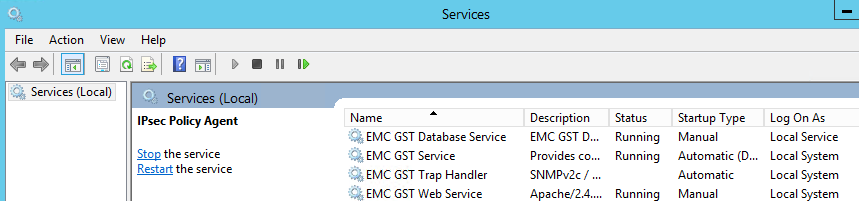
NOTE: If services are not owned by Local system/service as shown above, modify the service ownership from the service properties to match the above.
Recoverpsm
recoverpsm is a NetWorker command which can be used to restore the nmcdb: NetWorker: How to Recover the NMC database?
This retains any reporting data, NMC Roles, and other systems (other servers, Data Domains, and so on) added into NMC Enterprise window.
Reinstall
If the above options do not resolve the issue. Reinstall NetWorker with a fresh Management directory.
1. Uninstall NetWorker using one of the following options:
1. Uninstall NetWorker using one of the following options:
a. There is no option to uninstall only NMC from "Programs and Features"; however, it is possible following: NetWorker: How to Uninstall NetWorker Management Console without Installing Entire NetWorker Package (Windows)
b. If system is a standalone NMC server, uninstall NetWorker from Programs and Features. If system is a NetWorker server, but no backup/restore/clone operations are running and downtime permits, uninstall NetWorker from Programs and Features.
2. Rename the Management directory: ..\Program Files\EMC NetWorker\Management
3. Ensure that the all required dependencies are installed on the host. See the Installing the NMC server software on Windows section of the NetWorker Installation Guide. https://www.dell.com/support/product-details/product/networker/docs
4. Reinstall NetWorker and Management Console package.
4. Reinstall NetWorker and Management Console package.
If no service issue is observed after reinstalling, connect to NMC using the Administrator account. If the NMC previously had AD/LDAP configured, add the AD/LDAP users or group DNs to the Setup->Users and Roles->NMC Roles window. The user or group DNs can typically be found from the NetWorker server Server->User Groups; check "Application Administrators" and "Security Administrators." The user or group DNs are in the "External Roles" field. See: NetWorker: How To Set up AD/LDAP Authentication
This method loses any stored Reporting data.
Debugging:
Additional Information
If the issue continues after following this KB, collect NSRGET and EMC reports bundles from the NMC server to further review OS logs.
- How to get and use NSRGET: NetWorker: How to Use the NSRGet NetWorker Data Collection Tool
- Collect the NMC logs:
- Linux:
tar cvzf /tmp/`hostname`-`date -I`.tgz /opt/lgtonmc/logs - Windows: Zip ..\Program Files\EMC NetWorker\Management\GST\logs
- Linux:
Affected Products
NetWorker, NetWorker Management ConsoleProducts
NetWorker Family, NetWorker SeriesArticle Properties
Article Number: 000206402
Article Type: How To
Last Modified: 12 Jun 2025
Version: 5
Find answers to your questions from other Dell users
Support Services
Check if your device is covered by Support Services.