PowerEdge: FD332 How to Replace Hard Drive
Summary: This article discusses how to Replace Hard Drive for PowerEdge FD332.
This article applies to
This article does not apply to
This article is not tied to any specific product.
Not all product versions are identified in this article.
Instructions
For FX2 chassis with storage sled of PowerEdge FD332, if the storage sled's hard driver has an issue, then hot swap the disk.
- Ensure that the PowerEdge FD332 sled release locks are in LOCKED position. Otherwise, when the Driver Drawer is unplugged, the entire storage sled is unplugged, causing power loss!
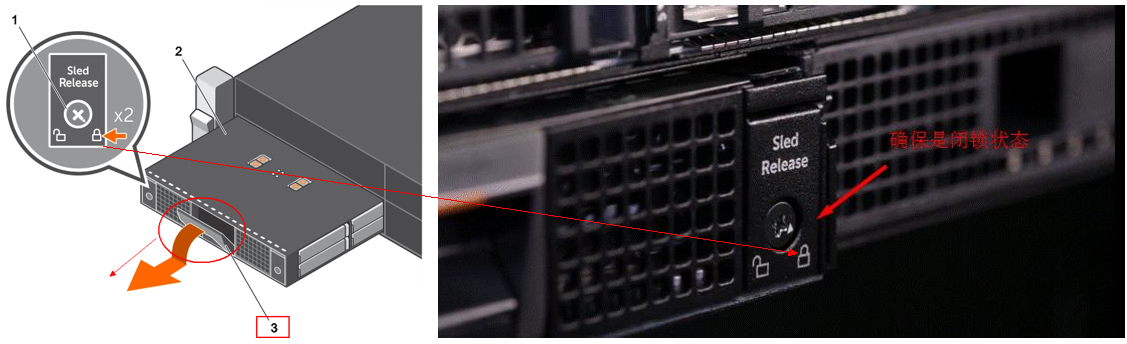
- Do not keep the drive drawer open for more than three minutes!
- The recommendation is to remove the issue disk and pull in the driver drawer, then follow the below video to replace the hard driver and carrier. Do Not release the PowerEdge FD332 sled from FX2s chassis.
For more information, see Dell PowerEdge FD332 Owner's Manual
Affected Products
PowerEdge FD332, PowerEdge FM120x4 (for PE FX2/FX2s)Article Properties
Article Number: 000206415
Article Type: How To
Last Modified: 18 Jun 2025
Version: 6
Find answers to your questions from other Dell users
Support Services
Check if your device is covered by Support Services.