CPU Frequency Stuck After Resume from Sleep Mode S3 Issue on Desktop
Summary: The following article provides information about CPU frequency stuck after resuming from sleep mode (S3) issue on desktop.
This article applies to
This article does not apply to
This article is not tied to any specific product.
Not all product versions are identified in this article.
Symptoms
When VT and VT-d are disabled in the BIOS setup, the system CPU frequency may get stuck after resuming from sleep mode (S3) issue.
Impacted model:
- ChengMing 3910
- Optiplex_3000
- OptiPlex 3000_thin_client
- OptiPlex 5000
- OptiPlex 5090
- OptiPlex 7090
- Precision 3450
- Vostro 5890
- Vostro 3890
- Vostro 3690
- Vostro 3910
- Vostro 3710
- Inspiron 3910
- Inspiron 3891
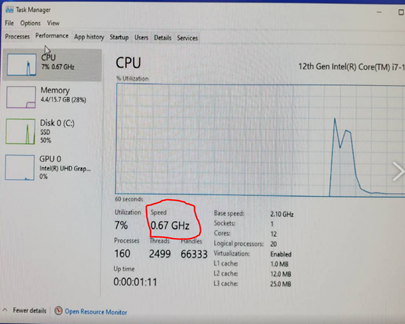
(Figure 1 - CPU Frequency Stuck)
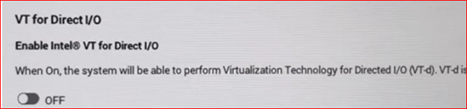
Figure 2 VT VT-d DMAR Disabled.
Cause
The BIOS has communication misalignment with the CPU and memory after resuming from sleep mode to set the CPU throttling to protect the system.
Resolution
Updating the BIOS on the computer resolves the issue. To download and install the BIOS, reference BIOS Update Guide.
Note: The web post date and BIOS version might be different based on the validation result.
- For Vostro_3910_3710 Inspiron_3910 ChengMing_3910 Optiplex_3000 Optiplex_5000 BIOS v1.9.1
- For Vostro_3890_3690 Optiplex_5090 BIOS v1.14.1
- For Inspiron_3891 BIOS v1.15
Affected Products
Inspiron 3891, Inspiron 3910, OptiPlex 3000 Tower, OptiPlex 3000 Micro, OptiPlex 3000 Small Form Factor, OptiPlex 3000 Thin Client, Optiplex 5000 Tower, OptiPlex 5000 Micro, OptiPlex 5000 Small Form Factor, OptiPlex 5090 Tower, OptiPlex 5090 Micro
, OptiPlex 5090 Small Form Factor, OptiPlex 7090 Tower, OptiPlex 7090 Micro, OptiPlex 7090 Small Form Factor, Precision 3450 XE Small Form Factor, Precision 3450 Small Form Factor, Vostro 3690, Vostro 3710, Vostro 3890, Vostro 3910, Vostro 5890
...
Article Properties
Article Number: 000208240
Article Type: Solution
Last Modified: 13 Nov 2025
Version: 7
Find answers to your questions from other Dell users
Support Services
Check if your device is covered by Support Services.