Dell VxRail 和 RecoverPoint for Virtual Machines:VxRail 預先檢查偵測到 RecoverPoint for Virtual Machines 不相容的版本
Summary: VxRail 預先檢查會偵測到 RecoverPoint for Virtual Machines 不相容的版本,儘管 RecoverPoint for Virtual Machines 已更新相容版本。
This article applies to
This article does not apply to
This article is not tied to any specific product.
Not all product versions are identified in this article.
Symptoms
VxRail 預先檢查會偵測到 RecoverPoint for Virtual Machines 不相容的版本,即使 RecoverPoint for Virtual Machines 已更新相容版本。
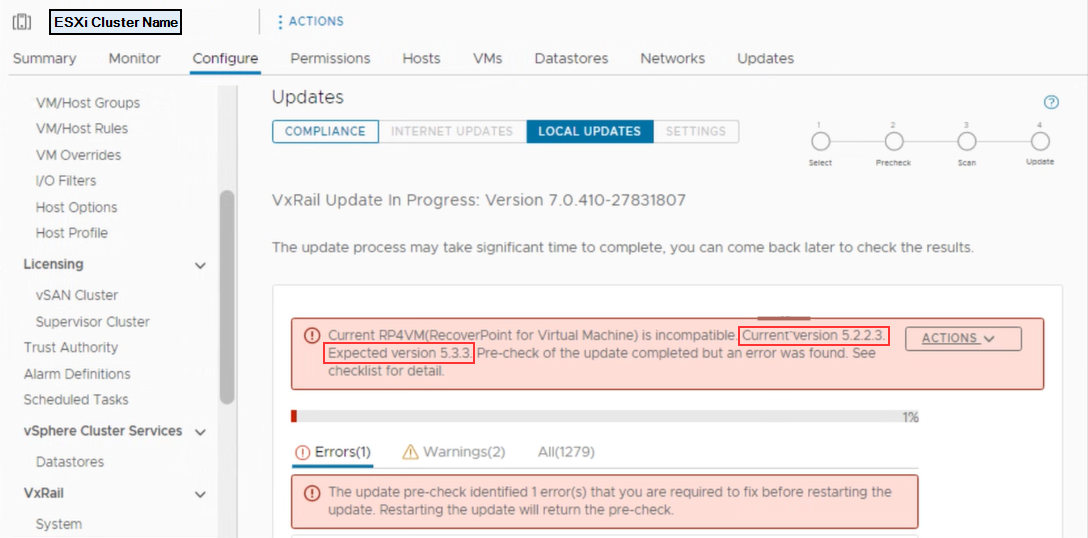
圖 1:VxRail 預先檢查會偵測到 RecoverPoint for Virtual Machine 不相容的問題。
注意:以上錯誤中顯示的目前 RecoverPoint 版本可能會有所不同。
"Current RP4VM(RecoverPoint for Virtual Machine) is incompatible. Current version x.x.x.x.
Expected version x.x.x.x. Pre-check of the update completed but an error was found. See checklist for detail."
圖 1:VxRail 預先檢查會偵測到 RecoverPoint for Virtual Machine 不相容的問題。
注意:以上錯誤中顯示的目前 RecoverPoint 版本可能會有所不同。
Cause
查看 VxRail 偵錯記錄時,您會在 vCenter 延伸模組下看到以下詳細資料:
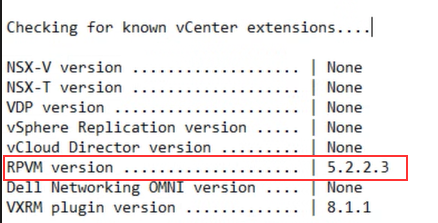
圖 2:VxRail 偵錯記錄詳細資料,說明 vCenter 上的擴充功能。
查看 MOB 時,您會在下方找到以下詳細資料:
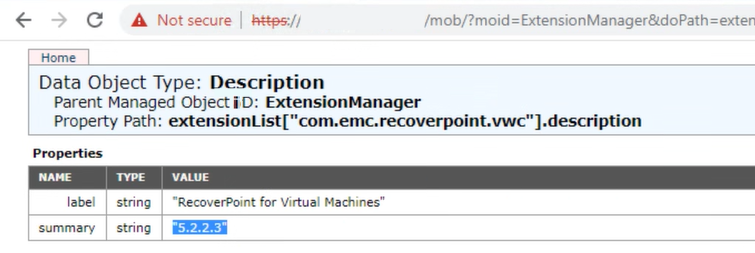
圖 3:有關 RecoverPoint 舊擴充功能的 vCenter MOB 詳細資料。
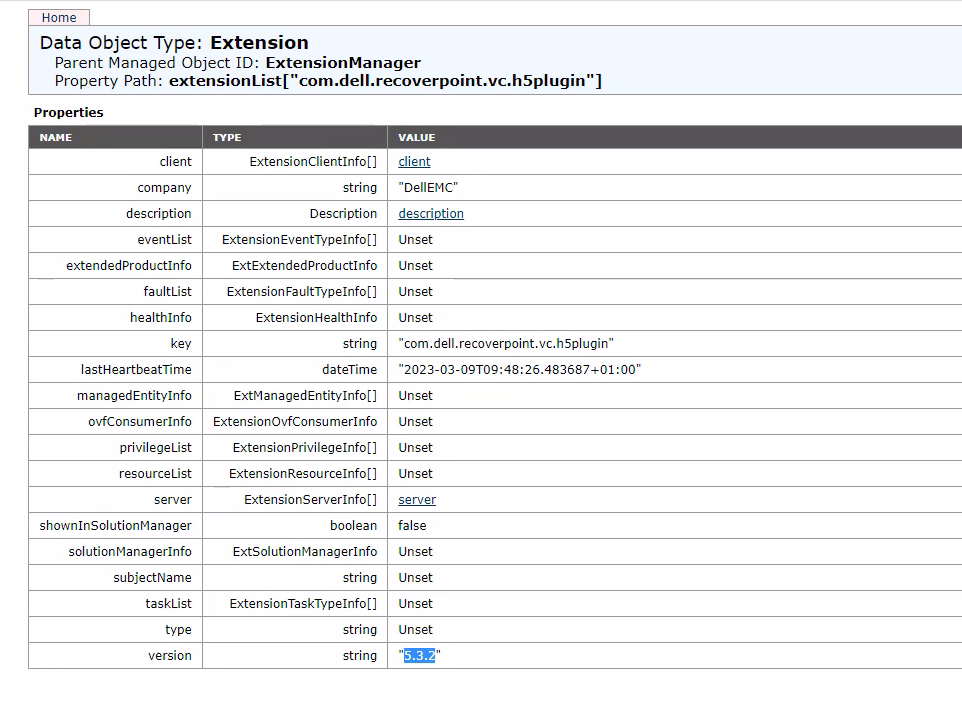
圖 4:MOB 中的附掛程式詳細資料
在 vCenter 用戶端外掛程式中,您可能會看到相同的版本詳細資料。

圖 5:vCenter 附掛程式詳細資料,顯示 VxRail 升級時不支援的 RecoverPoint 外掛程式版本。
在 VxRail 升級前置檢查期間顯示的錯誤訊息可能與以下相關:
圖 2:VxRail 偵錯記錄詳細資料,說明 vCenter 上的擴充功能。
- 存取 MOB HTTPs://vCenterIP/mob
- 按一下下列超連結:Content > ExtensionManager > com.emc.recoverpoint.> 說明
圖 3:有關 RecoverPoint 舊擴充功能的 vCenter MOB 詳細資料。
注意:VxRail 升級前置檢查上的錯誤可能也與未升級的 RecoverPoint 附掛程式伺服器有關。
- 按一下下列超連結:Content > ExtensionManager > com.dell.recoverpoint.vc.h5plugin > 說明
圖 4:MOB 中的附掛程式詳細資料
在 vCenter 用戶端外掛程式中,您可能會看到相同的版本詳細資料。
圖 5:vCenter 附掛程式詳細資料,顯示 VxRail 升級時不支援的 RecoverPoint 外掛程式版本。
在 VxRail 升級前置檢查期間顯示的錯誤訊息可能與以下相關:
- 向 vCenter 註冊的舊 RecoverPoint 附掛程式或延伸模組。
- HMTL5 附掛程式未升級,因此版本低於 RecoverPoint 5.3.3.x 所需的版本
Resolution
要解決此問題:
如果問題與下列問題有關:
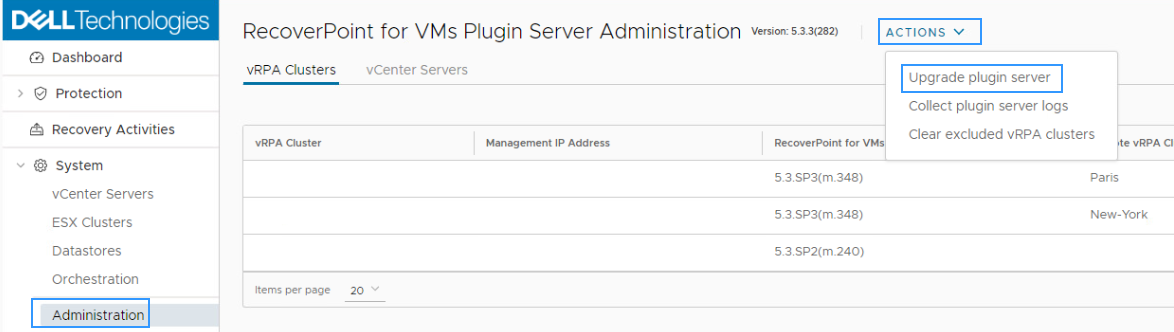
圖 6:外掛程式伺服器升級詳細資料
如果問題與下列問題有關:
- 正在 vCenter 註冊的舊 RecoverPoint 外掛程式或延伸模組:
- 存取 MOB HTTPs://vCenterIP/mob
- 按一下下列超連結:ExtensionManager內容>
- 選取 取消註冊副檔名
- 在extensionKey中輸入 Value com.emc.recoverpoint.vwc或 com.dell.recoverpoint.vc.h5plugin
- 按下叫用方法
- 從 MOB 登出
- HMTL5 附掛程式未升級,因此版本低於 RecoverPoint 5.3.3.x 所需的版本:
- 在 vSphere 用戶端 適用的 RecoverPoint for VMs HTML5 附掛程式中 ,按一下 系統 > 管理
- 按一下升級外掛程式伺服器>動作
- 選取外掛程式與升級的升級套件組合
圖 6:外掛程式伺服器升級詳細資料
注意:有時,將 HTML5 附掛程式伺服器升級至支援的版本後,MOB 詳細資料可能會看到先前的版本。若是這樣,您必須從 MOB 取消註冊擴充,請參閱解決方法中所列的動作,說明「使用 vCenter 註冊舊的 RecoverPoint 附掛程式或延伸裝置」。
Article Properties
Article Number: 000209521
Article Type: Solution
Last Modified: 20 Sep 2023
Version: 6
Find answers to your questions from other Dell users
Support Services
Check if your device is covered by Support Services.