CPU Utilization in Windows Task Manager Cannot Reach 100 Percent
Summary: Learn what to do if the Windows Task Manager Performance tab CPU utilization information is unable to reach 100%.
This article applies to
This article does not apply to
This article is not tied to any specific product.
Not all product versions are identified in this article.
Symptoms
Users may report that their CPU utilization in Windows Task Manager’s Performance tab cannot reach 100%. This occurs during a heavy load or while running the Intel Power and Thermal Analysis Tool (PTAT).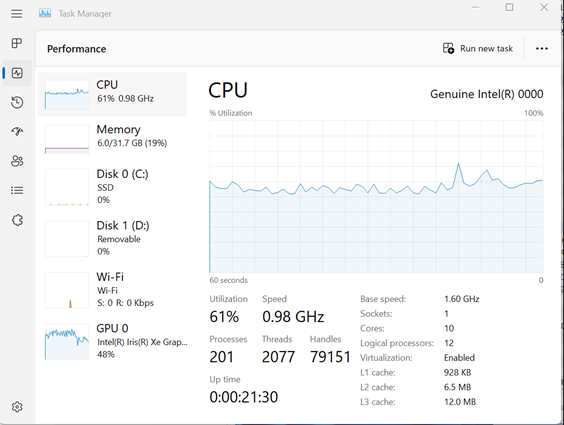
Affected Platforms:
- Latitude 5340
- Latitude 5540
- Latitude 7340
- Latitude 7440
- Latitude 7640
- Precision 3580
- Precision 3581
Cause
The Intel generation 13 processor Raptor Lake (RPL-U15) has a 15W thermal design power (TDP). Intel has confirmed that the utilization reaches 100% only when the CPU power is higher than the TDP power. Once the TDP is not higher than the level recommended by Intel, the utilization is lower than 100%. The only way to determine when the CPU power is higher than the TDP power is by using third-party utilities.
Resolution
This is expected behavior. This is working as designed as confirmed by Intel.
Affected Products
Latitude 5340, Latitude 7340, Latitude 7440, Latitude 5540, Latitude 7640, Precision 3580, Precision 3581Article Properties
Article Number: 000209738
Article Type: Solution
Last Modified: 05 May 2025
Version: 4
Find answers to your questions from other Dell users
Support Services
Check if your device is covered by Support Services.