網路復原:NetWorker DR 失敗並顯示錯誤「無法根據使用者權杖為系統設定使用者許可權...」
Summary: 網路復原:NetWorker DR 失敗並顯示錯誤訊息。無法根據 Networker.server.vault 上的系統使用者權杖設定使用者許可權:無法驗證安全權杖。
This article applies to
This article does not apply to
This article is not tied to any specific product.
Not all product versions are identified in this article.
Symptoms
記錄中的故障點是在 nsrdr 命令復原啟動程式資料之後。接著嘗試使用 REST 卸載裝置。發生錯誤,導致自動化 Cyber Recovery DR 中斷。
以下是 Cyber Recovery 主機的「apps.log」擷取。
從 Vault NetWorker 伺服器的已呈現 daemon.log 解壓縮。
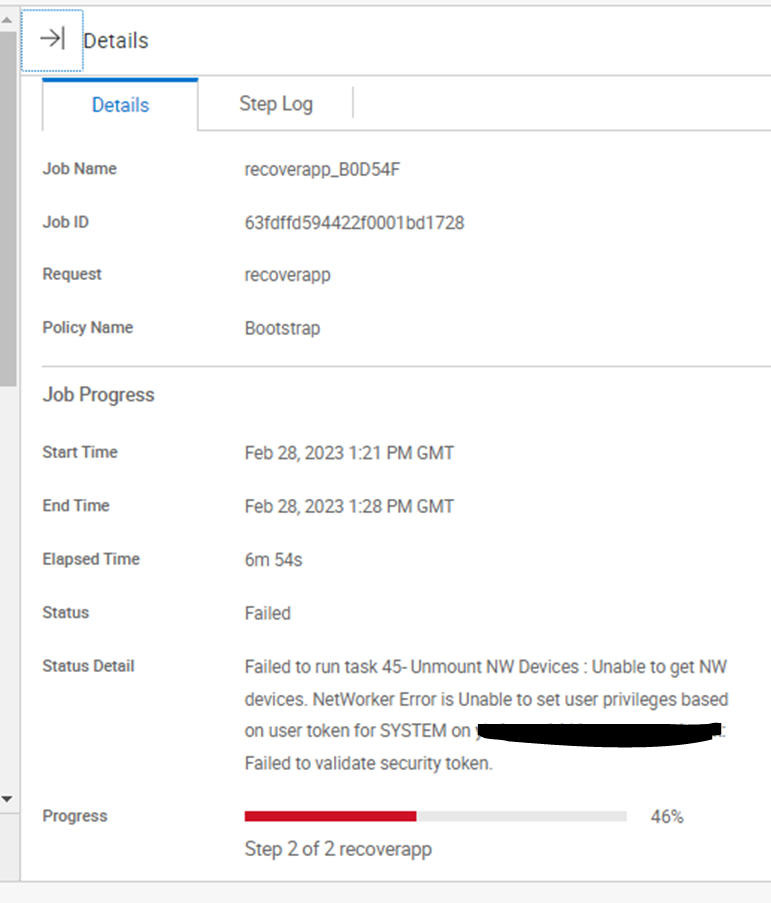
Cyber Recovery Manager 中的錯誤;
以下是 Cyber Recovery 主機的「apps.log」擷取。
[2023-02-28 13:22:54.062] [INFO] [apps] [ddssh.go:718 CreateSSHClientConn()] : SSH connecting to 192.168.1.10:22
[2023-02-28 13:22:54.179] [INFO] [apps] [ddssh.go:317 RunSSHCmd()] : Running: 192.168.1.10:22 nsrdr -d 192.168.1.20_vault_dev_0 -B 2432563240 -a -A
[2023-02-28 13:28:14.608] [INFO] [apps] [RecoverNetWorkerApp.go:1278 NWUnmountDevices()] : Umounting devices from the vault before running DR procedure...
[2023-02-28 13:28:14.609] [INFO] [apps] [restapi_client.go:261 CallRESTAPI()] : Methods is :GET URL is:https://192.168.1.10:9090/nwrestapi/v2/datazone/devices
[2023-02-28 13:28:19.522] [INFO] [apps] [appsUtils.go:109 HandleNWResponse()] : REST status code :500
[2023-02-28 13:28:19.523] [ERROR] [apps] [appsUtils.go:123 HandleNWResponse()] : Error response is : {Message:Unable to set user privileges based on user token for SYSTEM on networker.server.vault: Failed to validate security token.
 Status:{Code:500 Class:Server Error Reason:Internal Server Error}}
從 Vault NetWorker 伺服器的已呈現 daemon.log 解壓縮。
28/02/2023 13:28:10  nsrd NSR info Disaster Recovery Notice: Bootstrap recovery from the backup 2432563240 is completed with the status Succeeded
28/02/2023 13:28:15  nsrd AUTHC critical Unable to set user privileges based on user token for SYSTEM on networker.server.vault: Failed to validate security token.
Cyber Recovery Manager 中的錯誤;
Cause
存放庫 NetWorker 伺服器上的系統權杖無效。即使登入存放庫 NetWorker 伺服器的 NMC 處於預設狀態 (執行任何 DR 之前),也會失敗並顯示錯誤。

Resolution
- 清理失敗的 NetWorker 應用程式復原,使存放庫 NetWorker 伺服器處於預設狀態 (如果尚未完成)。
- 在存放庫中卸載 NetWorker。
- 重新命名「。」。\EMC NetWorker\nsr'folder to '..\EMC NetWorker\old.nsr' 和 '..\EMC NetWorker\Management'folder to '..\EMC NetWorker\old。管理」。
- 將存放庫中的 NetWorker 重新安裝至相同位置,並使用相同的版本,並使用與之前相同的認證。
- 確認 NetWorker 已啟動並正在執行中。
- 在 Cyber Recovery 中刪除並重新建立 NetWorker 資產。
- 再次執行 DR。
Affected Products
PowerProtect Cyber Recovery, NetWorkerProducts
Cyber Recovery SeriesArticle Properties
Article Number: 000210780
Article Type: Solution
Last Modified: 19 Sep 2023
Version: 3
Find answers to your questions from other Dell users
Support Services
Check if your device is covered by Support Services.