NetWorker:vProxy 一体机在部署时不应用网络参数
Summary: vProxy 应用装置不应用或保留网络参数。
This article applies to
This article does not apply to
This article is not tied to any specific product.
Not all product versions are identified in this article.
Symptoms
vProxy 应用装置部署但不应用网络参数。
使用 ifconfig 手动应用网络设置后,vProxy 将注册但备份失败,并显示错误:
使用 ifconfig 手动应用网络设置后,vProxy 将注册但备份失败,并显示错误:
Unable to find identity (MORef) of vProxy's virtual machine: Unable to determine network interface.重新启动 vProxy 应用装置会再次擦除网络参数。
Cause
存在重复的 IP 地址。另一个设备已分配与 vProxy 应用装置相同的地址。
Resolution
- 在 vProxy 应用装置上,使用以下命令检查 wickedd 服务的状态。Wickedd 是在 vProxy 应用装置上使用的网络管理服务。
提醒:如果无法通过 SSH 访问 vProxy,请使用 VMware Web Client 以控制台连接到 vProxy。
systemctl status wickedd
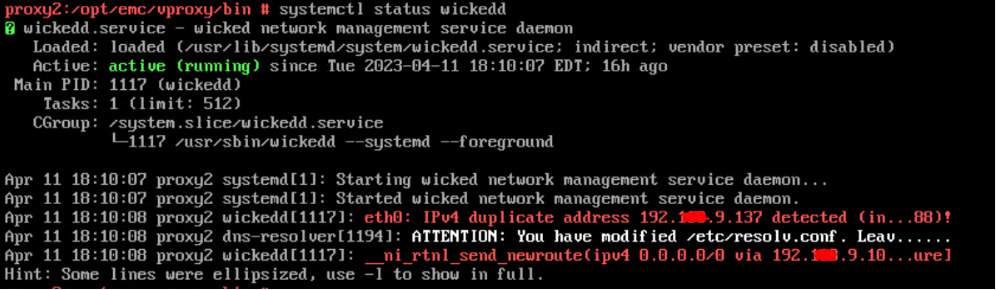
图 1:wickedd 命令的消息结果
要查看完整消息,请使用以下 wickedd 命令:
systemctl -l status wickedd
(小写 L)
示例:

图 2:Extended wickedd 命令的消息结果
记下 MAC 地址并与网络管理员一起查找重复 IP,并解析或为 vProxy 分配不同的 IP 地址。
- 解决网络环境中的重复 IP 地址问题。
- 使用以下命令重新配置 vProxy 的网络参数:
/opt/emc/vproxy/bin/network_config.sh
Network_config详情请参阅知识库文章 157759 NVP vProxy:如何手动更改 vProxy 一体机网络接口设置。
Affected Products
NetWorkerProducts
NetWorker Family, NetWorker SeriesArticle Properties
Article Number: 000212275
Article Type: Solution
Last Modified: 21 Apr 2023
Version: 2
Find answers to your questions from other Dell users
Support Services
Check if your device is covered by Support Services.