PowerFlex 3.6: How To Clear Unknown or Unrelated Errors in PowerFlex Manager
Summary: Random errors are shown in PowerFlex Manager (PFxM) for a host. Error displays a red x.
This article applies to
This article does not apply to
This article is not tied to any specific product.
Not all product versions are identified in this article.
Instructions
Symptom:
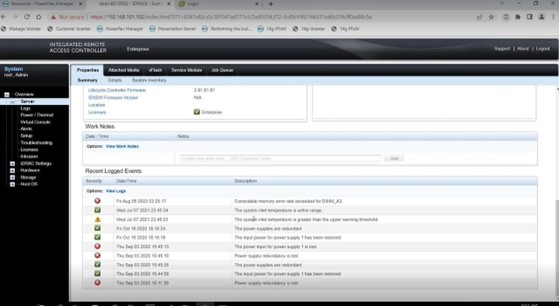
Random errors displayed as a red x are shown in PFxM for a host.- Error Example:

- To investigate the error, login to the iDRAC user interface for the node in question to see if any related errors or issues display. Some errors may come in the form of correctable errors such as the error listed in the screenshot example below.
Resolutions To Attempt:
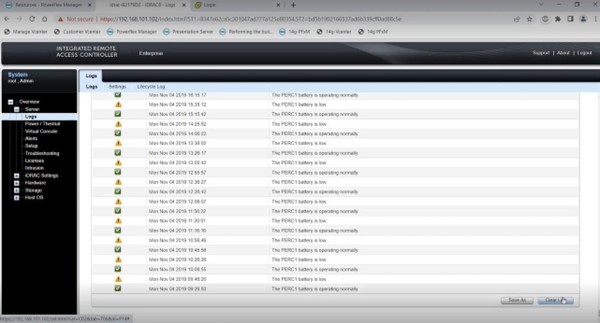
- Go to the Logs area in the iDRAC user interface, click Clear Log at the bottom right corner to clear the logs for the node.
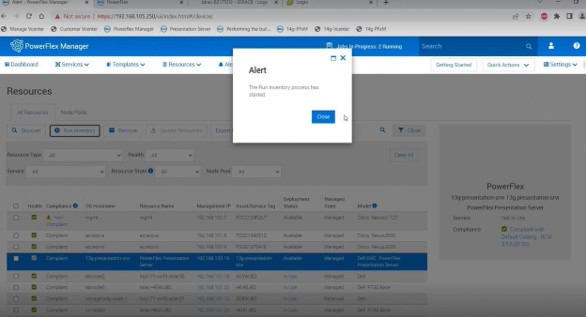
- Select the check box next to the node in question experiencing the error, go back towards the top in the All Resources menu and click Run Inventory to see if this clears the error.


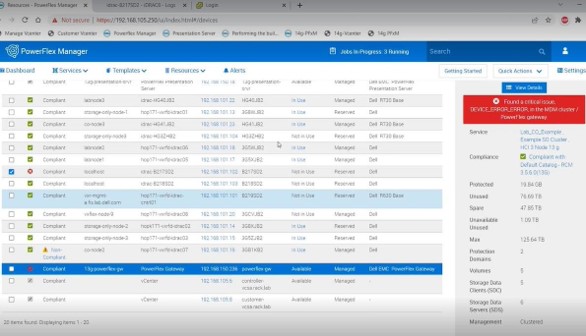
- For errors in the PFxM that are shown for the gateway, go to the presentation server user interface and clear and acknowledge the errors on that end as per the screenshots below. These errors may take a few minutes to show up as cleared in PFxM. If the errors do not clear after an hour or so, try switching the primary and secondary MDM roles as the primary MDM can cache this information.

Affected Products
PowerFlex rack, VxFlex Ready Nodes, PowerFlex appliance connectivity, PowerFlex appliance R650, PowerFlex appliance R6525, PowerFlex appliance R660, PowerFlex appliance R6625, Powerflex appliance R750, PowerFlex appliance R760
, PowerFlex appliance R7625, PowerFlex custom node, PowerFlex appliance R640, PowerFlex appliance R740XD, PowerFlex appliance R7525, PowerFlex appliance R840
...
Article Properties
Article Number: 000213161
Article Type: How To
Last Modified: 22 May 2025
Version: 6
Find answers to your questions from other Dell users
Support Services
Check if your device is covered by Support Services.