Data Domain DD6400: Adding Replacement Disk on DD6400
Summary: This article serves as reference for how to add a replacement disk on a DD6400 model.
This article applies to
This article does not apply to
This article is not tied to any specific product.
Not all product versions are identified in this article.
Instructions
Other Data Domain products with a replacement disk showing unknown "U" can be "disk unfail" to make it spare. Storage pool products like DD6400 only accept "storage add" command to add a new disk into the system.
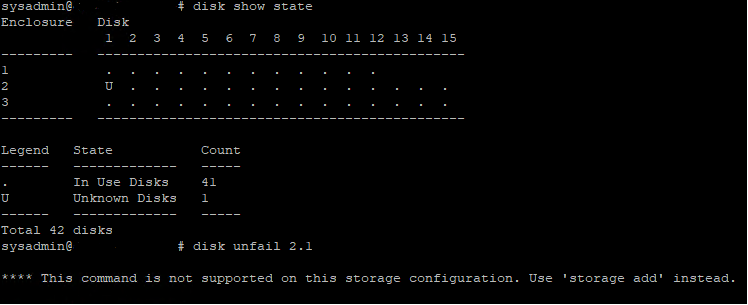
Figure 1: Data Domain CLI - Disk Show State, Disk Unfail
Figure 1: Data Domain CLI - Disk Show State, Disk Unfail
- Below is the CLI command to add a replacement operating system (1.1 and 1.2) or Data Disk into the DD6400.
- Run the storage add force disk command to add a replacement disk to the system, where disk is the number of the replacement disk
# storage add force disk 2.1

The 'storage add force' command will make the disk available to the
        filesystem. Any existing data on this will be lost.
        Are you sure? (yes|no) [no]: yes

Checking storage requirements...done
Adding disk 2.1 to the system...done

Updating system information...done

Disk 2.1 successfully added to the system
- Use the following command to check that the Data Domain system recognizes the disk drive. In the command display, the Disk State should be spare or reconstructing.
# disk show state

Enclosure   Disk
             1  2  3  4  5  6  7  8  9  10 11 12 13 14 15
---------   ----------------------------------------------
1            .  .  .  .  .  .  .  .  .  .  .  .
2            v  .  .  .  .  .  .  .  .  .  .  .  .  .  .
---------   ----------------------------------------------

Legend   State             Count
------   ---------------   -----
.        In Use Disks      26
v        Available Disks   1
------   ---------------   -----
Total 27 disks

Estimated total time remaining for reconstruction (minutes) 874
- Below is the CLI commands to add a replacement disk into the DD6400 cache tier (1.3 and 1.4).
- Run the storage add disk 1.<n> command to add the disk back to the Cache Tier, where <n> is the number of the disk from the hardware failure alert message.
- Run the filesys expand command to set the new cache disk as in-use.
Affected Products
DD6400 ApplianceProducts
Data DomainArticle Properties
Article Number: 000214343
Article Type: How To
Last Modified: 18 May 2026
Version: 5
Find answers to your questions from other Dell users
Support Services
Check if your device is covered by Support Services.