Data Domain DD6400: DD6400에 교체 디스크 추가
Summary: 이 문서는 DD6400 모델에 교체 디스크를 추가하는 방법에 대한 참조로 사용됩니다.
This article applies to
This article does not apply to
This article is not tied to any specific product.
Not all product versions are identified in this article.
Instructions
알 수 없는 "U"가 표시된 교체용 디스크가 있는 다른 Data Domain 제품은 "disk unfail"이 되어 스페어로 만들 수 있습니다. DD6400과 같은 스토리지 풀 제품은 "storage add" 명령만 수락하여 시스템에 새 디스크를 추가합니다.
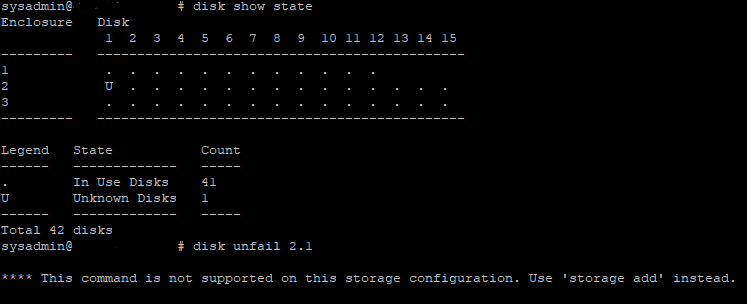
그림 1: Data Domain CLI - 디스크 표시 상태, 디스크 연결 해제
그림 1: Data Domain CLI - 디스크 표시 상태, 디스크 연결 해제
- 다음은 DD6400에 교체 운영 체제(1.1 및 1.2) 또는 데이터 디스크를 추가하는 CLI 명령입니다.
- 스토리지 add force disk 명령을 실행하여 교체 디스크를 시스템에 추가합니다. 여기서 디스크는 교체 디스크의 수입니다.
# storage add force disk 2.1

The 'storage add force' command will make the disk available to the
        filesystem. Any existing data on this will be lost.
        Are you sure? (yes|no) [no]: yes

Checking storage requirements...done
Adding disk 2.1 to the system...done

Updating system information...done

Disk 2.1 successfully added to the system
- 다음 명령을 사용하여 Data Domain 시스템이 디스크 드라이브를 인식하는지 확인합니다. 명령 표시에서 디스크 상태는 스페어 또는 재구성이어야 합니다.
# disk show state

Enclosure   Disk
             1  2  3  4  5  6  7  8  9  10 11 12 13 14 15
---------   ----------------------------------------------
1            .  .  .  .  .  .  .  .  .  .  .  .
2            v  .  .  .  .  .  .  .  .  .  .  .  .  .  .
---------   ----------------------------------------------

Legend   State             Count
------   ---------------   -----
.        In Use Disks      26
v        Available Disks   1
------   ---------------   -----
Total 27 disks

Estimated total time remaining for reconstruction (minutes) 874
- 다음은 DD6400 캐시 계층(1.3 및 1.4)에 교체 디스크를 추가하는 CLI 명령입니다.
- storage add disk 1. 명령을 실행하여 디스크를 캐시 계층에 다시 추가합니다. 여기서 는 하드웨어 장애 알림 메시지의 디스크 수입니다.
- filesys expand 명령을 실행하여 새 캐시 디스크를 사용 중인 것으로 설정합니다.
Affected Products
DD6400 ApplianceProducts
Data DomainArticle Properties
Article Number: 000214343
Article Type: How To
Last Modified: 18 May 2026
Version: 5
Find answers to your questions from other Dell users
Support Services
Check if your device is covered by Support Services.