Data Domain DD6400: Aggiunta di un disco sostitutivo su DD6400
Summary: Questo articolo fornisce riferimento per aggiungere un disco sostitutivo su un modello DD6400.
This article applies to
This article does not apply to
This article is not tied to any specific product.
Not all product versions are identified in this article.
Instructions
Altri prodotti Data Domain con un disco sostitutivo che mostra "U" sconosciuto possono essere "disk unfail" per renderlo di riserva. I prodotti del pool di storage come DD6400 accettano solo il comando "storage add" per aggiungere un nuovo disco al sistema.
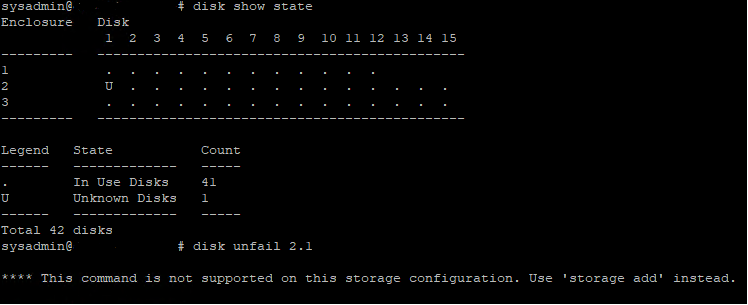
Figura 1. Data Domain CLI - Disk Show State, Disk Unfail
Figura 1. Data Domain CLI - Disk Show State, Disk Unfail
- Di seguito è riportato il comando CLI per aggiungere un sistema operativo sostitutivo (1.1 e 1.2) o un disco dati in DD6400.
- Eseguire il comando storage add force disk per aggiungere un disco sostitutivo al sistema, dove disco è il numero del disco sostitutivo
# storage add force disk 2.1

The 'storage add force' command will make the disk available to the
        filesystem. Any existing data on this will be lost.
        Are you sure? (yes|no) [no]: yes

Checking storage requirements...done
Adding disk 2.1 to the system...done

Updating system information...done

Disk 2.1 successfully added to the system
- Utilizzare il seguente comando per verificare che il sistema Data Domain riconosca l'unità disco. Nella visualizzazione del comando, lo stato del disco deve essere di riserva o in ricostruzione.
# disk show state

Enclosure   Disk
             1  2  3  4  5  6  7  8  9  10 11 12 13 14 15
---------   ----------------------------------------------
1            .  .  .  .  .  .  .  .  .  .  .  .
2            v  .  .  .  .  .  .  .  .  .  .  .  .  .  .
---------   ----------------------------------------------

Legend   State             Count
------   ---------------   -----
.        In Use Disks      26
v        Available Disks   1
------   ---------------   -----
Total 27 disks

Estimated total time remaining for reconstruction (minutes) 874
- Di seguito sono riportati i comandi CLI per aggiungere un disco sostitutivo nel tier della cache DD6400 (1.3 e 1.4).
- Eseguire il comando storage add disk 1. per aggiungere nuovamente il disco al cache tier, dove è il numero del disco nel messaggio di avviso di errore hardware.
- Eseguire il comando filesys expand per impostare il nuovo disco cache come in uso.
Affected Products
DD6400 ApplianceProducts
Data DomainArticle Properties
Article Number: 000214343
Article Type: How To
Last Modified: 18 May 2026
Version: 5
Find answers to your questions from other Dell users
Support Services
Check if your device is covered by Support Services.