Data Domain DD6400:在 DD6400 新增更換磁片
Summary: 本文將作為如何在 DD6400 機型上新增更換磁片的參考資料。
This article applies to
This article does not apply to
This article is not tied to any specific product.
Not all product versions are identified in this article.
Instructions
其他 Data Domain 產品若更換磁片顯示未知的「U」,則可能是「磁片未損毀」,使其成為備用磁片。DD6400 等儲存集區產品僅接受「儲存裝置新增」命令,將新磁片新增至系統。
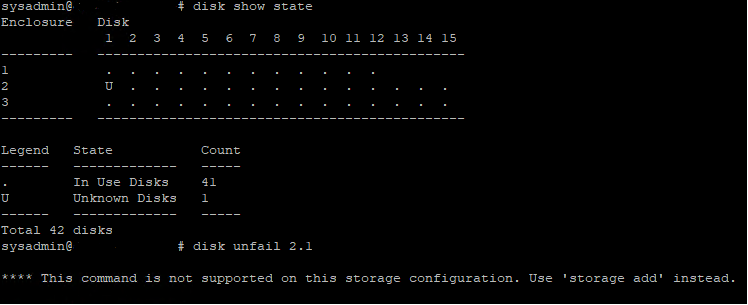
圖 1:Data Domain CLI - 磁片顯示狀態、磁片取消保護
圖 1:Data Domain CLI - 磁片顯示狀態、磁片取消保護
- 以下是命令列介面 (CLI) 命令,可將替換的作業系統 (1.1 和 1.2) 或資料磁片新增至 DD6400。
- 執行 儲存裝置新增強制磁片 命令,將替換磁片新增至系統,其中磁片是更換磁片的數目
# storage add force disk 2.1

The 'storage add force' command will make the disk available to the
        filesystem. Any existing data on this will be lost.
        Are you sure? (yes|no) [no]: yes

Checking storage requirements...done
Adding disk 2.1 to the system...done

Updating system information...done

Disk 2.1 successfully added to the system
- 使用下列命令檢查 Data Domain 系統是否辨識磁片磁碟機。在命令顯示器中, 磁片狀態 應為備援或重建。
# disk show state

Enclosure   Disk
             1  2  3  4  5  6  7  8  9  10 11 12 13 14 15
---------   ----------------------------------------------
1            .  .  .  .  .  .  .  .  .  .  .  .
2            v  .  .  .  .  .  .  .  .  .  .  .  .  .  .
---------   ----------------------------------------------

Legend   State             Count
------   ---------------   -----
.        In Use Disks      26
v        Available Disks   1
------   ---------------   -----
Total 27 disks

Estimated total time remaining for reconstruction (minutes) 874
- 以下是 CLI 命令,可將替換磁片新增至 DD6400 快取記憶體層 (1.3 和 1.4)。
- 執行 儲存裝置新增磁片 1. 命令,將磁片新增至快取層,其中為硬體故障警示訊息中的磁片數量。
- 執行 檔案系統擴充 命令,將新快取磁片設定為使用中。
Affected Products
DD6400 ApplianceProducts
Data DomainArticle Properties
Article Number: 000214343
Article Type: How To
Last Modified: 18 May 2026
Version: 5
Find answers to your questions from other Dell users
Support Services
Check if your device is covered by Support Services.