Re-imaging Windows 10 IoT on a Latitude 3440, Latitude 5440, and OptiPlex 7410 AIO
Summary: Windows 10 IoT may be reinstalled using a USB drive that is supplied by Dell support.
This article applies to
This article does not apply to
This article is not tied to any specific product.
Not all product versions are identified in this article.
Instructions
Affected Platforms:
- Latitude 3440
- Latitude 5440
- OptiPlex 7410 All-in-One
Affected Operating Systems:
- Windows 10 IoT Enterprise LTSC 2021
Note: For system board replacement service scenario, the Win 10 IoT operating system Recovery USB drive is dispatched with the replacement system board.
- Insert the Windows 10 IoT operating system Recovery USB drive into a USB port of the device.
- Power on the device, press F2 to enter BIOS setup.
Note: The BIOS admin password is
Fireport
- Go to Integrated Devices and Enable USB boot support.
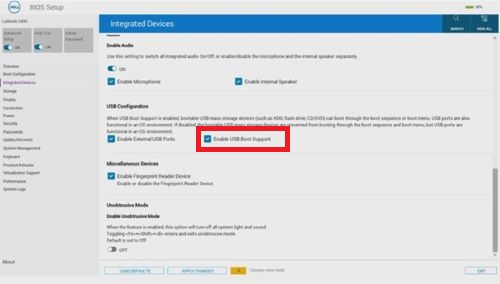
Figure 1: (English Only) Enable USB boot Support
- Go to Storage, SATA/NVMe Operations and select ACHI/NVMe.
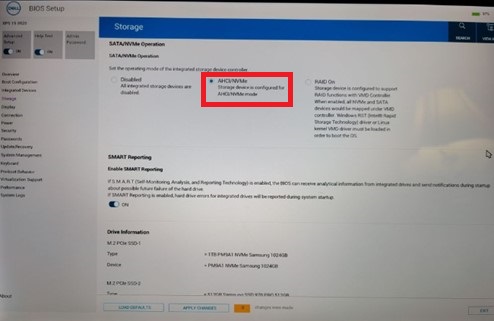
Figure 2: (English Only) Select ACHI/NVMe
- Go to Virtualization Support, set Enable Pre-Boot DMA Support to Off, set Enable OS Kernel DMA Support to OFF.
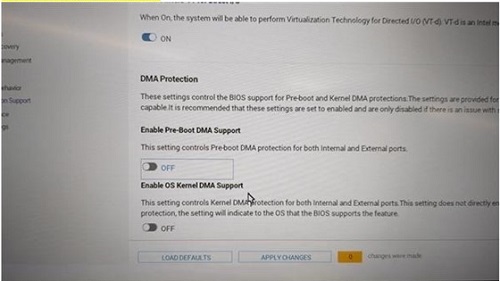
Figure 3: (English Only) Set Enable Pre-Boot DMA Support to Off, set Enable OS Kernel DMA Support to OFF
- Save the settings and Exit.
- When the device reboots, press F12 to trigger the Boot Menu and select the bootable Windows 10 IoT operating system Recovery USB drive and Press Enter.
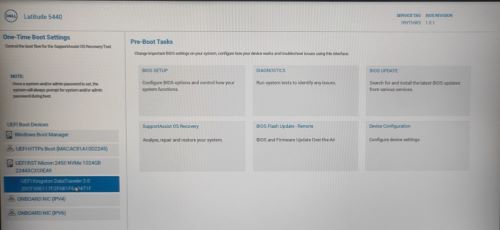
Figure 4: (English Only) Select the bootable Windows 10 IoT operating system Recovery USB drive and Press Enter
- Select the operating system image and click OK. This starts the installation process.
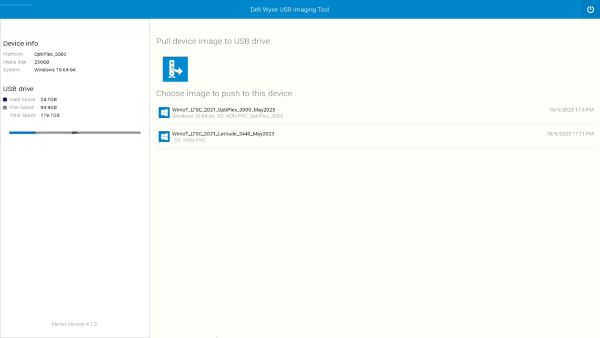
Figure 5: (English Only) Select the operating system image and click OK
- After the installation is complete, the device will reboot. Remove the operating system Recovery USB drive.
- Press F12 to trigger the Boot Menu and select the SSD/HDD storage where Windows 10 IoT operating system is installed and Press Enter.
- Windows IoT boots to the desktop.

Figure 6: (English Only) Windows 10 IoT Desktop
Affected Products
Latitude 3440, Latitude 5440, OptiPlex All-In-One 7410Article Properties
Article Number: 000214612
Article Type: How To
Last Modified: 07 Jun 2024
Version: 8
Find answers to your questions from other Dell users
Support Services
Check if your device is covered by Support Services.