在電話會議中共用多媒體內容時發生間歇性或音訊雜訊
Summary: 本文提供在電話會議期間分享的多媒體音訊內容相關資訊,其他參與者可能會視之失真或斷斷續續。使用搭載 Intel 第 12 代和第 13 代處理器的桌上型電腦和筆記型電腦時,就會發生這種情況。
This article applies to
This article does not apply to
This article is not tied to any specific product.
Not all product versions are identified in this article.
Symptoms
使用者可能會遇到多媒體內容 (線上串流或儲存在本機) 的音訊失真或間歇性的體驗。使用會議應用程式 (例如 Teams 和 Zoom) 時,就會發生這種情況。
正在使用 USB 耳機?在 Windows 11 中使用視訊會議應用程式時,檢查 USB 耳機音訊問題。
受影響的機型:
- Dell DCXXXXX
- Dell 14 DC14250
- Dell 15 DC15250
- Dell Pro Essentials
- Dell Pro 14 基本PV14250
- Dell Pro 15 基本PV15250
- Inspiron
- Inspiron 13 5320
- Inspiron 13 5330
- Inspiron 14 5420
- Inspiron 14 5430
- Inspiron 14 7420 二合一
- Inspiron 14 7430 2 合 1
- Inspiron 14 Plus 7420
- Inspiron 14 Plus 7430
- Inspiron 14R 5421
- Inspiron 15 3520
- Inspiron 15 3530
- Inspiron 16 5620
- Inspiron 16 5630
- Inspiron 16 7620 二合一
- Inspiron 16 7630 二合一
- Inspiron 16 Plus 7620
- Inspiron 16 Plus 7630
- Inspiron 24 5410 多合一
- Inspiron 27 7710 多合一
- Inspiron 27 7720 多合一
- Latitude
- Latitude 3140
- Latitude 3330
- Latitude 3340
- Latitude 3430
- Latitude 3440
- Latitude 3530
- Latitude 3540
- Latitude 5330
- Latitude 5340
- Latitude 5430
- Latitude 5431
- Latitude 5440
- Latitude 5530
- Latitude 5531
- Latitude 5540
- Latitude 7230 Rugged Extreme 平板電腦
- Latitude 7330
- Latitude 7340
- Latitude 7430
- Latitude 7440
- Latitude 7530
- Latitude 7640
- Latitude 9330
- Latitude 9430
- Latitude 9440 二合一
- Dell Pro 13 進階版
- OptiPlex
- OptiPlex 3000 Micro
- OptiPlex 5000 Micro
- OptiPlex 5400 多合一
- OptiPlex 7000 Micro
- OptiPlex 7010 立式
- OptiPlex 7400 多合一
- OptiPlex All-in-One 7410
- OptiPlex Micro 7010
- OptiPlex 小機型 (SFF) 7010
- Precision
- Precision 3260 Compact
- Precision 3460 小機型 (SFF)
- Precision 3470
- Precision 3570
- Precision 3571
- Precision 3580
- Precision 3581
- Precision 3660 直立式
- Precision 3660 XE 直立式
- Precision 5470
- Precision 5480
- Precision 5570
- Precision 5680
- Precision 5770
- Precision 7670
- Precision 7680
- Precision 7770
- Precision 7780
- Vostro
- Vostro 14 3430
- Vostro 15 3530
- Vostro 16 5630
- Vostro 3420
- Vostro 3520
- Vostro 5320
- Vostro 5620
- Vostro 7620
- XPS
- XPS 13 9315
- XPS 13 9315 二合一
- XPS 13 Plus 9320
- XPS 15 9520
- XPS 15 9530
- XPS 17 9720
- XPS 17 9730
Cause
Dell Optimizer 或 MyDell 中的「移除他人的背景雜音」功能,以及 Waves MaxxAudio Pro 應用程式中的「移除雜音」設定,會嘗試從電話會議聆聽參與者移除非人類語音。
來自多媒體內容的音訊可能會被視為非人類語音,這些功能會移除音訊。
Resolution
檢查電腦上是否安裝了下列其中一個應用程式;Dell Optimizer、 MyDell 或 Waves MaxxAudio Pro。如果已安裝 Dell Optimizer 或 MyDell 應用程式,請檢查是否已啟用 移除其他人的背景噪音 設定。如果已安裝 Waves MaxxAudio Pro 應用程式,請檢查 移除噪音 設定是否已啟用。
若要使用 Dell Optimizer 應用程式解決問題,請停用 「移除其他人的背景噪音 」功能。
- 開啟 Dell Optimizer 應用程式。
- 在提升您的 Dell 體驗區段中選取音訊 (圖 1)

圖 1.在提升您的 Dell 體驗區段中選取音訊
- 將移除其他人的背景噪音功能設為關閉 (圖 2)。

圖 2.將移除其他人的背景噪音功能設為關閉。
若要使用 MyDell 應用程式解決此問題,請停用 「移除其他人的背景噪音 」功能。
- 開啟 MyDell 應用程式。在歡迎頁面上選取 音效 (圖 3)。

圖 3.選取音效
- 選取 語音品質 標籤 (圖 4)。

圖 4。「語音品質」標籤
- 將移除其他人的背景噪音功能設為關閉 (圖 5)。
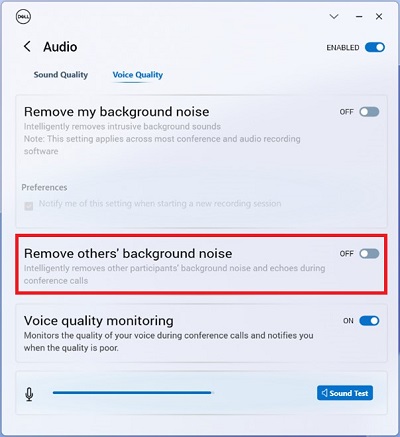
圖 5。移除其他人的背景噪音功能。
若要使用 Waves MaxxAudio Pro 應用程式解決此問題,請停用 「移除噪音 」功能。
- 開啟 Waves MaxxAudio Pro 應用程式。
- 選取 語音 標籤。
- 在 喇叭設定下, 將移除噪音 功能設為 關閉 (圖 6)。

圖 6。將移除噪音功能設為關閉。
注意:如果無法使用 Waves Maxx 音訊設定,請前往 Windows 控制台>的系統音效 ,並開啟所用麥克風或喇叭 的增強音訊 。
Additional Information
Affected Products
Dell 14 DC14250, Dell 15 DC15250, Dell Optimizer, Dell Pro 13 Premium PA13250, Dell Pro 14 Essential PV14250, Dell Pro 15 Essential PV15250, Inspiron 13 5320, Inspiron 13 5330, Inspiron 14 5420, Inspiron 14 5430, Inspiron 14 7420 2-in-1
, Inspiron 14 Plus 7420, Inspiron 14 7430 2-in-1, Inspiron 14 Plus 7430, Inspiron 14R 5421, Inspiron 15 3520, Inspiron 15 3530, Inspiron 16 5620, Inspiron 16 5630, Inspiron 16 7620 2-in-1, Inspiron 16 Plus 7620, Inspiron 16 7630 2-in-1, Inspiron 16 Plus 7630, Inspiron 24 5410 All-in-One, Inspiron 27 7710 All-in-One, Inspiron 27 7720 All-in-One, Latitude 3140, Latitude 7230 Rugged Extreme Tablet, Latitude 3330, Latitude 3340, Latitude 5330, Latitude 5340, Latitude 7330, Latitude 7340, Latitude 9330, Latitude 3430, Latitude 3440, Latitude 5431, Latitude 5440, Latitude 7430, Latitude 7440, Latitude 9430, Latitude 9440 2-in-1, Latitude 3530, Latitude 3540, Latitude 5530, Latitude 5531, Latitude 5540, Latitude 7530, Latitude 7640, Latitude 5430, MyDell, OptiPlex 3000 Micro, OptiPlex 5000 Micro, OptiPlex 5400 All-In-One, OptiPlex 7000 Micro, OptiPlex Tower 7010, OptiPlex Micro 7010, OptiPlex Small Form Factor 7010, OptiPlex 7400 All-In-One, OptiPlex All-In-One 7410, Precision 3660 XE Tower, Precision 3470, Precision 5470, Precision 5480, Precision 3570, Precision 3571, Precision 3580, Precision 3581, Precision 5570, Precision 5680, Precision 7670, Precision 7680, Precision 5770, Precision 7770, Precision 7780, Precision 3260 Compact, Precision 3460 Small Form Factor, Precision 3660 Tower, Vostro 5320, Vostro 3420, Vostro 14 3430, Vostro 3520, Vostro 15 3530, Vostro 5620, Vostro 16 5630, Vostro 7620, XPS 13 9315 2-in-1, XPS 13 9315, XPS 13 Plus 9320, XPS 15 9520, XPS 15 9530, XPS 17 9720, XPS 17 9730
...
Products
Inspiron 15 3520, Inspiron 15 3530, Inspiron 16 5620, Inspiron 16 5630, Inspiron 16 7620 2-in-1, Inspiron 16 Plus 7620, Inspiron 16 7630 2-in-1, Inspiron 16 Plus 7630, Inspiron 24 5410 All-in-One, Inspiron 27 7710 All-in-One
, Inspiron 27 7720 All-in-One, Latitude 3140, Latitude 7230 Rugged Extreme Tablet, Latitude 3330, Latitude 3340, Latitude 5330, Latitude 5340, Latitude 7330, Latitude 7340, Latitude 9330, Latitude 3430, Latitude 3440, Latitude 5431, Latitude 5440, Latitude 7430, Latitude 7440, Latitude 9430, Latitude 9440 2-in-1, Latitude 3530, Latitude 3540, Latitude 5530, Latitude 5531, Latitude 5540, Latitude 7530, Latitude 7640, Latitude 5430, OptiPlex 3000 Micro, OptiPlex 5000 Micro, OptiPlex 5400 All-In-One, OptiPlex 7000 Micro, OptiPlex Tower 7010, OptiPlex Micro 7010, OptiPlex Small Form Factor 7010, OptiPlex 7400 All-In-One, OptiPlex All-In-One 7410, Precision 3660 XE Tower, Precision 3470, Precision 5470, Precision 5480, Precision 3570, Precision 3571, Precision 3580, Precision 3581, Precision 5570, Precision 5680, Precision 7670, Precision 7680, Precision 5770, Precision 7770, Precision 7780, Precision 3260 Compact, Precision 3460 Small Form Factor, Precision 3660 Tower, Vostro 5320, Vostro 3420, Vostro 14 3430, Vostro 3520, Vostro 15 3530, Vostro 5620, Vostro 16 5630, Vostro 7620, XPS 13 9315 2-in-1, XPS 13 9315, XPS 13 Plus 9320, XPS 15 9520, XPS 15 9530, XPS 17 9720, XPS 17 9730
...
Article Properties
Article Number: 000215376
Article Type: Solution
Last Modified: 17 Oct 2025
Version: 17
Find answers to your questions from other Dell users
Support Services
Check if your device is covered by Support Services.