NetWorker: NMM Hyper-V parallel restore for multiple VMs fail for some VMs
Summary: NetWorker: NMM Hyper-V parallel restore for multiple Virtual Machines,
This article applies to
This article does not apply to
This article is not tied to any specific product.
Not all product versions are identified in this article.
Symptoms
If Hyper-V Virtual Machines are corrupted and the need for recovery of multiple virtual machines:
NMM enables recovery of multiple virtual machines to their original (source) locations.
Prerequisites:
● To recover virtual machines to the source Hyper-V server, ensure that the original drive letters or mount points for the virtual machines exist on the source server.
The directory paths are automatically created. Recovering virtual machines to the source server overwrites the source virtual machines.
● Because Hyper-V recognizes virtual machines by using an internal GUID, ensure that you do not either move or rename the virtual machines during the recovery operation.
The restore fails for some Virtual Machines when performing parallel restore for multiple Virtual Machines.
nsrnmmrc: Restore failed with the error: Failed to complete BBB restore.
Cause
During the recovery process, NMM tries to stop and remove VM from Hyper-V manager using a PowerShell command. Get-VM -ComputerName '<hostname>' | Where-Object {$_.name -eq '<VMName>' } | Stop-VM -Force
This fails to stop and remove some of the VMs, which results in a failed restore.
Event logs > Hyper-v VMMS admin log show the following error:
Failed to perform the operation. The virtual machine is currently performing another operation
<VMName> failed to perform the 'Turning Off' operation. The virtual machine is currently performing the following operation: 'Shutting Down'.(Virtual machine ID GUID)
PowerShell's attempt to stop the VM fails with:
Get-VM -ComputerName '<hostname>' | Where-Object {$_.name -eq '<VMName>' } | Stop-VM -Force
Stop-VM : '<VMName>' failed to shut down. (Virtual machine ID <GUID>)
Failed to perform the operation. The virtual machine is currently performing another operation.
+ ... '<hostname>' | Where-Object {$_.name -eq <VMName> } | Stop-VM -Force
+                                                            ~~~~~~~~~~~~~~
    + CategoryInfo          : NotSpecified: (:) [Stop-VM], VirtualizationException
    + FullyQualifiedErrorId : OperationFailed,Microsoft.HyperV.PowerShell.Commands.StopVM

PS C:\Using VHD> Get-VM -ComputerName '<hostname>' | Where-Object {$_.name -eq '<VMName>' } | Remove-VM -Force
Remove-VM : Deleting '<VMName>' failed.
Resolution
Workaround:-
If encountering this issue, manually stop and remove the virtual machine and then perform a restore.
From Powershell
Step 1:- Turn off the virtual machine.Get-VM -ComputerName '<hostname>' | Where-Object {$_.name -eq '<VMName>' } | Stop-VM -TurnOff
Note: Turns off the virtual machine <VMName>.
This operation is equivalent to disconnecting the power from the virtual machine, and can result in loss of unsaved data.
Step 2:- Remove the VM. Get-VM -ComputerName '<hostname>' | Where-Object {$_.name -eq '<VMName>' } | remove-VM
From Hyper-v Manager
Step 1:- Open the Hyper-V manager, Right click VMs and click "Turn Off".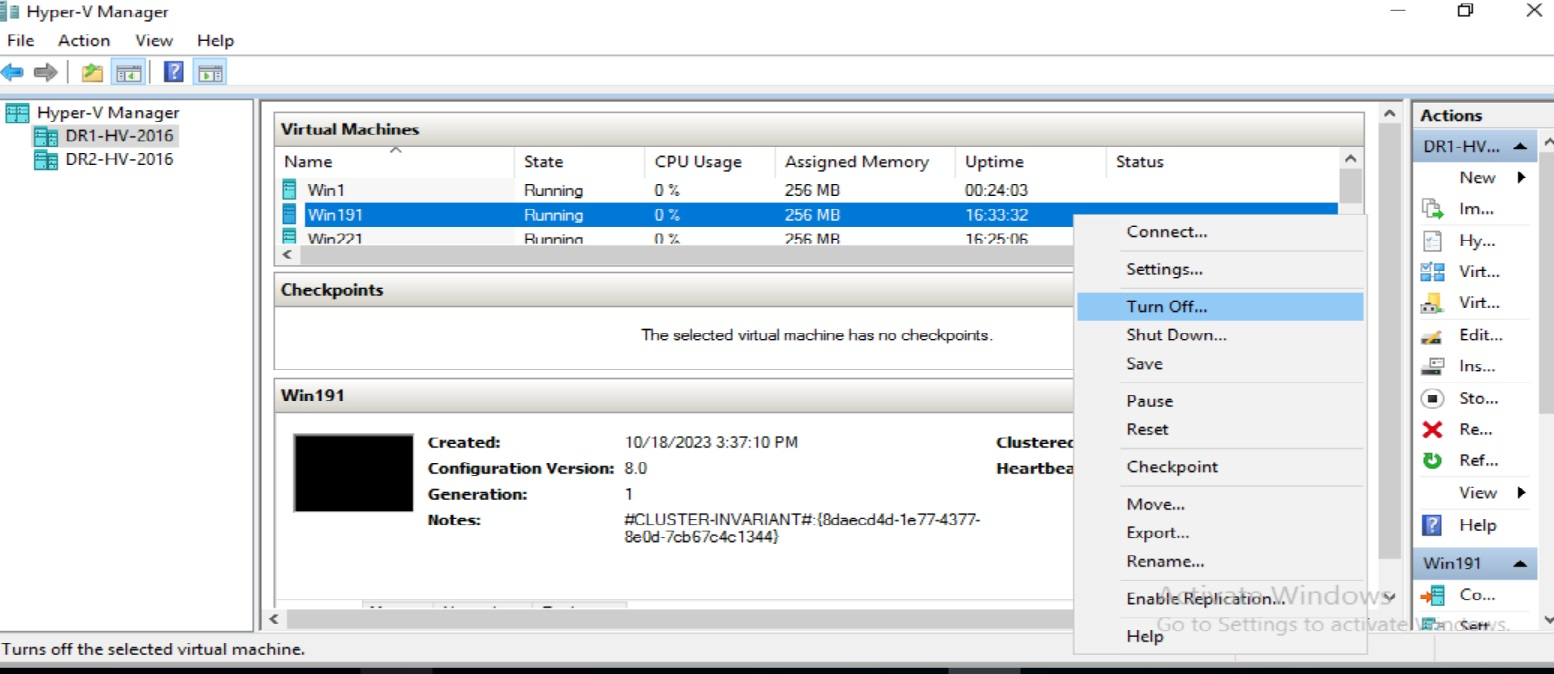
Step 2:- After "Turn off", right click the VM and click "Delete"

Affected Products
NetWorker Module for MicrosoftArticle Properties
Article Number: 000218962
Article Type: Solution
Last Modified: 31 Jul 2025
Version: 5
Find answers to your questions from other Dell users
Support Services
Check if your device is covered by Support Services.